One window, and it does not reopen
Low-voltage rough-in happens in a specific slot: after framing and electrical, before insulation and drywall. Inside that window, running a cable anywhere is straightforward. Once drywall goes up, the same cable costs many times more and sometimes cannot be run at all.
The asymmetry is the whole story of new-construction low voltage. Decisions made cheaply during rough-in become expensive or impossible afterwards, which is why the pre-rough-in planning conversation is worth more than any equipment choice made later.
- Rough-in window sits between electrical and drywall
- Upstream delays compress the window without extending the deadline
- Post-drywall changes cost many times more, if they are possible at all
- Finish work happens months later, after paint and ceilings
Decide locations, claim pathways, leave capacity
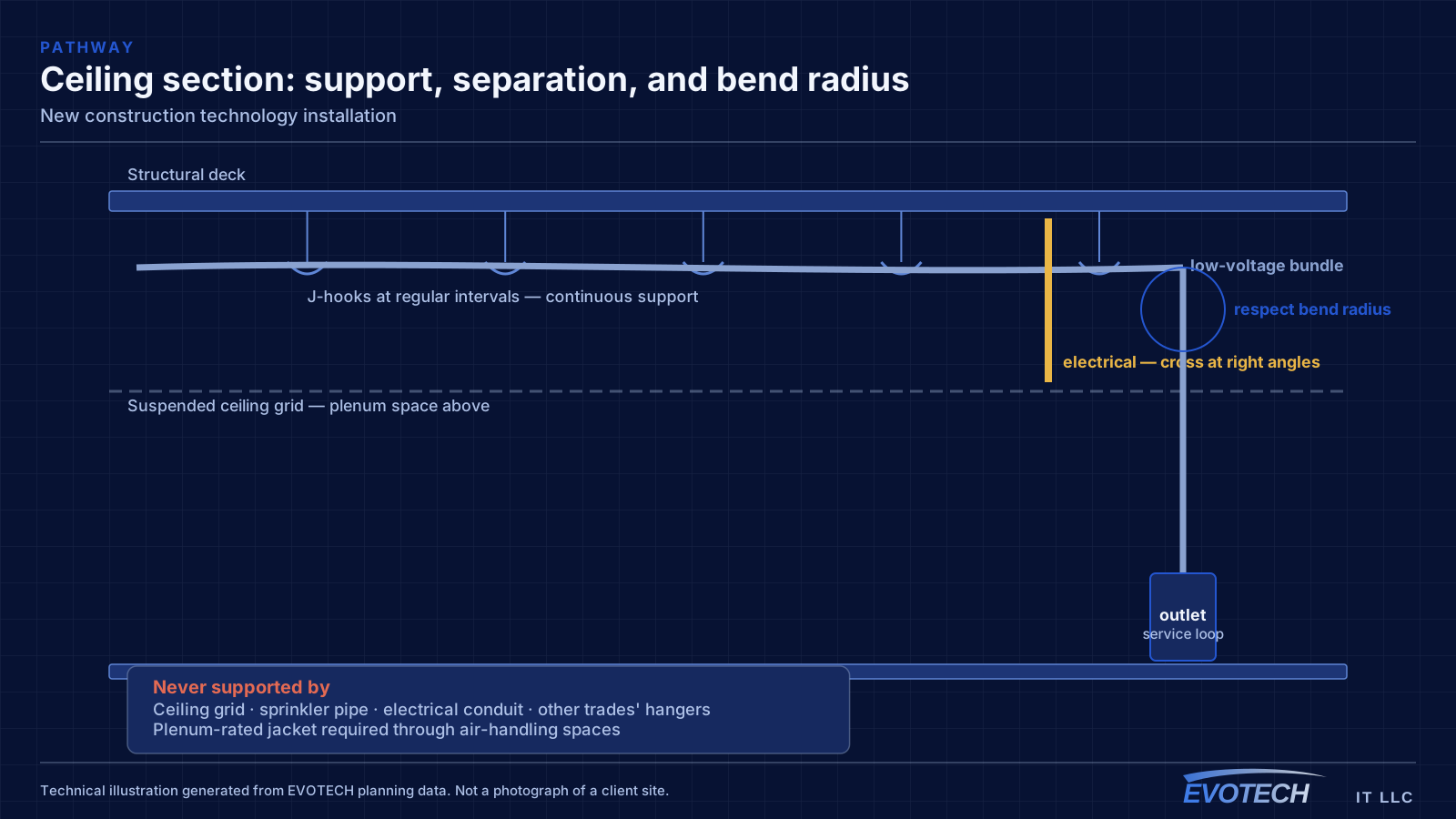
Three things matter more than everything else combined: agreeing device locations before rough-in, claiming pathway before the other trades fill the ceiling, and running more capacity than the current plan requires.
The third is the one most often skipped and most often regretted. An extra run to a likely future access point, camera, or display position costs very little while the walls are open.
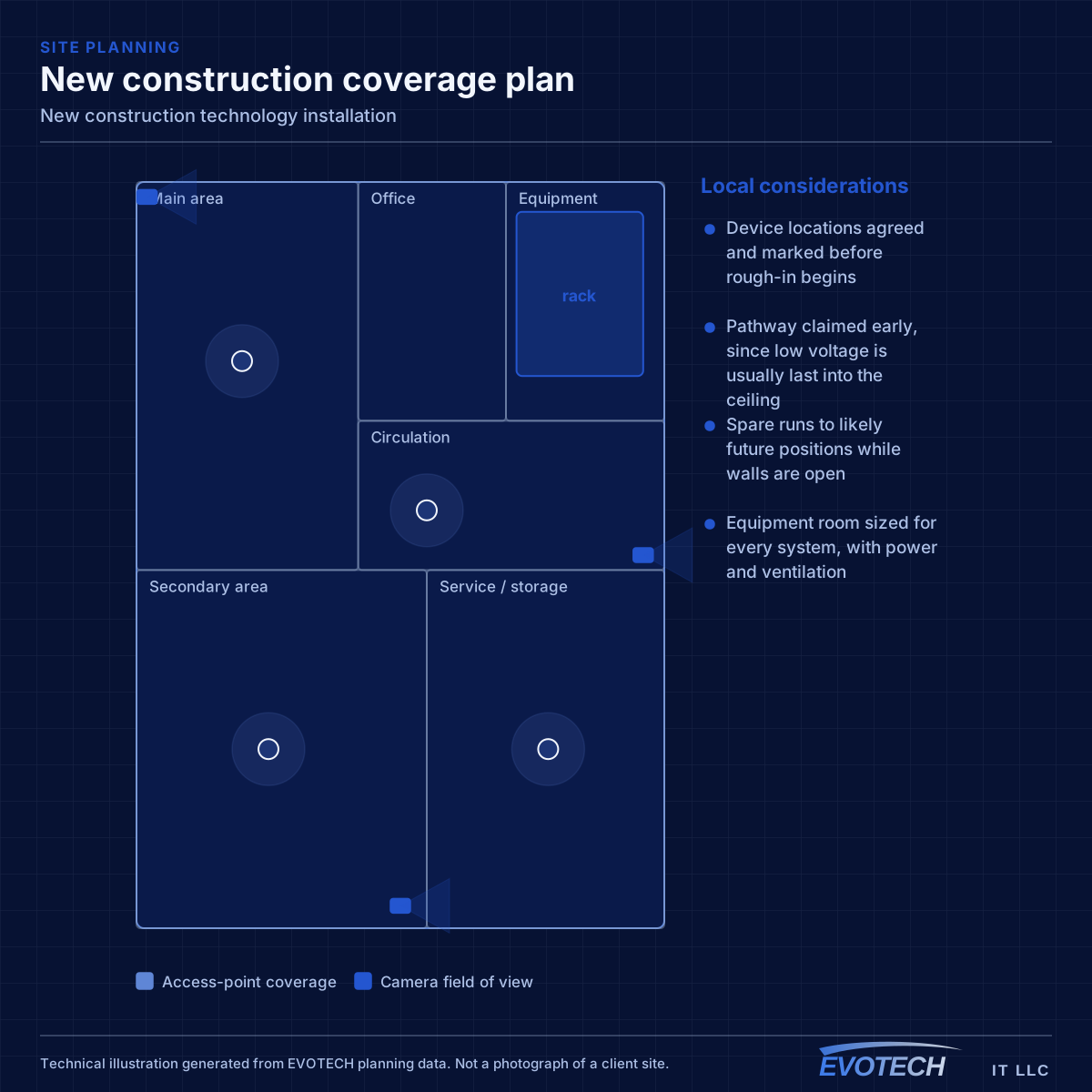
- Device locations agreed and marked before rough-in begins
- Pathway claimed early, since low voltage is usually last into the ceiling
- Spare runs to likely future positions while walls are open
- Equipment room sized for every system, with power and ventilation
- Rated penetrations sleeved and firestopped properly
What to rough in even without a final design
Full system design is often not finished when the rough-in window arrives. That is normal, and it is not a reason to skip the pathway. Running conduit or sleeves to likely positions preserves the option cheaply even when the eventual equipment is undecided.
For a commercial building, the reliable rough-in set is: cable to every likely device outlet, ceiling positions for access points spaced for the intended coverage, camera positions at entries and approaches, door positions with cable to the controller location, and pathway to any likely display or AV position. Plus, in every case, a properly located equipment room.
The equipment room deserves particular emphasis because it is the most commonly under-provisioned item. It has to hold the network rack, camera recorder, access-control panel, and any AV equipment, with dedicated power, ventilation, and clearance to work. Sizing it from the network alone is a decision that gets discovered eighteen months later.
- Sleeves and conduit to likely positions even before final design
- Ceiling access-point positions spaced for the intended coverage
- Camera positions at entries, approaches, and service areas
- Cable from every controlled door to the controller position
- Equipment room with dedicated power, ventilation, and working clearance
Positions to prewire even if cameras come later
Camera positions are among the cheapest things to prewire and among the most annoying to retrofit, because they are usually exterior, high, and behind finished soffit. Running cable to likely positions during rough-in preserves the option at almost no cost.
The positions worth prewiring in nearly every building: primary entrance, rear or service entrance, any delivery or receiving point, parking approaches, and the equipment room itself. In residential construction, add the front door for a doorbell and the driveway approach.
- Primary and secondary entrance positions
- Delivery, receiving, and service door approaches
- Parking and vehicle approach positions
- Doorbell position in residential builds
- Cable terminated and labeled even where no camera is installed yet
Working inside somebody else's schedule
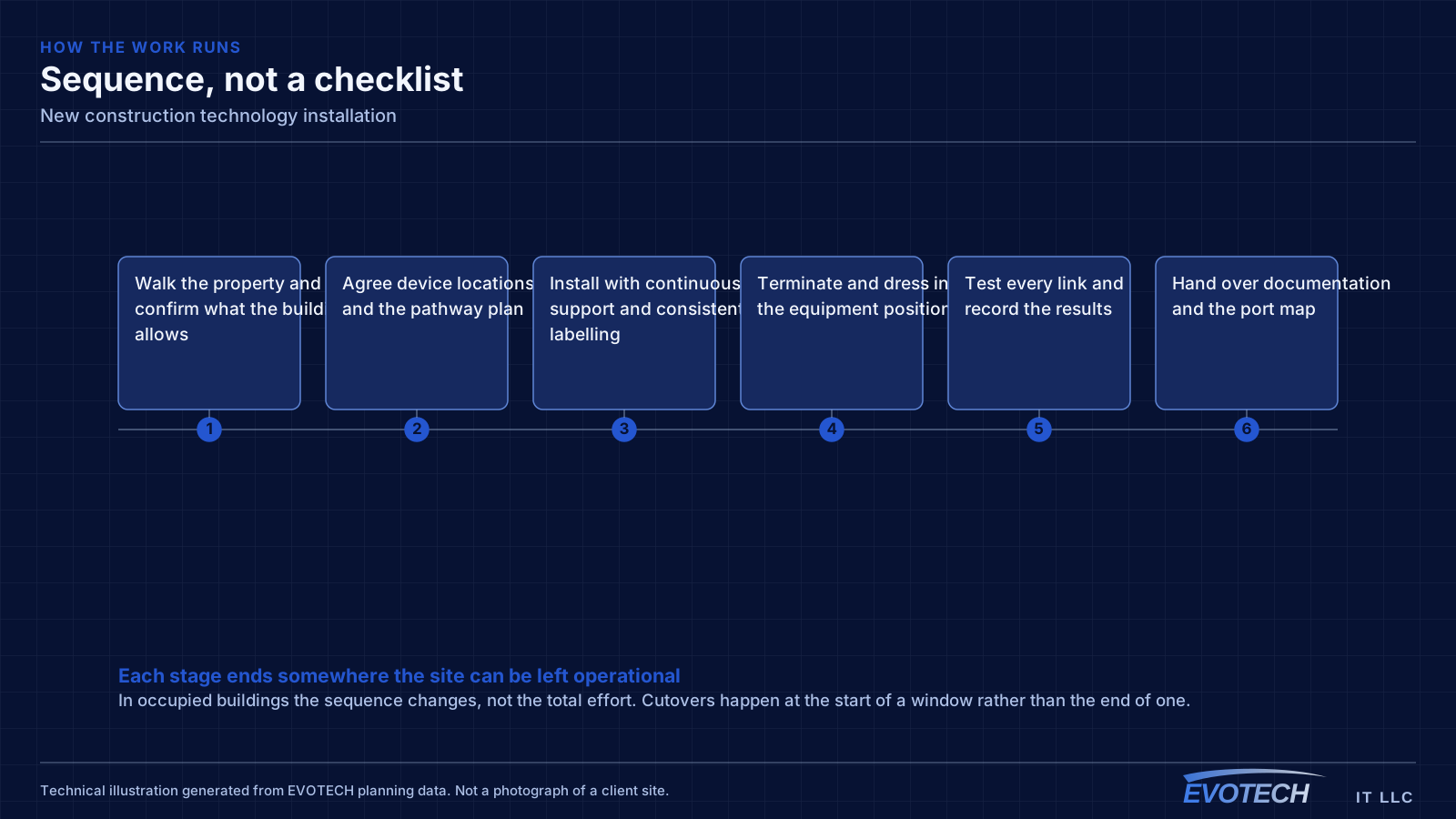
Low voltage is scheduled against a construction programme it does not control. Delays upstream compress the window; a compressed window means either additional mobilisations or work done under pressure. Being ready in advance — decisions made, materials on site, pathway plan settled — is the main defence.
The gap between rough-in and finish is its own risk. Cable sitting in walls for months needs protecting and identifying clearly, or the finish crew spends the first day working out which coil goes where. Documenting as-built positions before the walls close is what makes the return visit efficient.
- Readiness before the window opens, since it will not extend
- Additional mobilisations where the schedule fragments
- Cable protected and clearly identified during the gap
- As-built documentation completed before walls close
- Coordination with electrical, mechanical, and fire-protection trades on pathway
Explore everything in this section
All 66 pages under New-construction low voltage from rough-in to commissioning.
- Access-control installation for new construction
- Business phone & VoIP for new construction
- Cat6 cabling for new construction
- Cat6A cabling for new construction
- Commercial IT solutions for new construction
- Commercial Wi-Fi for new construction
- Conference-room AV for new construction
- Data-jack installation for new construction
- Digital signage for new construction
- Ethernet installation for new construction
- Fiber-optic cabling for new construction
- Fireplace TV mounting for new construction
- Floodlight camera installation for new construction
- Gate & license-plate cameras for new construction
- Home theater installation for new construction
- In-wall cable concealment for new construction
- Intercom installation for new construction
- Low-voltage installation for new construction
- Network cabling for new construction
- Network troubleshooting for new construction
- Network-rack installation for new construction
- NVR installation for new construction
- Outdoor & patio speakers for new construction
- Outdoor TV installation for new construction
- Paging & PA systems for new construction
- PoE camera installation for new construction
- Projector & screen installation for new construction
- Residential Wi-Fi for new construction
- Samsung Frame TV installation for new construction
- Security-camera installation for new construction
- Smart home & smart locks for new construction
- Soundbar mounting for new construction
- Technology for new construction in Bridgeland and Towne Lake
- Technology for new construction in EaDo (East Downtown)
- Technology for new construction in east Kingwood
- Technology for new construction in Houston
- Technology for new construction in Humble
- Technology for new construction in Katy
- Technology for new construction in Meyerland
- Technology for new construction in Missouri City
- Technology for new construction in Oak Forest and Garden Oaks
- Technology for new construction in Old Katy and Cane Island
- Technology for new construction in Pasadena
- Technology for new construction in River Oaks
- Technology for new construction in Spring
- Technology for new construction in Spring Branch
- Technology for new construction in Stafford
- Technology for new construction in Sugar Creek and old Sugar Land
- Technology for new construction in the 77338 Humble area
- Technology for new construction in the 77449 Katy area
- Technology for new construction in the 77469 Richmond area
- Technology for new construction in the Coles Crossing area of Cypress
- Technology for new construction in the Galleria and Uptown
- Technology for new construction in the Panther Creek and Cochran's Crossing villages
- Technology for new construction in the Pecan Grove and west Richmond area
- Technology for new construction in the Rose Hill and Tomball area
- Technology for new construction in the Shepherd Park and west Oak Forest area
- Technology for new construction in the Sienna area
- Technology for new construction in the Texas Medical Center area
- TV mounting for new construction
- Ubiquiti UniFi installation for new construction
- Video wall installation for new construction
- Video-doorbell installation for new construction
- Whole-home & multi-zone audio for new construction
- Wi-Fi installation for new construction
- Wireless bridge (point-to-point) for new construction
Frequently asked questions
What has to be decided before rough-in?
Device locations, the equipment room position, and the pathway plan. Equipment selection can wait — you can run cable to a position without knowing which camera or access point will go there. What cannot wait is the decision about where things go, because that is what determines where cable is pulled while the walls are open.
Is it worth prewiring for systems that may never be installed?
Usually yes, because the cost asymmetry is severe. A spare run during rough-in is inexpensive; the same run after drywall may be several times the cost, and in some locations impossible. Terminating and labeling the spare run costs a few minutes and preserves the option indefinitely.
What happens if the rough-in window gets compressed?
Either the work is done under pressure or it splits into additional mobilisations, both of which cost something. The mitigation is being ready before the window opens — decisions made, materials on site, pathway agreed — so that whatever time exists is spent installing rather than deciding.
How big should the equipment room be?
Big enough for the network rack, the camera recorder, the access-control panel, any AV equipment, and a UPS, with dedicated power, ventilation, and room to stand and work behind the rack. Sizing it from the network alone is the most common and most expensive planning error in a new build.