The short version
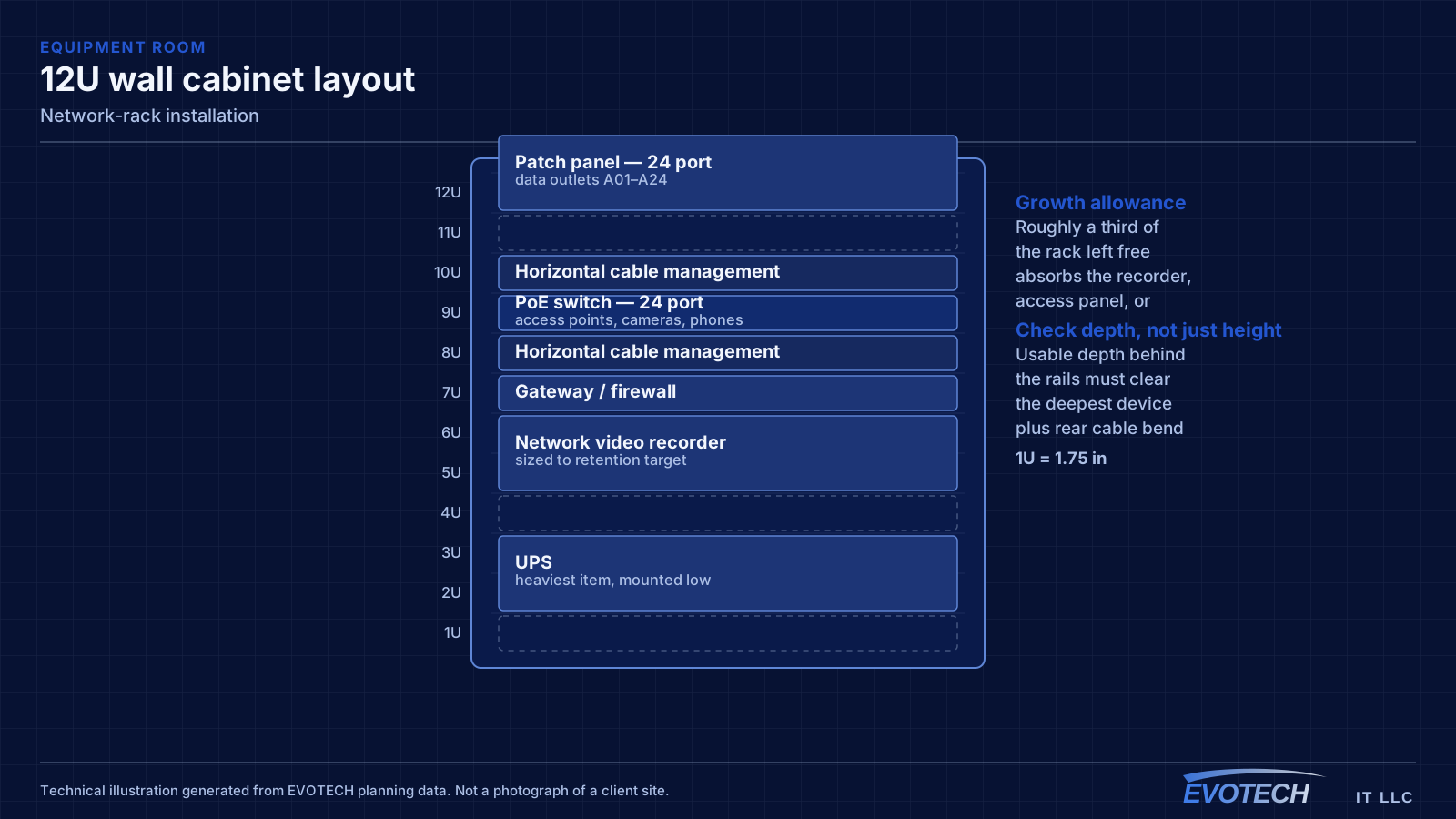
Rack sizing is measured in rack units — each U is 1.75 inches of vertical mounting space. Counting the equipment gives a starting number, but the useful sizing rule is to add space for cable management between device groups and leave roughly a third of the rack empty for whatever arrives later. A rack packed to capacity on day one is a rack that gets a switch balanced on top of it within a year.
Depth matters as much as height and is more often overlooked. A shallow wall-mount cabinet chosen because it fits a hallway will not accept a deeper server or a UPS, and the discovery usually happens after the cabinet is mounted. Checking the deepest intended device against the cabinet's usable depth — behind the mounting rails, allowing for cable bend at the rear — avoids that.
Sizing, heat, weight, and power
Start from a device list with each item's U height and depth, add a U of management between logical groups, add the patch panels, and then add roughly a third again for growth. A 12U wall cabinet that appears generous for today's four devices often turns out to be the right size once panels, management, and a UPS are counted properly.
Heat load is the sum of what the equipment dissipates, and in an enclosed cabinet it has nowhere to go without a path. A vented door plus a top vent gives passive convection; fans give active movement but need to draw from somewhere cooler than the closet itself. In this climate a closet on an exterior wall or adjacent to unconditioned space deserves particular attention, because ambient temperature is already high.
Weight and power are the two practical constraints that get discovered late. A populated wall cabinet with a UPS is heavy and needs mounting into structure rather than drywall anchors. Power needs a dedicated circuit and enough receptacles at the rack, ideally through a mounted PDU rather than a consumer power strip cable-tied to a rail.
- 1U = 1.75 inches; size from a real device list plus management plus growth
- Check usable depth behind the rails against the deepest device plus rear cable bend
- Provide a genuine airflow path for enclosed cabinets
- Mount wall cabinets into structure, accounting for the loaded weight including a UPS
- Dedicated circuit and a mounted PDU rather than daisy-chained strips
- Horizontal management between panel and switch groups
Who this work is for
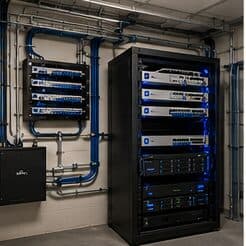
Rack work is usually either a first proper equipment position or a remediation of one that grew organically.
- Offices consolidating equipment from a shelf, cupboard, or desk into a proper position
- Buildings inheriting a wiring closet with equipment stacked and no management
- New fit-outs establishing an equipment room before the cabling is pulled
- Sites adding cameras or access control and needing somewhere structured for the recorder and switching
- Homes centralising a media panel into a small wall-mounted cabinet
What tends to go wrong
Heat is the problem that shortens equipment life quietly. A sealed cabinet in a closet with no ventilation concentrates the heat of a switch, a recorder, and a UPS in a small volume, and the equipment inside runs hot for years before something fails. Enclosed cabinets need either passive ventilation with a genuine airflow path or active fans, and the closet itself needs somewhere for that heat to go.
The second problem is serviceability. Racks built without horizontal management, without slack, and without labels make every subsequent change slow and risky. Pulling one patch cord out of a woven mass to trace it is how adjacent connections get knocked loose.
- Sealed cabinets with no ventilation path concentrating heat
- Depth insufficient for the deepest device once rear cable bend is included
- No horizontal cable management, so patch cords weave across the rack face
- Equipment resting on other equipment rather than mounted
- No spare U space, so additions get stacked on top
- Power strips daisy-chained instead of a properly mounted PDU
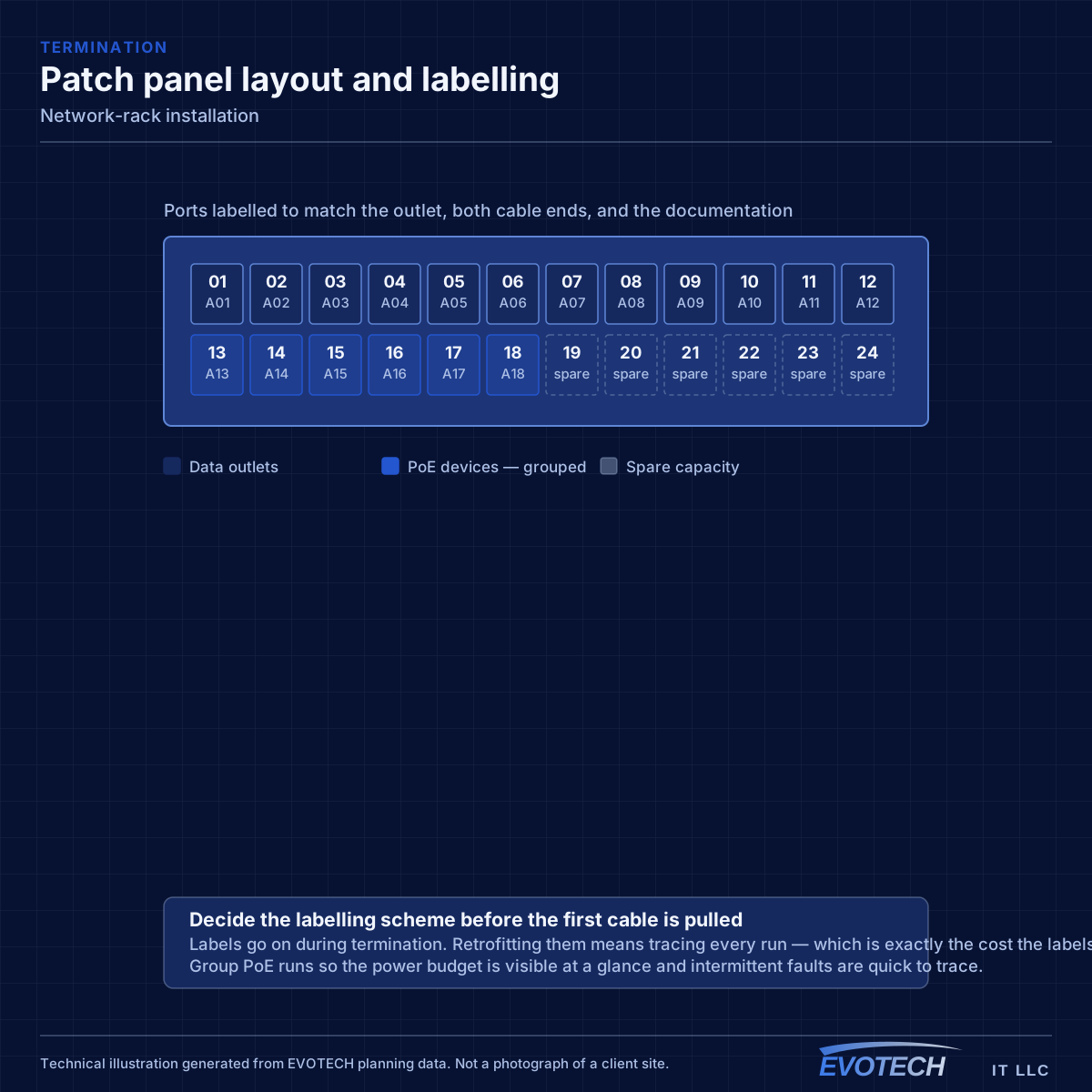
- No labels, so tracing a connection requires pulling on cables
How the work runs
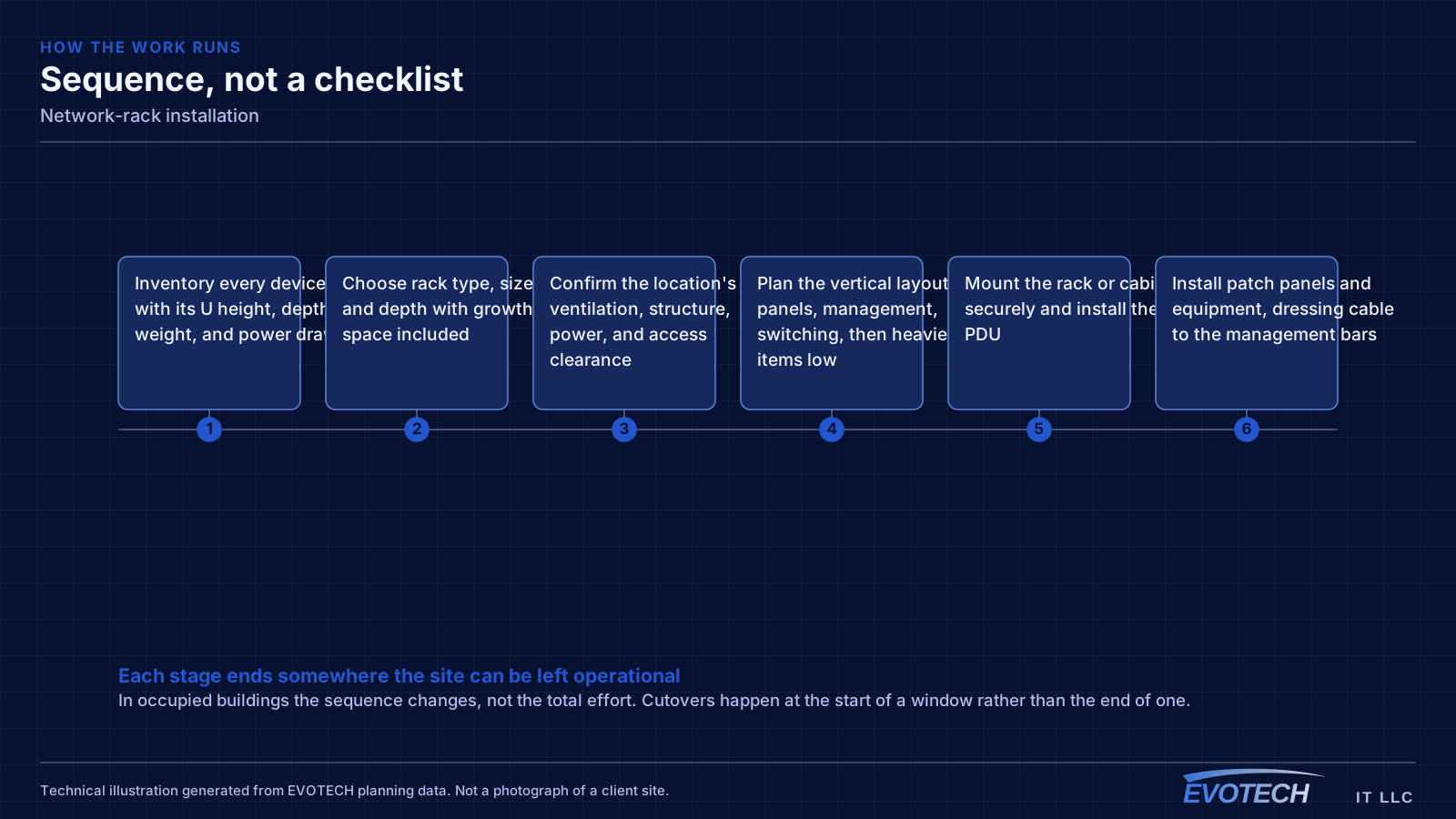
Rack builds go better when the layout is decided on paper before anything is mounted.
- Inventory every device with its U height, depth, weight, and power draw
- Choose rack type, size, and depth with growth space included
- Confirm the location's ventilation, structure, power, and access clearance
- Plan the vertical layout: panels, management, switching, then heavier items low
- Mount the rack or cabinet securely and install the PDU
- Install patch panels and equipment, dressing cable to the management bars
- Label panels, ports, devices, and power
- Verify airflow and temperature under load, then document the layout
What changes the scope
Rack scope moves with location constraints more than with equipment count.
- Total U required including management and growth allowance
- Wall-mount cabinet versus floor-standing rack, and depth required
- Location ventilation and ambient temperature
- Structural mounting requirements for the loaded weight
- Power availability and whether a dedicated circuit is needed
- UPS capacity and its weight and heat contribution
- Whether existing cabling must be re-dressed and re-terminated into new panels
- Access clearance in front of and behind the rack
What drives the cost
The enclosure is a modest part; location work and re-dressing existing cable are usually larger.
- Rack or cabinet size, depth, and type
- Structural mounting requirements
- Ventilation or fan provision
- PDU, UPS, and any electrical work for a dedicated circuit
- Patch panels, management hardware, and patch cords
- Re-terminating and re-dressing existing cable into new panels
- Labeling and documentation depth
Testing and verification
A rack is commissioned by checking it under load, not by looking at it when everything is idle.
- Verify every port is labeled and the labels match the documentation
- Confirm airflow and measure temperature with equipment under normal load
- Verify total power draw against the circuit and PDU rating
- Confirm UPS runtime with the full load connected
- Check that every device can be serviced without disturbing neighbours
- Confirm mounting security with the rack fully loaded
Common mistakes
Rack mistakes are the ones that make every future visit longer.
- Sizing to today's equipment with no growth allowance
- Choosing a cabinet by width and height while ignoring depth
- Sealing a cabinet in an unventilated closet
- Mounting a heavy cabinet to drywall anchors instead of structure
- Skipping horizontal management to save two U
- Daisy-chaining power strips
- Labeling after installation, which usually means not labeling
Honest limitations
These are the boundaries of what this service can do, stated up front rather than discovered later.
- Ventilation depends on the room as well as the cabinet; a closet with no path for heat cannot be solved by the enclosure alone.
- Dedicated circuits and electrical modifications fall to a qualified electrical trade.
- Rack layout can improve serviceability, but it cannot compensate for horizontal cabling that is unlabeled or untested.
- Wall-mount capacity is limited by structure; heavier loads may require a floor-standing rack.
Popular services nearby
Frequently searched near this area — the pages people look for most.
Frequently asked questions
What size rack is needed?
Add the U heights of every intended device, add a U of management between logical groups, add the patch panels, then add roughly a third for growth. The result is usually a size or two larger than the first instinct, and the extra space costs far less than the disruption of replacing an undersized cabinet later.
Does a network cabinet need cooling?
Enclosed cabinets need an airflow path — at minimum a vented door and top vent for passive convection, and fans where the load is higher. Just as important is where the heat goes: a sealed closet with no ventilation simply warms up, and the equipment then sits in that ambient temperature permanently. In this climate a closet against unconditioned space deserves particular attention.
Wall-mount cabinet or floor-standing rack?
Wall-mount suits small equipment counts with limited depth and modest weight — a switch, a small recorder, patch panels. Floor-standing suits larger counts, deeper equipment, and heavier loads such as a substantial UPS. The two limits that decide it are usable depth and total loaded weight, both of which are worth checking before ordering.
Why does cable management matter if everything works?
Because everything works until the first change. A rack with dressed cable and clear labels makes a move or an addition a short job; a rack with a woven mass of patch cords makes it an investigation, with a real risk of disturbing working connections while tracing. The management hardware costs a couple of rack units and repays them repeatedly.