The short version
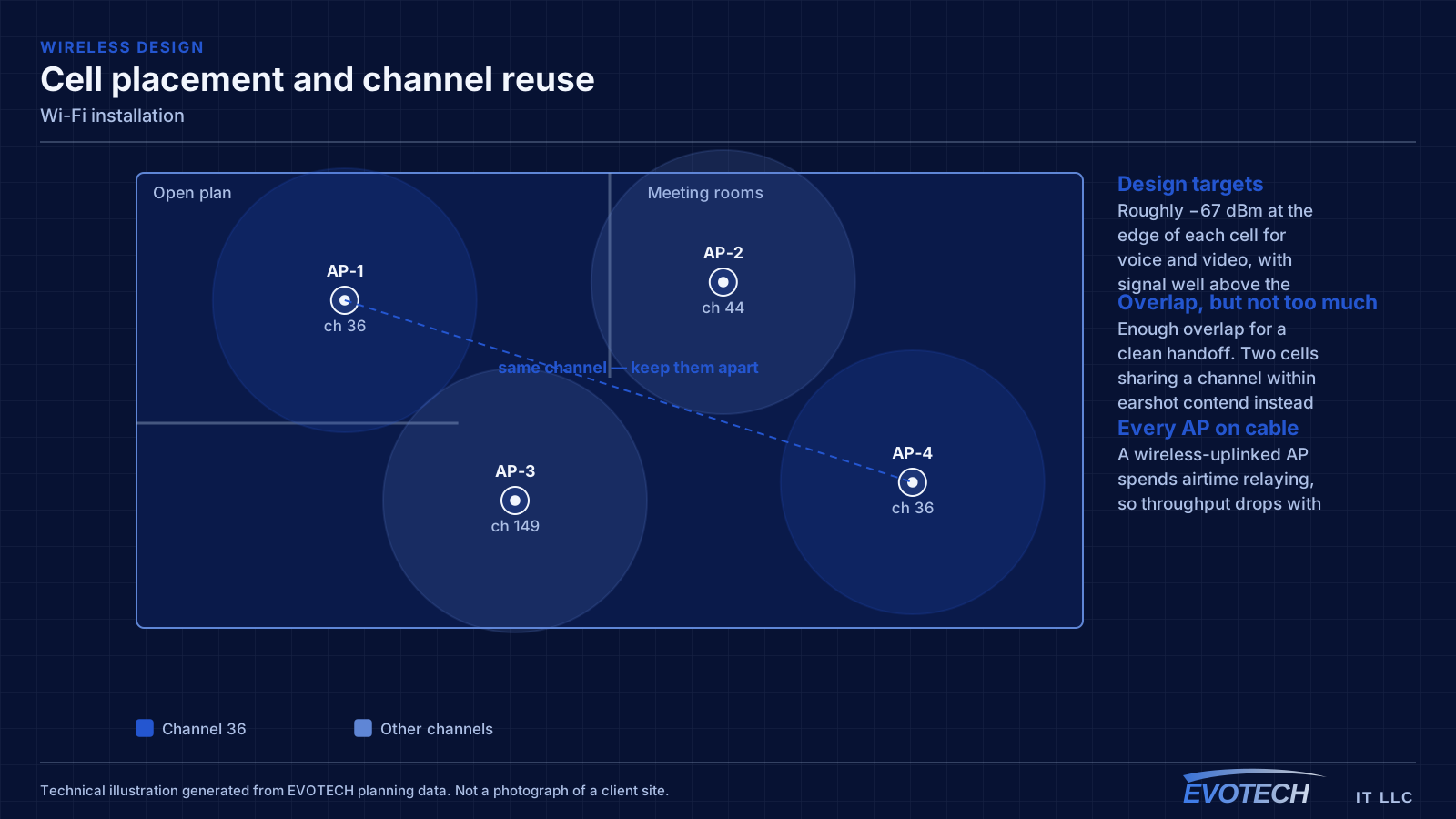
Good Wi-Fi comes from deciding where signal needs to be strong, then placing access points so that each area gets a solid signal from one AP without excessive overlap from others. The target most designs work to is around -67 dBm at the edge of each coverage area for voice and video, with signal comfortably above the local noise floor. Placement follows from that number and from the walls between the AP and the users.
The part people skip is the channel plan. Two access points on the same channel that can hear each other do not add capacity — they share it, because Wi-Fi devices take turns on a channel. That is why adding more access points to a struggling network sometimes makes it worse, and why 2.4 GHz, with only three non-overlapping channels, is usually the band causing the complaints.
What tends to go wrong
The most common complaint is a call dropping when someone walks from one room to another. That is a roaming problem, and it usually traces back to coverage design: either the cells overlap too little, so the client hangs onto a dying signal, or they overlap too much on the same channel, so everything is contending.
The second recurring problem is that the wireless network is blamed for a wired or internet issue. A device showing full signal bars and still performing badly is pointing at something past the access point — an oversubscribed uplink, a saturated internet circuit, or a switch port negotiating incorrectly.
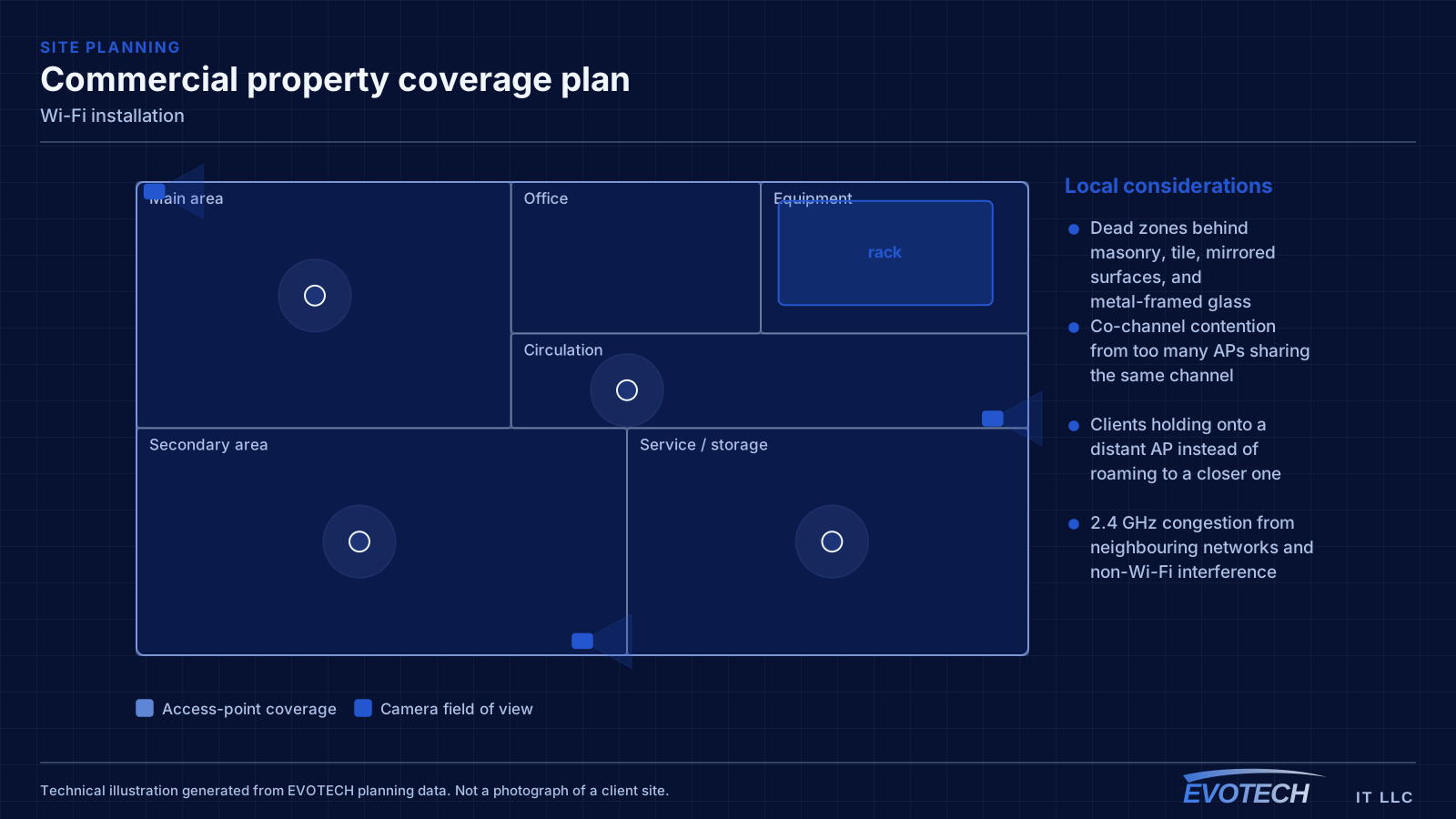
- Dead zones behind masonry, tile, mirrored surfaces, and metal-framed glass
- Co-channel contention from too many APs sharing the same channel
- Clients holding onto a distant AP instead of roaming to a closer one
- 2.4 GHz congestion from neighbouring networks and non-Wi-Fi interference
- Access points fed by repeaters instead of cable, halving effective throughput
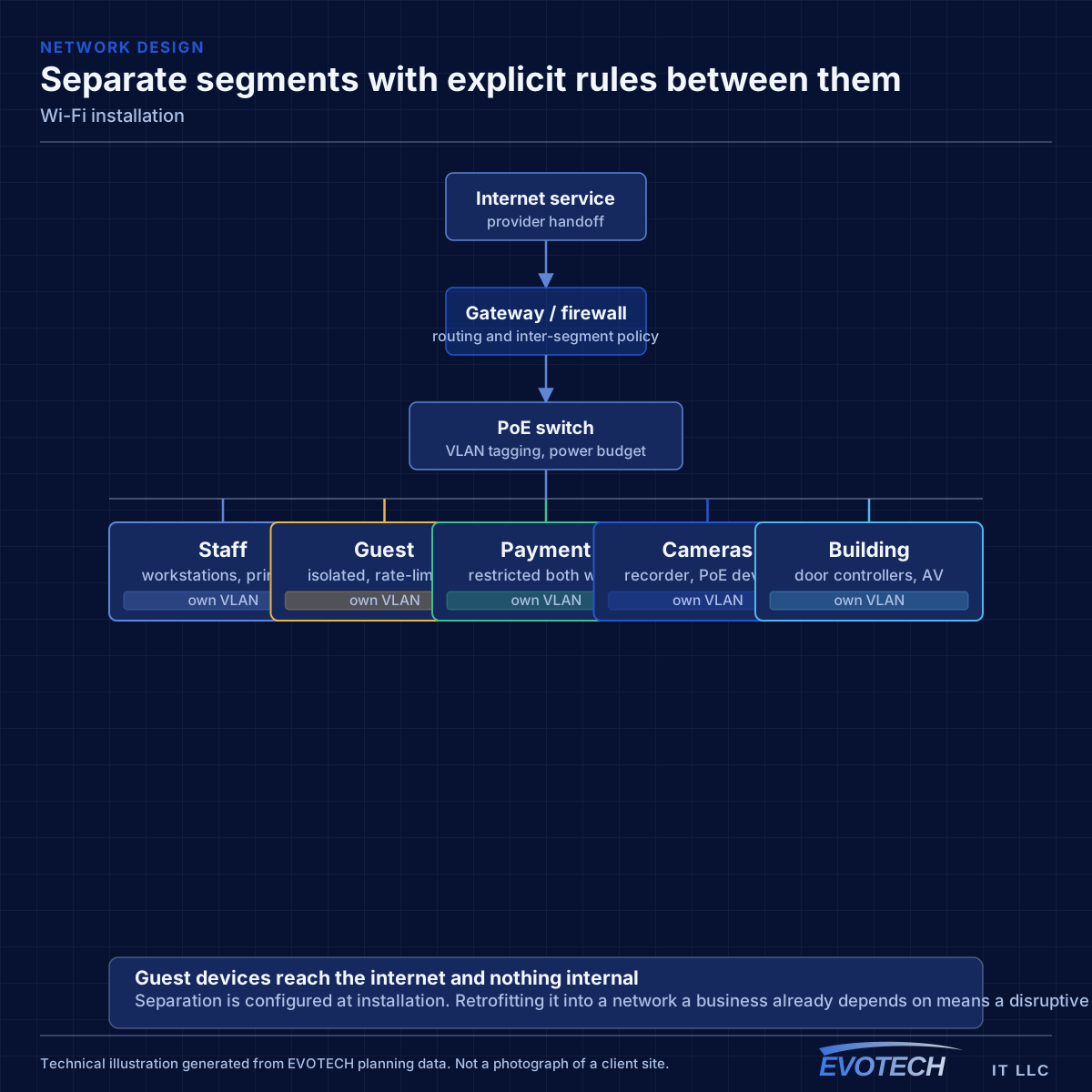
- Guest and business traffic sharing one network with no separation
Signal level, channel reuse, and why backhaul decides everything
Wireless capacity comes from having multiple non-overlapping channels in use across a space. In North America, 2.4 GHz offers three non-overlapping 20 MHz channels, which is why it congests so quickly — in a dense building the neighbours are using them too. The 5 GHz band offers far more channels, including DFS channels that require radar detection and which many designs skip unnecessarily. The 6 GHz band, where equipment and regulations permit, adds substantially more spectrum with the caveat that only newer client devices can use it.
Channel width is a trade. A wider channel gives a single client more throughput but consumes more spectrum, which means fewer non-overlapping channels and more contention between access points. In dense deployments narrower channels usually produce better aggregate performance than wide ones, which is the opposite of the intuition that wider is faster.
Backhaul is the part that quietly determines the ceiling. An access point connected by cable has its full radio capacity available to clients. An access point relaying through another AP wirelessly spends radio time receiving and retransmitting the same data, and effective throughput drops accordingly with each hop. Running cable to each AP position is the single highest-value decision in most wireless projects.
- Roughly -67 dBm at the coverage edge as a working target for voice and video
- Three non-overlapping 20 MHz channels at 2.4 GHz; many more at 5 GHz
- Wider channels raise peak throughput but reduce reuse and raise contention
- Wired backhaul to every AP wherever cable can reach
- Separate guest traffic from business systems at the network level
Who this work is for
Wireless work splits into new design and remediation, and the two start very differently. New design begins with the floor plan and the intended device population. Remediation begins by measuring what is actually happening.
- Offices where video calls drop when people move between rooms
- Buildings that added access points over time with no channel plan
- Spaces with dense device counts in one area, such as conference rooms and training rooms
- Properties where mesh repeaters are covering for missing cable
- New fit-outs where AP positions need to be set before the ceiling closes
How the work runs
The sequence differs between a new design and a remediation, but both end at the same place: measured coverage rather than assumed coverage.
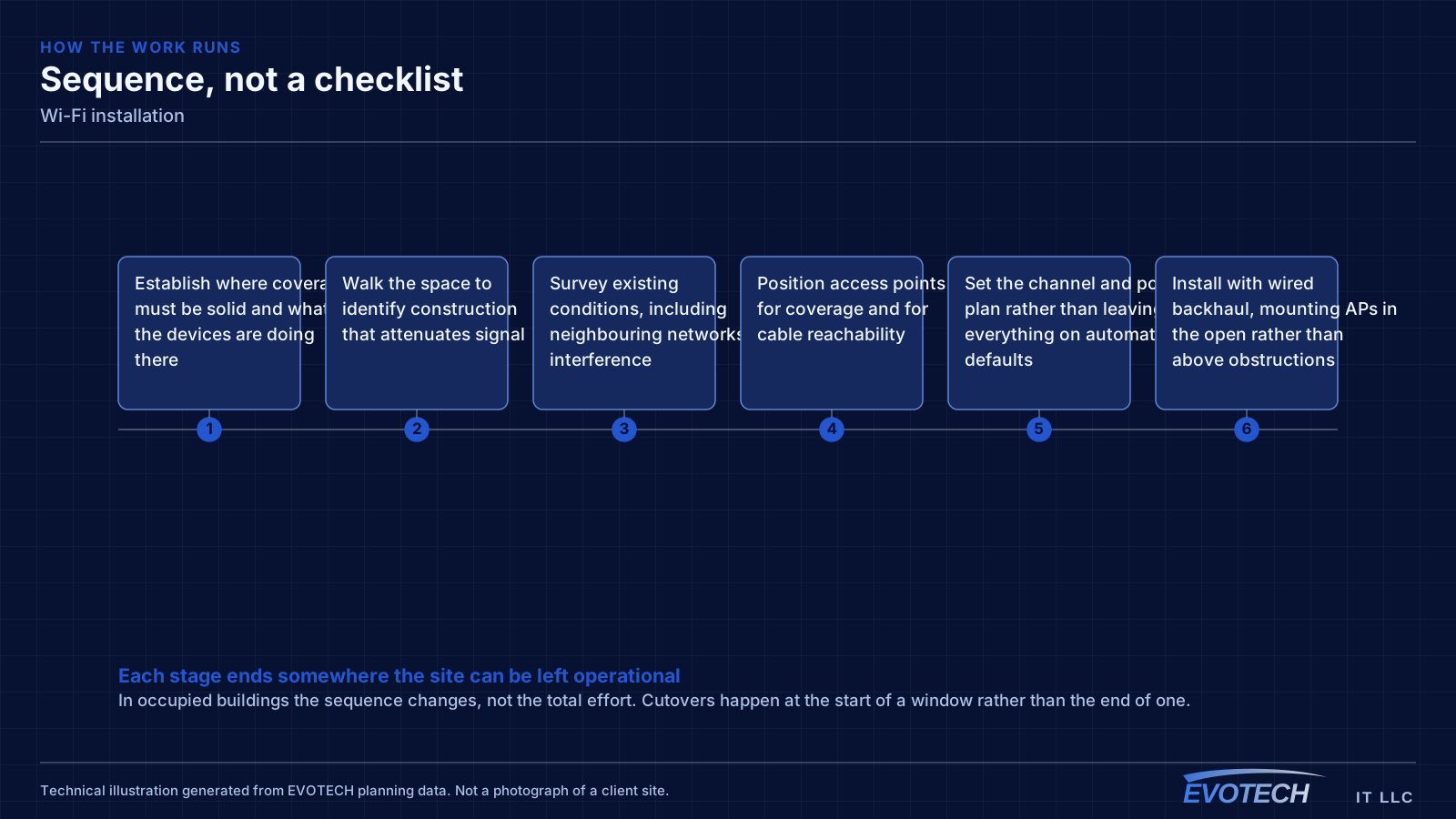
- Establish where coverage must be solid and what the devices are doing there
- Walk the space to identify construction that attenuates signal
- Survey existing conditions, including neighbouring networks and interference
- Position access points for coverage and for cable reachability
- Set the channel and power plan rather than leaving everything on automatic defaults
- Install with wired backhaul, mounting APs in the open rather than above obstructions
- Validate with a post-installation walk and adjust power, channels, or placement
What changes the scope
Access-point count is an output of the design, not an input. What drives it:
- Construction materials: drywall behaves very differently from masonry, tile, or metal stud with foil-backed board
- Ceiling height, which changes both coverage radius and mounting method
- Device density per area and what those devices do
- Whether coverage is needed outdoors, in stairwells, or in parking areas
- Cable reachability to each candidate AP position
- Neighbouring networks competing for the same spectrum
- Whether the client population includes older devices limited to 2.4 GHz
Testing and verification
A wireless installation is validated by walking it. Signal level, signal-to-noise ratio, and the channel each AP settled on are measured at the places people actually work, not from the middle of the room.
Roaming is tested by moving between coverage areas during an active call and watching whether the handoff is clean. Throughput is tested at the edges of each cell, where it is worst, rather than standing under an access point.
- Post-installation coverage walk recording signal and noise at working positions
- Channel and power verification against the intended plan
- Roaming test during an active call across coverage boundaries
- Throughput measured at cell edges and in the densest areas
- Guest and business network separation verified
Common mistakes
Most wireless disappointment traces back to a small number of repeated decisions.
- Adding access points to fix congestion, which increases contention instead
- Mounting APs inside closets, above ceiling tiles, or behind ductwork
- Leaving every radio on maximum power, which enlarges cells and worsens overlap
- Using wireless uplinks where cable was available
- Running wide channels in a dense deployment
- Judging the network by the signal bars rather than by measured signal and noise
What drives the cost
Wireless cost is mostly cabling and access-point count, with survey depth as the third variable.
- Number of access points the coverage design requires
- Cable runs to each AP position and the difficulty of those runs
- Ceiling type and mounting hardware, especially at height
- Switch capacity and PoE budget to power the APs
- Survey depth, from a walkthrough to a full measured survey
- Whether outdoor or warehouse coverage is included
Honest limitations
These are the boundaries of what this service can do, stated up front rather than discovered later.
- Wireless coverage cannot exceed what the building allows; some construction requires more access points than a floor plan suggests.
- Wi-Fi improvements do not increase the capacity of the internet circuit.
- Interference from non-Wi-Fi sources can be identified and mitigated but not eliminated.
- Client behaviour varies by device; some older clients roam poorly regardless of network design.
Frequently asked questions
Why does a call drop when walking between rooms?
That is a roaming symptom. Either the coverage areas do not overlap enough, so the device holds a fading signal past the point of usefulness, or they overlap heavily on the same channel, so the handoff happens into a congested cell. Both are fixed by adjusting placement, power, and the channel plan rather than by adding another access point at the same settings.
Will adding more access points fix slow Wi-Fi?
Sometimes the opposite. If the problem is congestion rather than coverage, adding access points on already-busy channels increases contention, because devices on the same channel take turns. The first step is measuring whether the issue is weak signal, channel contention, or something past the access point entirely.
Is mesh acceptable, or does every access point need a cable?
Cable wherever it can reach. A wireless uplink spends radio time relaying traffic, so throughput falls with each hop and latency becomes less predictable. Mesh is a reasonable answer for a detached structure or a location cable genuinely cannot reach — it is a poor default for a building where a run was possible.
Should the 2.4 GHz band be turned off?
Not usually, because some devices only support it — older printers, sensors, and thermostats among them. The more useful adjustments are keeping 2.4 GHz to 20 MHz channels, reducing its transmit power so it does not extend far past the 5 GHz cells, and moving anything capable onto the higher bands.