The short answer
There is no square-footage rule that survives contact with a real building. The count comes from three inputs: what the walls are made of, how many devices need to work simultaneously in each area, and where coverage genuinely has to be solid. A masonry building needs more access points than a drywall one of the same size, and a conference-heavy office needs more than an open warehouse floor of the same area.
As a starting point before any measurement: a typical two-storey house usually needs at least one access point per floor. A small office floor might be served by two or three. A conference-heavy office floor might need six despite being the same size. A warehouse is planned by aisle rather than by area entirely. Those are starting points for a conversation, not answers.
The three inputs that actually determine the number
The first is attenuation. Signal loses strength passing through material, and materials differ enormously: modern drywall passes signal reasonably well, while masonry, tile, metal stud with foil-backed board, and mirrored surfaces attenuate heavily. A floor between storeys is one of the biggest single losses in a residential building, which is why a downstairs router serves upstairs bedrooms poorly regardless of specification.
The second is capacity. Wi-Fi devices sharing a channel take turns transmitting, so a cell's throughput is divided among its clients. Twelve people on a video call in one conference room place a much heavier demand on one cell than forty scattered desks do across a floor. Capacity requirements concentrate; coverage requirements distribute.
The third is where coverage genuinely matters. Solid coverage at every desk, in every meeting room, and along the routes people walk while on calls is worth designing for. Solid coverage in a storage room nobody works in is not, and treating every square metre as equally important inflates the count without improving anything.
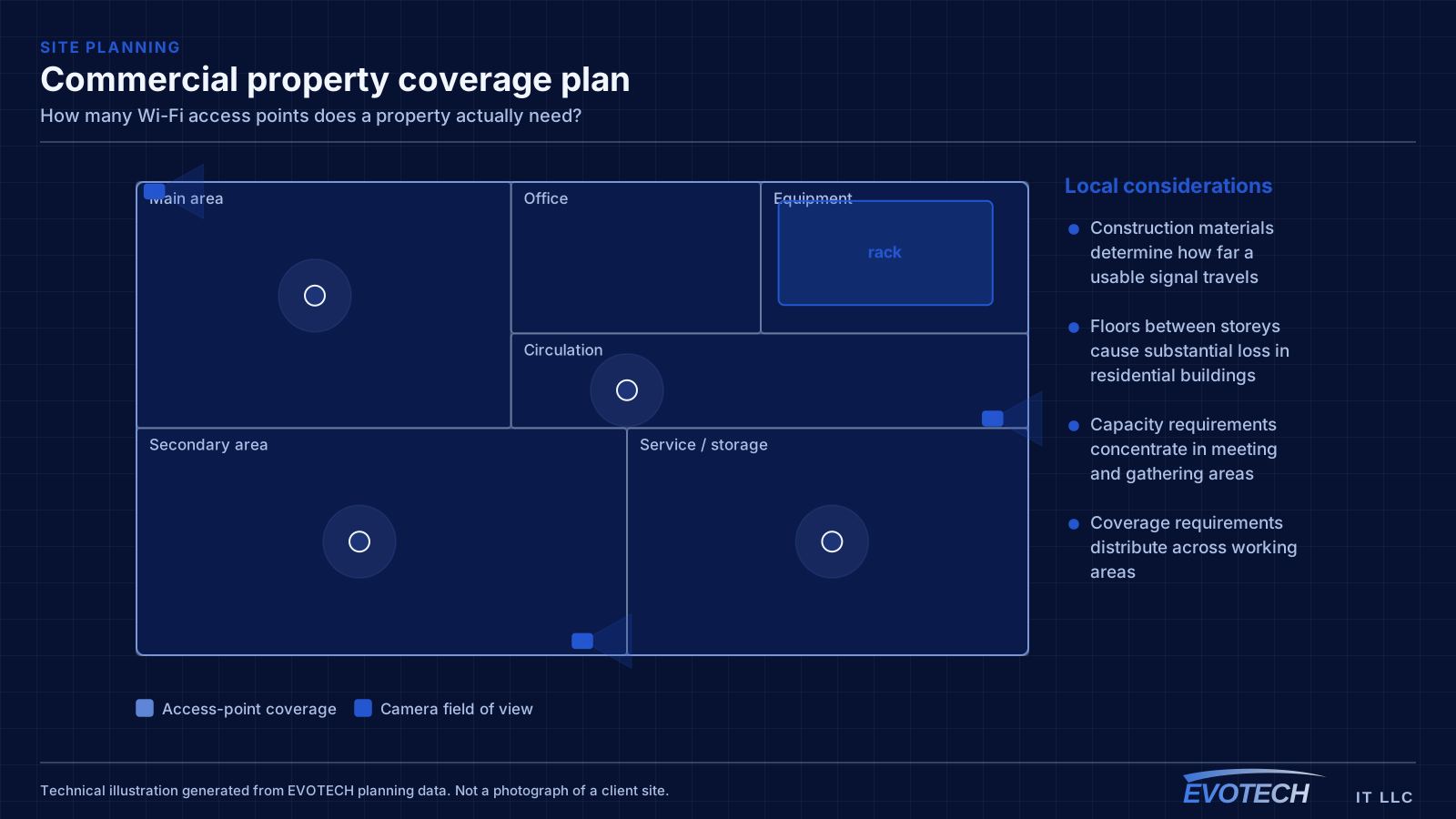
- Construction materials determine how far a usable signal travels
- Floors between storeys cause substantial loss in residential buildings
- Capacity requirements concentrate in meeting and gathering areas
- Coverage requirements distribute across working areas
- Not every space needs the same quality of coverage
What 'good coverage' means numerically
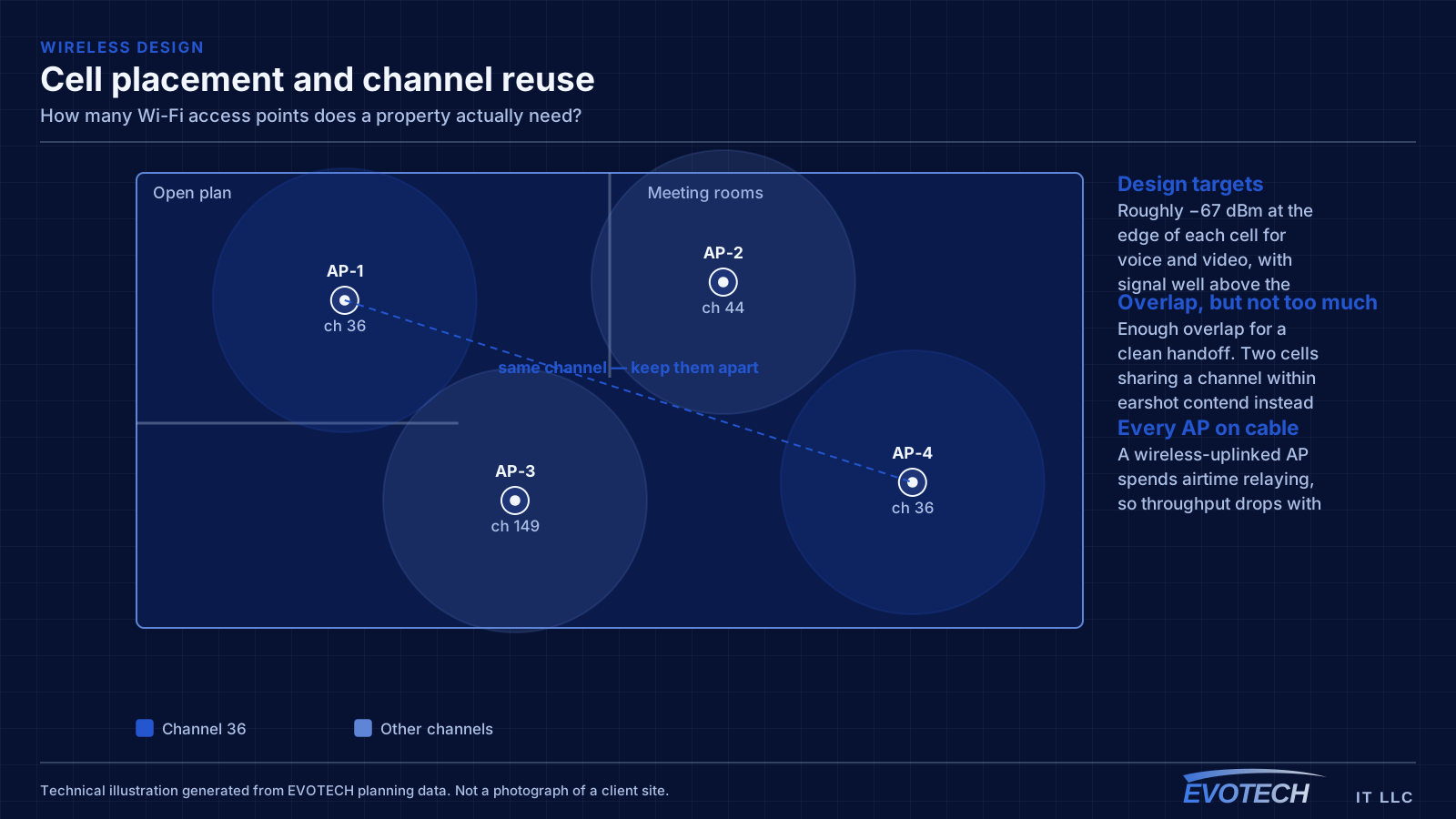
A working target for voice and video is roughly -67 dBm at the edge of each coverage area, with the signal comfortably above the local noise floor. Signal strength alone is not sufficient — a strong signal in a noisy environment performs worse than a moderate signal in a quiet one, which is why measurement tools report both.
Devices also need to roam. That requires coverage areas to overlap enough for a client to find a better access point before its current one becomes unusable. Too little overlap and calls drop at the boundary; too much overlap on the same channel and the two cells contend with each other. The design target is enough overlap for a clean handoff and no more.
This is why more access points can make a network worse. Adding cells without adjusting channels and transmit power increases contention, and the symptom — slow wireless — looks identical to insufficient coverage while having the opposite cause.
- Roughly -67 dBm at the coverage edge as a voice and video target
- Signal-to-noise ratio matters as much as raw signal strength
- Coverage areas need enough overlap for clean roaming, and no more
- Excessive same-channel overlap causes contention, not capacity
- More access points at default settings can degrade a network
How much spectrum is actually available
Capacity ultimately comes from spectrum. In North America, the 2.4 GHz band offers three non-overlapping 20 MHz channels, which is why it congests so quickly — in any dense area the neighbours are using them too. The 5 GHz band offers considerably more, including DFS channels that many deployments skip unnecessarily. Where regulations and equipment permit, 6 GHz adds substantially more again, with the caveat that only newer client devices can use it.
Channel width is a real trade-off and the intuition is backwards. A wider channel gives one client more peak throughput but consumes more spectrum, which means fewer non-overlapping channels available and more contention between neighbouring access points. In dense deployments, narrower channels usually produce better aggregate performance than wide ones.
This is the ceiling on what more hardware can achieve. Past a certain density, adding access points stops helping because there is no more spectrum to give them, and the answer becomes narrower channels, tighter cells, and moving capable clients to higher bands.
- 2.4 GHz: three non-overlapping 20 MHz channels in North America
- 5 GHz: many more channels, including DFS channels often skipped
- 6 GHz where permitted adds substantial spectrum for newer clients
- Wider channels raise peak throughput but reduce reuse
- Narrower channels usually win in dense deployments
A practical method for arriving at a number
Start by listing the areas that need coverage and, for each, the peak number of devices that will be working simultaneously and what they will be doing. This is the step people skip, and it is the one that distinguishes a capacity design from a coverage guess.
Then walk the building. Note the construction between areas, identify anything reflective or heavily attenuating, and — if there is an existing network — measure signal and noise at the places that generate complaints. Also survey what neighbouring networks are transmitting, because in a shared building their channels constrain your plan.
Now place candidate positions: central to the areas being served, in the open rather than above ductwork or inside closets, and — critically — reachable by cable. An ideal position that cannot be wired is not ideal; a slightly worse position that can be wired usually outperforms it, because a wired access point delivers its full radio capacity to clients while a wireless-uplinked one spends a large share relaying.
Finally, validate after installation. Walk the building at a realistic time of day, measure at the working positions rather than in the middle of the room, and test roaming by moving between areas during an active call.
- List areas with peak simultaneous device counts and their workloads
- Walk the building and note construction and reflective surfaces
- Survey neighbouring networks in shared buildings
- Place positions centrally, in the open, and reachable by cable
- Validate by walking the space at a realistic busy time
How the answer differs by environment
In a house, the baseline is one access point per floor, positioned centrally in the used areas rather than at the perimeter. Larger plans, distant wings, and detached structures each add to that, and outdoor areas are planned separately with rated equipment rather than covered by turning indoor power up.
In an office, the count concentrates around meeting rooms. A busy conference room frequently justifies its own access point, and adjacent busy rooms need non-contending channels or they will interfere through the wall regardless of how well each is covered.
In a warehouse, area is nearly irrelevant. Coverage gets designed along aisles, because racking blocks the cross-aisle paths, and the design must assume stocked conditions — a survey in an empty building describes a different radio environment entirely.
In retail, coverage is planned by zone rather than by current fixture position, because layouts get reset. Sales floor, fitting areas, stockroom, and receiving are each distinct, and handheld devices moving between them make roaming a first-class requirement.
- Homes: one per floor as a baseline, plus wings and outdoor areas
- Offices: concentrated around meeting rooms with a deliberate channel plan
- Warehouses: designed along aisles, validated with stock in place
- Retail: planned by zone because layouts change
- Outdoor areas: rated equipment positioned for them, not indoor spillover
Frequently asked questions
Is there a square-footage rule of thumb?
Not one that survives a real building. Construction materials change coverage by a large factor, and device density changes capacity requirements independently of area. A rule of thumb produces a number that is wrong in both directions depending on the building — too few in masonry, too many in an open drywall office with light use.
Would one high-end access point beat three ordinary ones?
Almost never, because the limitation is physics rather than the device. Signal weakens through walls and floors at a rate that no amount of transmit power usefully overcomes, and raising power mostly enlarges the cell so it interferes with more things. Three well-placed, well-configured access points beat one powerful device in almost every building.
Can access points be added later?
Yes, provided cable can reach the new positions and the channel plan gets revisited. That second part matters — adding a cell without adjusting channels and power frequently makes the network worse rather than better, which is why 'we added an access point and it got slower' is a common report.
Do access points need to be the same make and model?
Not strictly, but a mixed estate is harder to manage and harder to tune coherently, particularly around roaming behaviour. Where a network is being expanded rather than replaced, matching the existing equipment usually costs less in configuration time than the hardware difference saves.