The short version
A UniFi deployment puts the gateway, switching, wireless, and often cameras and door access under one controller. The practical benefit is operational rather than raw performance: one interface for network configuration, client visibility, firmware updates, and camera review, instead of separate systems that each need their own knowledge.
The tradeoff is ecosystem commitment. Mixed-vendor networks give more freedom to choose the best component for each role; single-vendor networks give a more coherent day-to-day experience and simpler support. Neither is universally correct, and it is worth deciding deliberately rather than by default.
What tends to go wrong
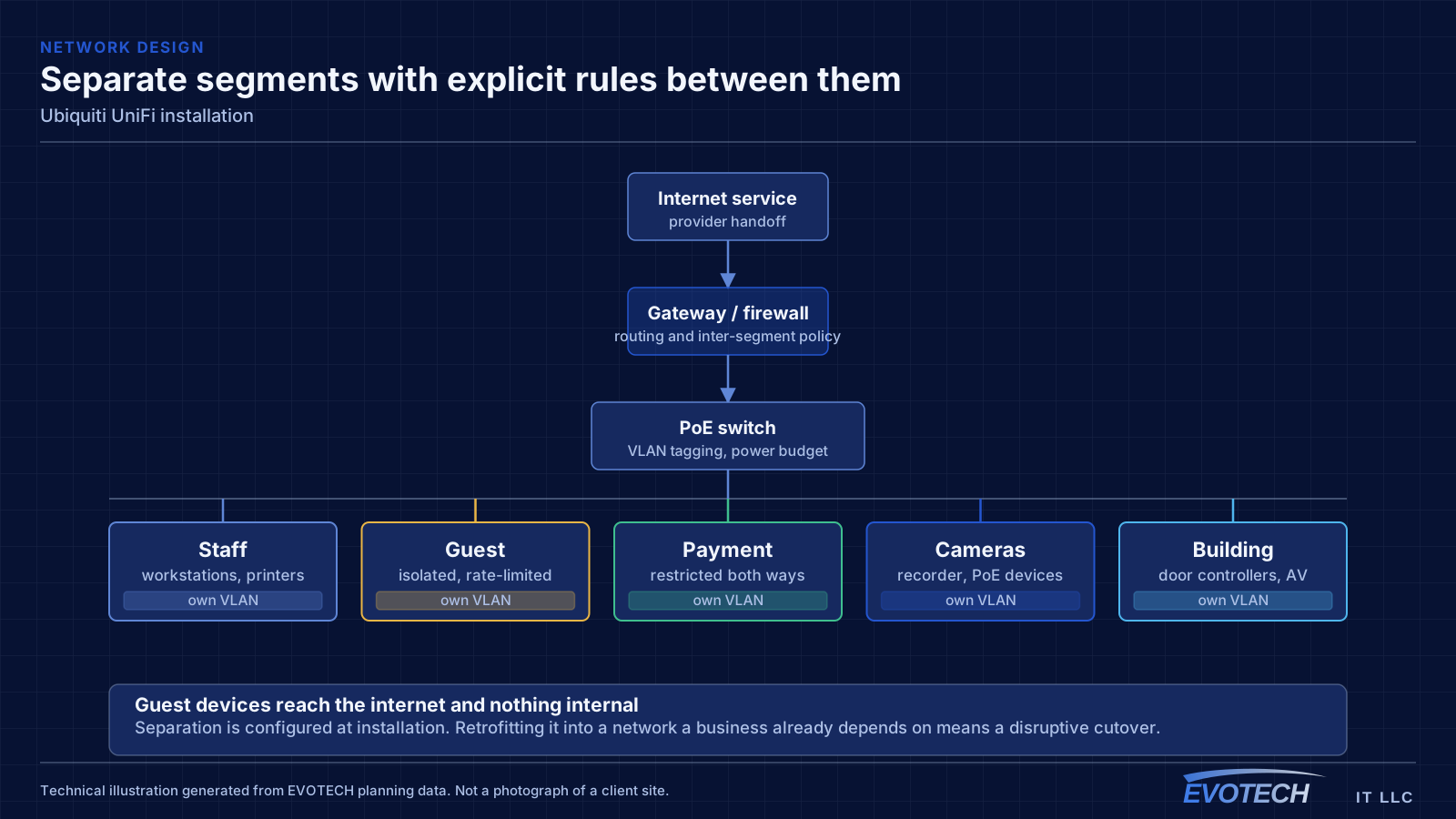
The most common problem with an existing UniFi installation is that it was deployed as a set of boxes rather than as a design. Adopted devices on default settings, no VLANs, no channel plan, and firmware left wherever it landed will underperform, and the interface makes that easy to overlook because everything reports as online.
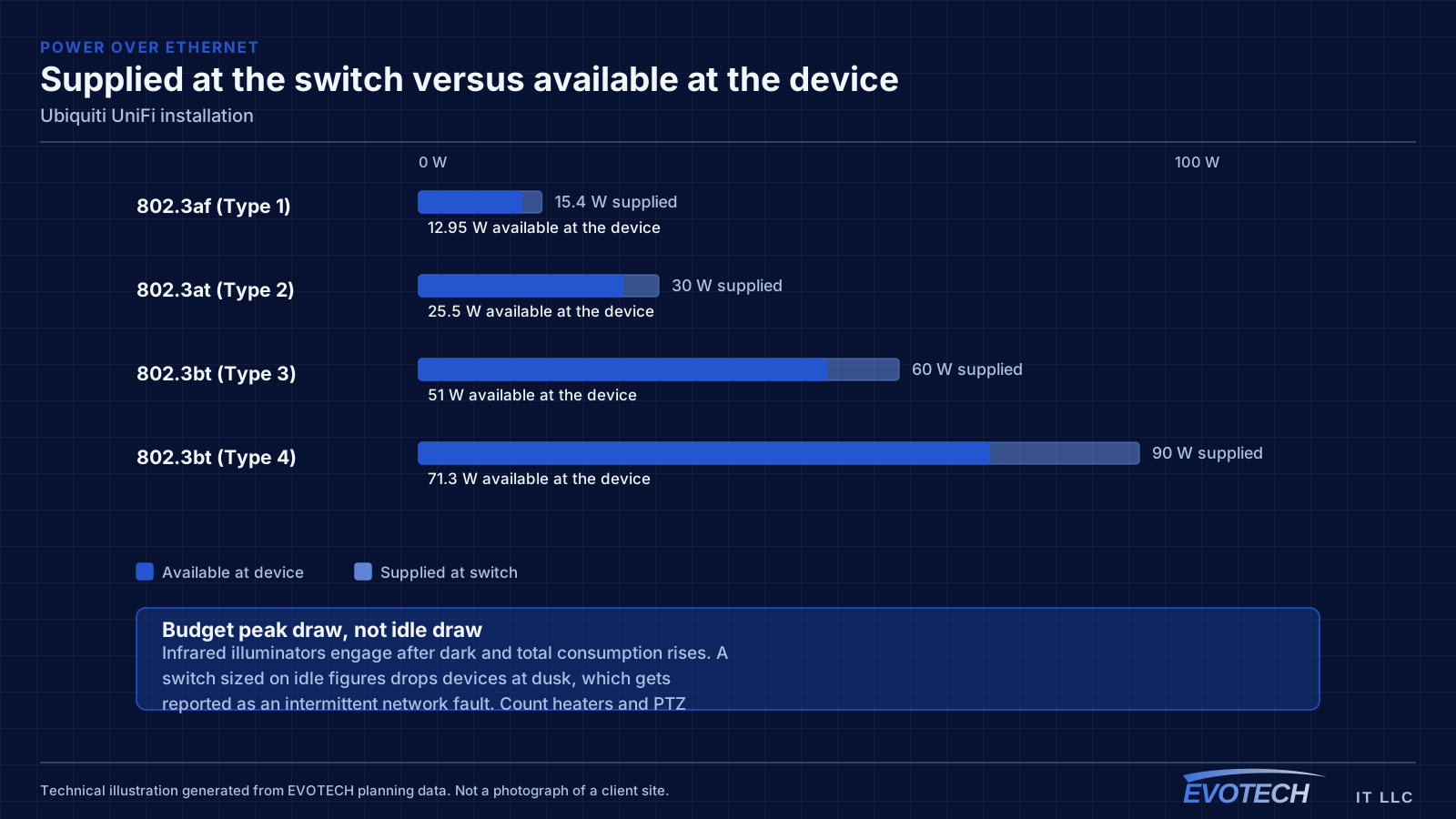
The second is powering. UniFi access points, cameras, and door hardware draw power over Ethernet at different classes, and a switch chosen on port count alone can run out of PoE budget before it runs out of ports. That shows up as devices rebooting under load rather than as an obvious power error.
- Devices adopted with default settings and no segmentation plan
- Switch PoE budget exhausted before the port count is
- Controller running on an unreliable host or with no backup of its configuration
- Firmware versions drifting apart across devices
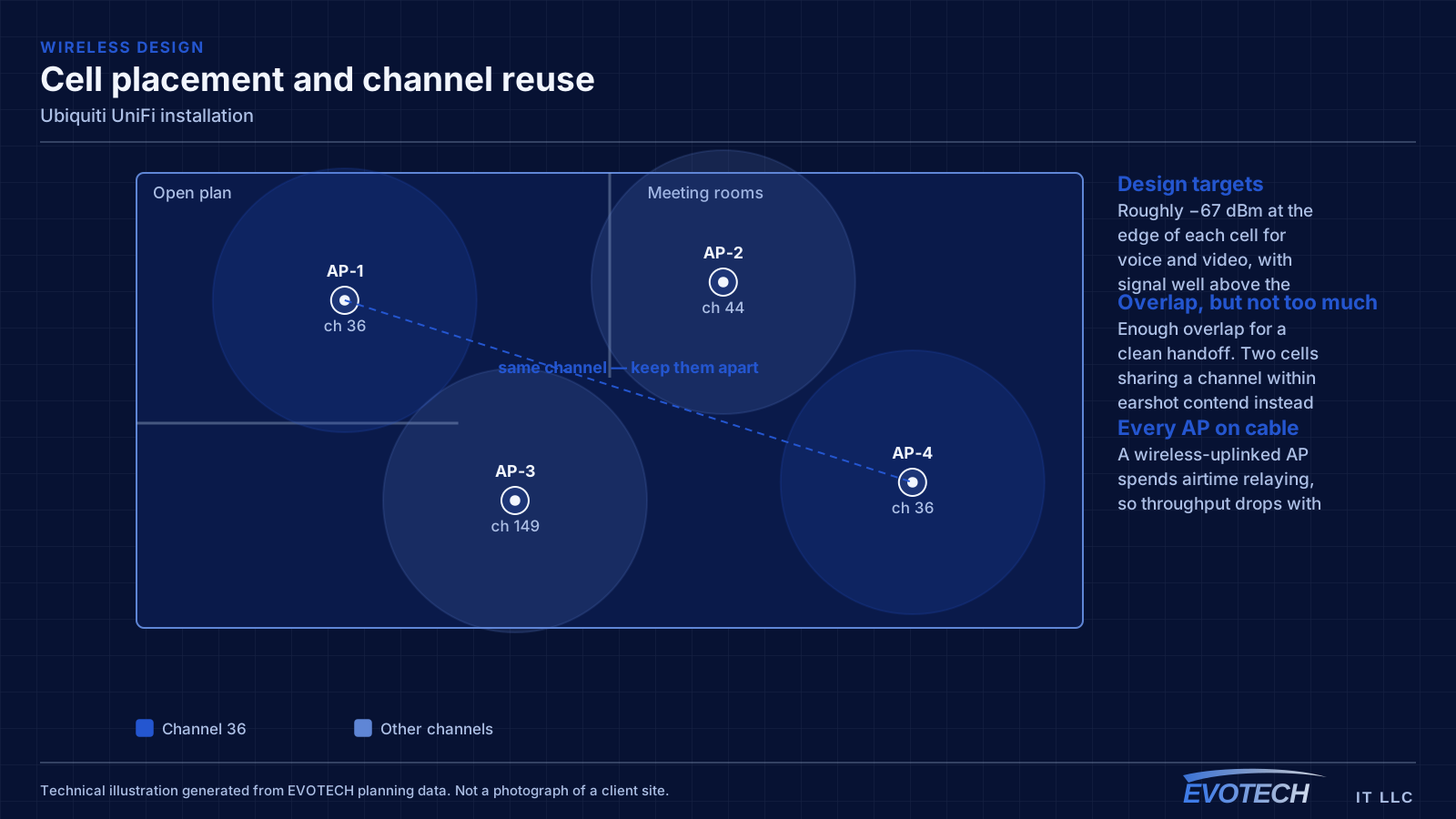
- Wireless left fully automatic in a dense environment where it needs guidance
- Camera storage sized without regard to retention expectations
Gateway, switching, PoE budget, and controller placement
The gateway handles routing, firewalling, and inter-VLAN policy. Segmentation is where most of the practical value sits: separate networks for staff, guests, payment systems, cameras, and building devices, with rules controlling what may talk to what. A guest network that cannot reach the camera recorder is a meaningful improvement over a flat network, and it takes configuration rather than extra hardware.
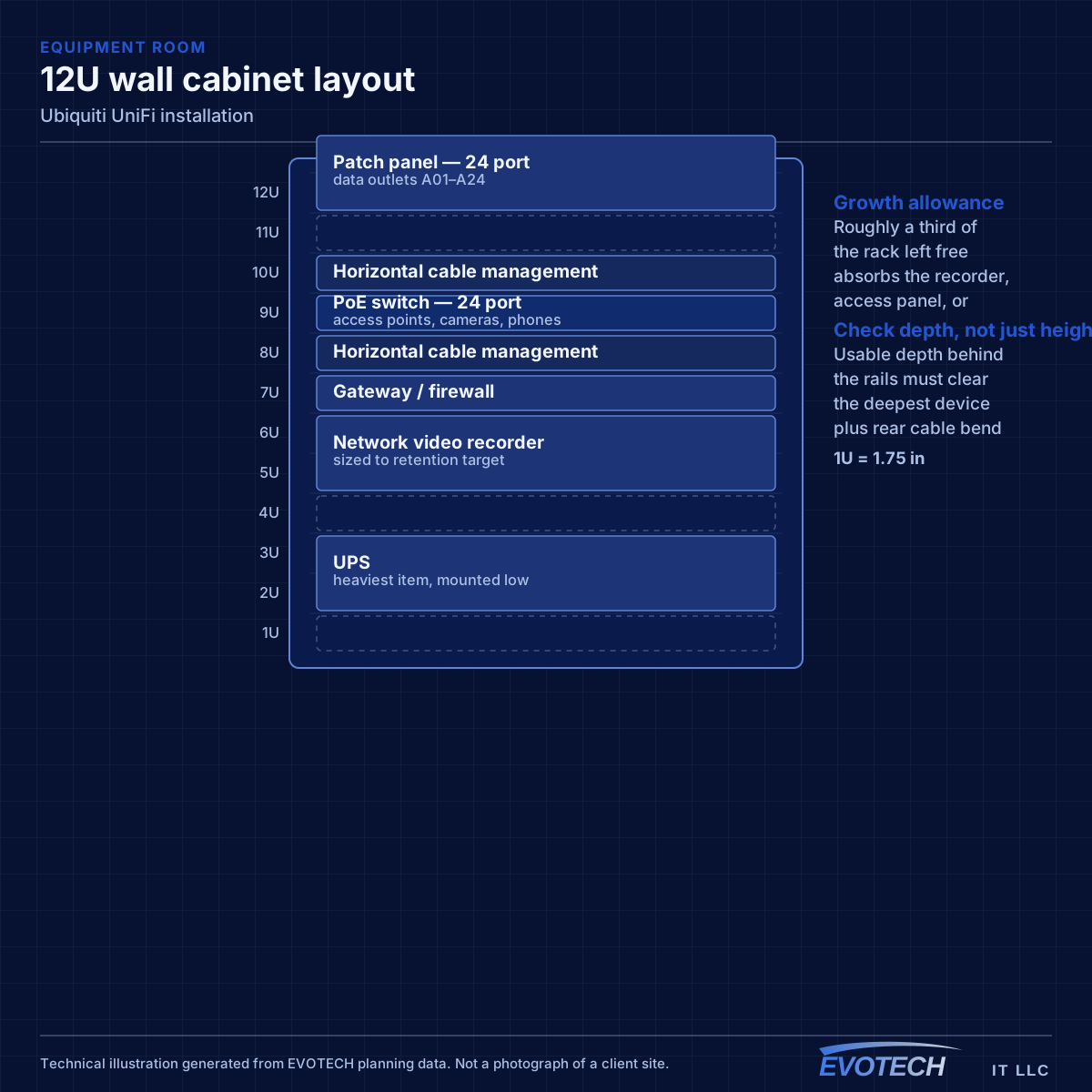
Switching has to be chosen on two numbers, not one. Port count is obvious; PoE budget is the one that catches people. Access points, cameras, and door hardware each draw a class of power, and the total across all connected devices must sit inside the switch's budget with headroom for the higher-draw devices. Cameras with heaters or illuminators, and pan-tilt-zoom units, draw considerably more than a typical access point.
The controller can run on dedicated hardware or as software on a host. Dedicated hardware is generally more reliable for a business site because it does not depend on someone else's computer staying online. Either way, configuration backups matter — the controller holds the network's design, and losing it means rebuilding rather than restoring.
- Segment staff, guest, payment, camera, and building traffic with explicit inter-network rules
- Size switches on PoE budget as well as port count, with headroom
- Account for higher-draw devices: PTZ cameras, illuminators, and door hardware
- Host the controller on reliable hardware and back up its configuration
- Keep firmware deliberately aligned rather than drifting
Who this work is for
UniFi tends to suit sites that want capable networking with manageable ongoing administration.
- Small and mid-sized offices wanting segmented networks without a dedicated network administrator
- Restaurants and retail spaces needing guest access separated from payment systems
- Larger homes consolidating routing, switching, wireless, cameras, and doorbells
- Multi-area properties where one interface across buildings simplifies support
- Sites replacing an accumulation of consumer equipment with something consistent
How the work runs
A UniFi installation is mostly design and configuration; the physical install is the shorter half.
- Define the network segments and what each is allowed to reach
- Size the gateway, switching, and PoE budget against the full device list
- Confirm cable runs to every access point, camera, and reader position
- Install and adopt devices, then apply the intended configuration rather than defaults
- Set the wireless channel and power plan for the actual environment
- Configure camera retention and verify storage against the retention target
- Validate segmentation, coverage, and remote access, then back up the controller
What changes the scope
Scope moves with device count and the amount of configuration the site needs.
- Number of access points, cameras, switches, and door devices
- Number of network segments and the complexity of the rules between them
- Cabling required to reach each device position
- Camera resolution and retention target, which set storage
- Whether the controller runs on dedicated hardware
- Whether an existing network must be migrated with minimal downtime
- Remote-access requirements and who needs which level of visibility
Testing and verification
Validation covers the network design as well as the radio coverage, because segmentation that was configured but not tested is not yet segmentation.
- Attempt cross-segment access to confirm rules behave as intended
- Measure wireless coverage and roaming across the space
- Verify PoE draw against switch budget with all devices powered
- Confirm camera recording, retention, and playback
- Test remote access and confirm which accounts have which permissions
- Take and store a controller configuration backup
Common mistakes
The recurring UniFi mistakes are configuration mistakes, not hardware mistakes.
- Adopting everything and leaving default settings in place
- Choosing a switch on port count and running out of PoE budget
- Running the controller on a workstation that gets shut down
- Never backing up the controller configuration
- Sizing camera storage for the resolution but not the retention period
- Leaving wireless entirely automatic in a dense multi-tenant building
What drives the cost
Equipment is visible, but configuration and cabling usually decide the total.
- Device count across gateway, switching, wireless, cameras, and access
- Cable runs and their difficulty
- Storage capacity for the camera retention target
- Number of segments and depth of the policy configuration
- Migration complexity from existing equipment
- Whether structured documentation and handover training are included
Honest limitations
These are the boundaries of what this service can do, stated up front rather than discovered later.
- Ubiquiti and UniFi are third-party trademarks. EVOTECH installs and configures this equipment and does not claim manufacturer authorization, dealership, or partnership.
- Single-vendor ecosystems trade component flexibility for operational coherence; that is a deliberate choice, not a free upgrade.
- Product capabilities and model availability change over time and should be confirmed against current manufacturer documentation.
- Cloud-dependent features such as remote access rely on manufacturer services outside any installer's control.
Frequently asked questions
Is UniFi the right choice for a small business?
It suits sites that want proper segmentation, decent wireless, and cameras under one interface without employing a network administrator. The tradeoff is committing to one vendor's ecosystem. A mixed-vendor design gives more freedom to pick the best component for each role; the single-vendor version is easier to live with day to day. Both are defensible — it is worth choosing on purpose.
Does EVOTECH have a partnership with Ubiquiti?
No. Ubiquiti and UniFi are trademarks of their owner, and this site makes no claim of manufacturer authorization, dealership, or partnership. EVOTECH installs, configures, and supports the equipment as an independent contractor.
Can UniFi devices be added to an existing network?
Yes, and it is common to migrate progressively — starting with access points or switching and adding the gateway later. What matters is planning the addressing, segmentation, and the cutover sequence in advance, so the site does not spend a day with half its devices on one design and half on another.
What happens if the controller goes offline?
Already-configured devices continue passing traffic; what stops is centralised management, new adoptions, and some statistics collection. Cameras that record locally keep recording. This is exactly why the controller belongs on reliable hardware and why its configuration should be backed up — a lost controller with no backup means rebuilding the design from scratch.