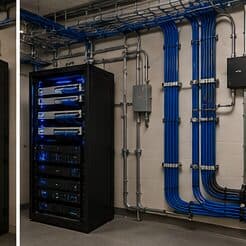
The short answer
A consumer router is a single device doing routing, switching, and wireless, configured through a simple interface and designed to work acceptably with no decisions made. A managed ecosystem like UniFi separates those roles across a gateway, switches, and access points under one controller, and expects decisions to be made about segmentation, channels, and policy.
The benefit is not speed. It is control and visibility: separate networks with rules between them, a coherent view of every client, deliberate channel and power planning, and cameras or door hardware under the same interface. The cost is that those things have to be configured, and a badly configured managed network can perform worse than a decent consumer router left alone.
What actually differs
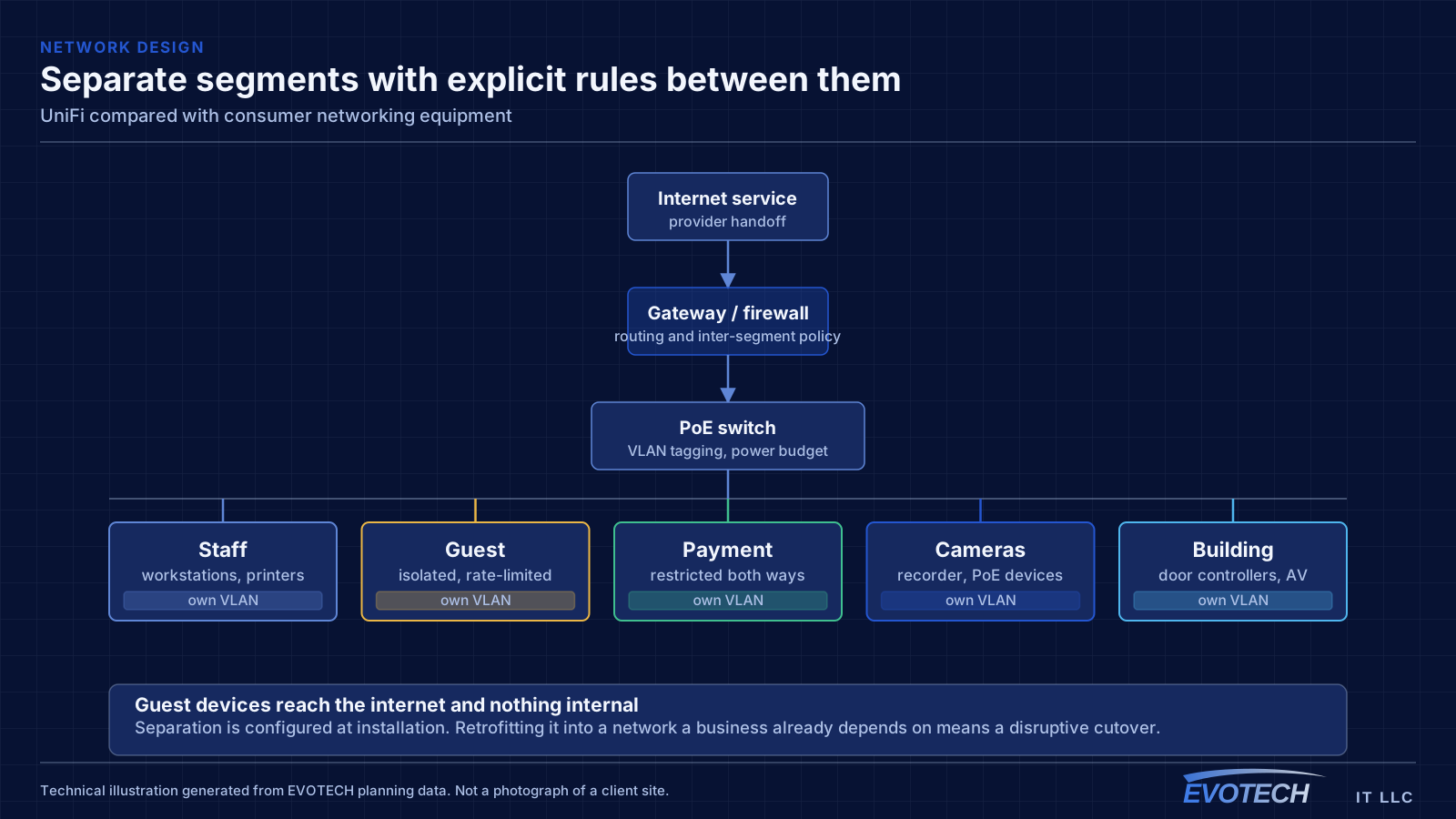
Segmentation is the largest practical difference. A consumer router typically offers a guest network and little else; a managed system lets you define separate networks for staff, guests, payment systems, cameras, and building controls, with explicit rules governing what may reach what. In a business context that is the single most valuable capability.
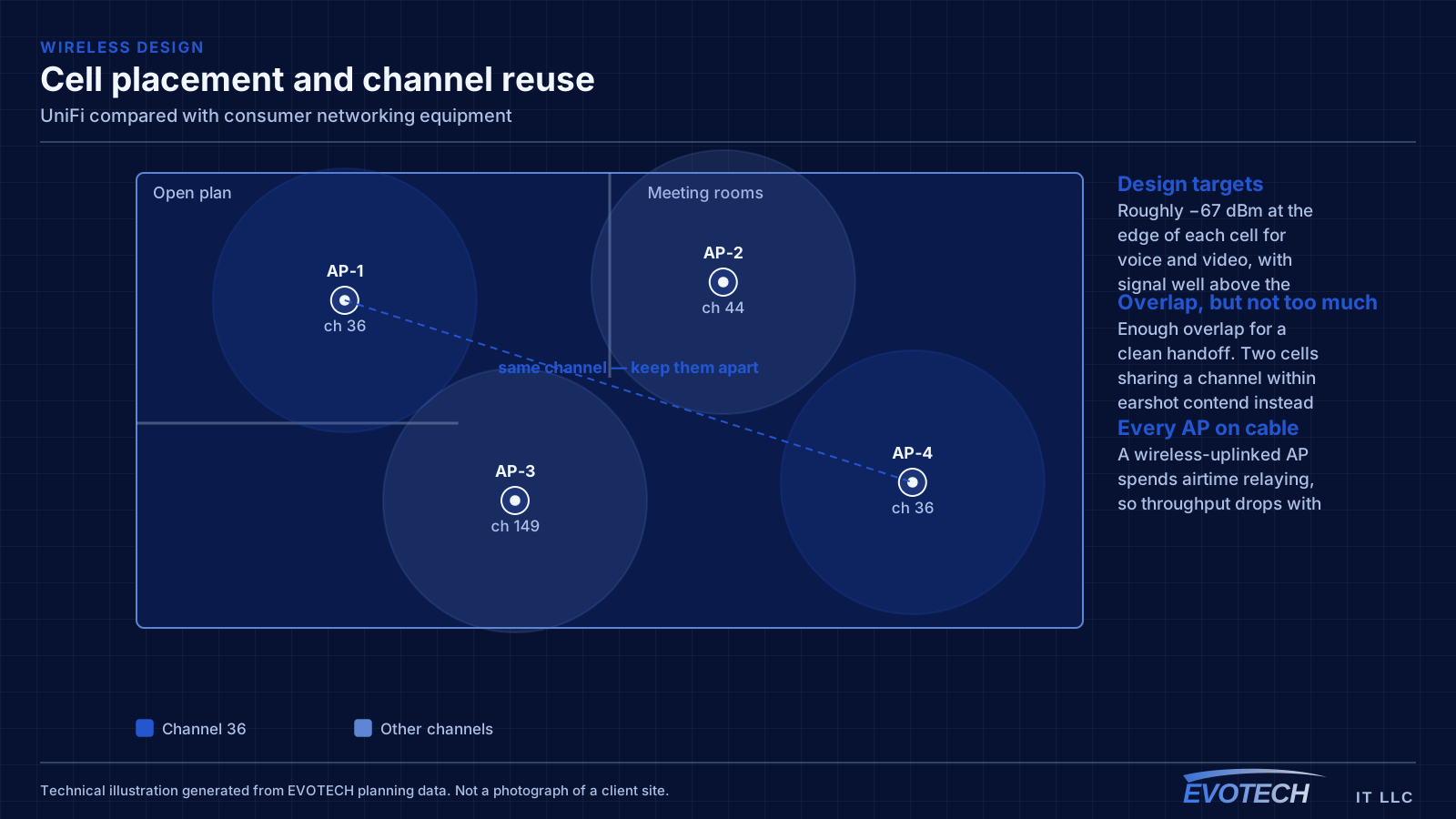
Wireless control is the second. Consumer equipment generally selects channels and power automatically and does not expose the decision. Managed systems let a channel plan be set deliberately, which matters enormously in dense environments where automatic selection cannot account for what the neighbours are doing.
Visibility is the third and the most underrated. Knowing which client is on which access point, on which channel, with what signal and what throughput, turns troubleshooting from guesswork into observation. Most consumer equipment simply does not report it.
- Multiple networks with explicit rules between them
- Deliberate channel and transmit power planning
- Per-client visibility including access point, channel, signal, and throughput
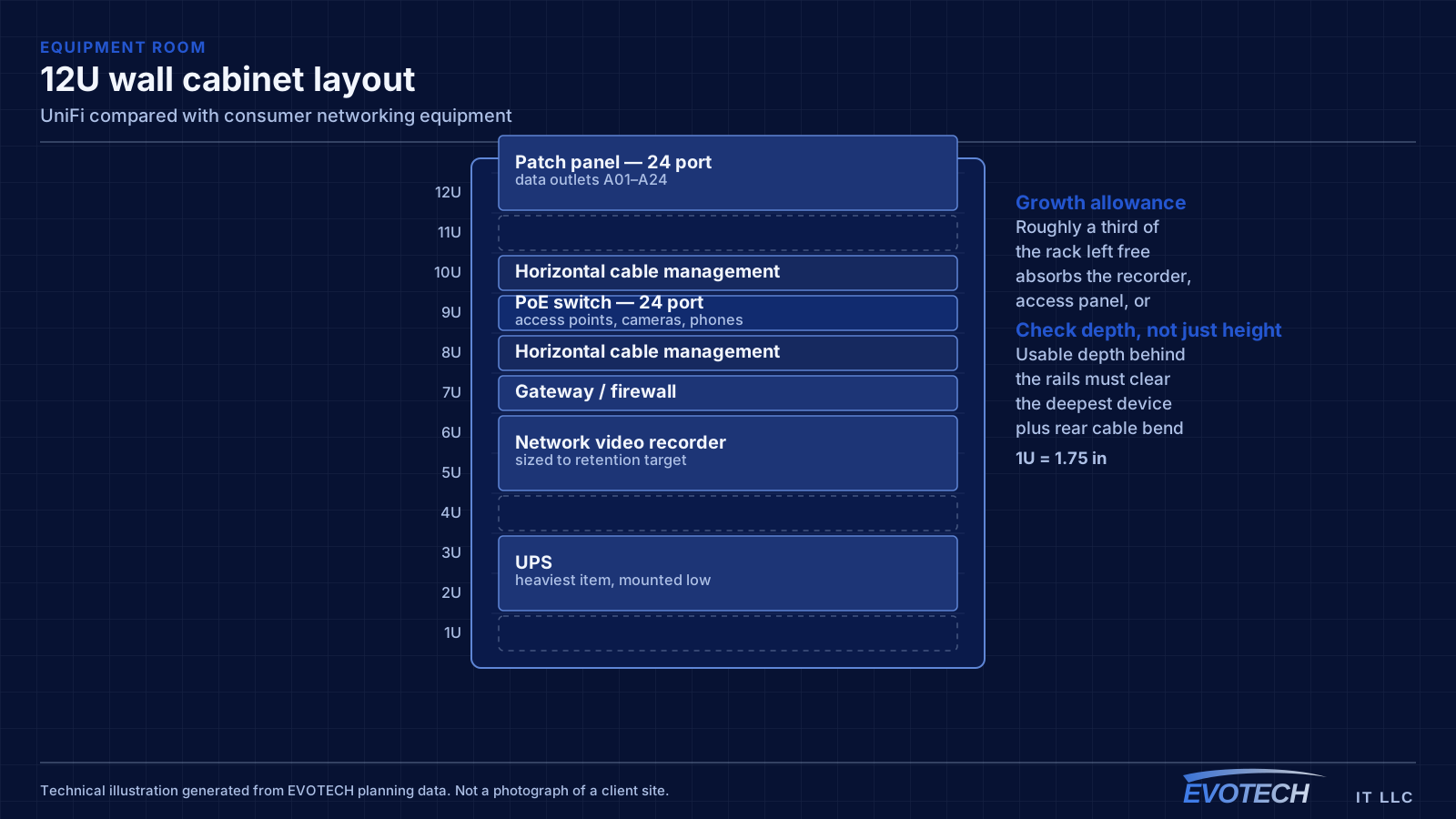
- Switching with PoE for access points, cameras, and phones
- Cameras and door hardware under the same management interface
When consumer equipment is genuinely the right choice
A small home with one or two access points, no separation requirements, and nobody who wants to think about networking is well served by good consumer equipment. Adding a managed system there buys capability that will never be used and introduces an interface someone has to understand.
The threshold is usually one of these: a need to keep some devices away from others, enough area that coverage requires deliberate planning, enough devices that channel decisions matter, or cameras and door hardware that would benefit from shared management. Any one of those starts to justify the move.
The other threshold is support. A managed network is easier to diagnose remotely and easier to hand over, because the configuration is explicit and visible. For a business that depends on its network, that is worth something even before any feature is used.
- Small home, no separation needs, no interest in configuration: consumer is fine
- Devices that must be kept apart: managed
- Coverage requiring more than two access points: managed
- Cameras or door hardware wanted under one interface: managed
- Networks someone else will have to support: managed
The tradeoffs of a single-vendor ecosystem
Single-vendor coherence is the point, and it is also the constraint. Everything works together, is managed in one place, and updates in a coordinated way. In exchange, you are committed to that vendor's roadmap, pricing, and product decisions, and mixing in a better component from elsewhere gives up part of the benefit you bought.
That is a legitimate trade in both directions. A mixed-vendor design offers freedom to pick the best component for each role and is what larger networks with dedicated staff often do. A single-vendor design offers a much better day-to-day experience for a site without dedicated staff. Neither is universally correct.
The relevant question is who will operate it. A site with someone who enjoys networking can run a mixed estate well. A site where the network needs to be somebody's occasional responsibility benefits substantially from one interface.
- Coherence in exchange for vendor commitment
- Mixed-vendor designs offer component freedom and more complexity
- Single-vendor designs offer simpler operation and less flexibility
- The deciding question is who operates it day to day
- Neither choice is a technical error; both are defensible
The mistakes that make a managed network perform badly
The most common is adopting everything and leaving defaults in place. A managed system configured as though it were a consumer one has all the cost and none of the benefit — no segmentation, no channel plan, and an interface nobody uses.
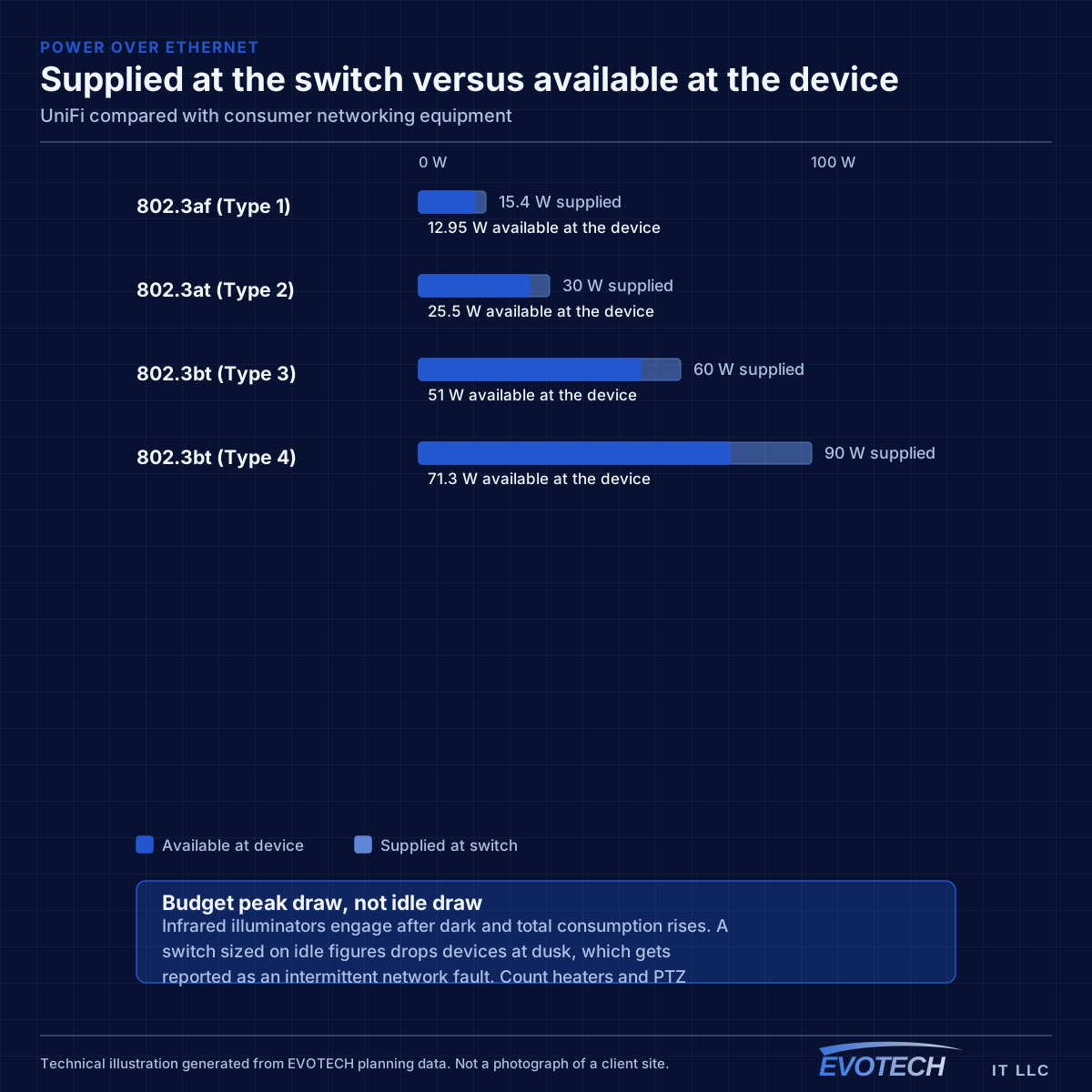
The second is switch sizing. Managed switches supply PoE to access points, cameras, and phones, and the budget is a separate number from the port count. A switch with enough ports but not enough watts produces devices rebooting under load, typically after dark when camera illuminators engage.
The third is the controller. It holds the network's configuration, and running it on a workstation that gets shut down means losing central management at unpredictable times. Not backing up its configuration means a hardware failure turns into rebuilding the design from scratch rather than restoring it.
- Defaults left in place, giving cost without benefit
- Switch chosen on port count with insufficient PoE budget
- Controller on unreliable hardware
- No configuration backup
- Firmware versions drifting apart across devices
Moving from consumer equipment without a bad week
Migration works best in stages, and the usual order is switching first, then access points, then the gateway. Each stage is independently useful, and the gateway — which changes routing and addressing — is the one that most affects everything else, so it benefits from going last when the rest is already stable.
Plan the addressing and segmentation before starting rather than during. Deciding which networks exist and what may reach what is a design activity, and doing it while devices are being cut over produces a configuration nobody can explain later.
Keep the old equipment until the new arrangement has run for a week under normal use. The problems that matter — a device that only appears on Tuesdays, a printer nobody thought about — surface during ordinary operation rather than during commissioning.
- Stage the migration: switching, then wireless, then gateway
- Decide addressing and segmentation before cutting over
- Inventory the devices that are easy to forget: printers, sensors, controls
- Keep old equipment available for a week of normal use
- Back up the controller configuration once the design is settled
What owning a managed network actually involves
The ongoing commitment is modest but it is not zero, and it is worth understanding before choosing a managed system rather than after. Firmware needs applying deliberately rather than automatically across everything at once, because a bad release applied to a gateway and every access point simultaneously takes the whole site down.
Configuration backups need to exist and need to be somewhere other than the controller itself. This is the single most commonly skipped item and the one with the worst consequences: a failed controller with no backup means reconstructing every network definition, rule, and wireless setting from memory.
Beyond that, the periodic work is light — reviewing which clients are on which network, checking that access-point channels have not drifted somewhere unhelpful, confirming camera retention is still meeting its target, and removing devices and credentials that belong to people who have left.
Consumer equipment has none of this because it offers none of the corresponding control. That is a legitimate trade for a site that does not need the control, and a poor one for a site that does.
- Firmware applied deliberately and in stages, not simultaneously everywhere
- Configuration backups stored somewhere other than the controller
- Periodic review of which clients sit on which network
- Channel and power settings checked for drift
- Retired devices and credentials removed rather than accumulating
Frequently asked questions
Is UniFi faster than a consumer router?
Not meaningfully, and speed is the wrong axis. Both handle typical internet connections comfortably. What differs is segmentation, deliberate wireless planning, per-client visibility, and PoE switching for other devices. If none of those matter for a given site, the managed system's advantages are largely unused.
Does EVOTECH have a relationship with Ubiquiti?
No. Ubiquiti and UniFi are trademarks of their owner. This site references the equipment because it gets installed, and claims no dealership, authorization, partnership, or endorsement from any manufacturer.
What happens if the controller stops working?
Configured devices keep passing traffic — the network does not go down. What stops is centralised management, new device adoption, and statistics collection, and cameras that record locally keep recording. The real risk is a lost controller with no configuration backup, which means rebuilding the design rather than restoring it.
Can managed and consumer equipment be mixed?
Technically yes, and it is common during a migration. The caveat is that features depending on coordination between devices — consistent segmentation, coherent roaming behaviour, unified visibility — only apply to the managed portion. A half-migrated network works; it just does not yet deliver what the migration was for.
Does a managed network need someone technical on staff?
Not permanently, but it does need someone who can perform the routine tasks and knows who to call otherwise. The design work and the initial configuration are where the expertise is required; day-to-day operation is adding a device to the right network, issuing or revoking a credential, and noticing when something reports a problem. Where nobody at all will look after it, that is a genuine argument for the simpler option rather than the more capable one.