The short version
Effective troubleshooting is a process of elimination against a specific, reproducible symptom. 'The internet is slow' is not yet a diagnosis — slow for whom, on which devices, wired or wireless, at what times, to which destinations. Those answers usually point at a layer before any equipment is touched.
The layers worth isolating in order are physical (cable, connectors, ports), local network (switching, addressing, loops), wireless (signal, contention, roaming), the internet circuit itself, and the destination service. Each has characteristic symptoms, and most of the diagnostic value comes from the first few questions rather than from expensive tooling.
What tends to go wrong
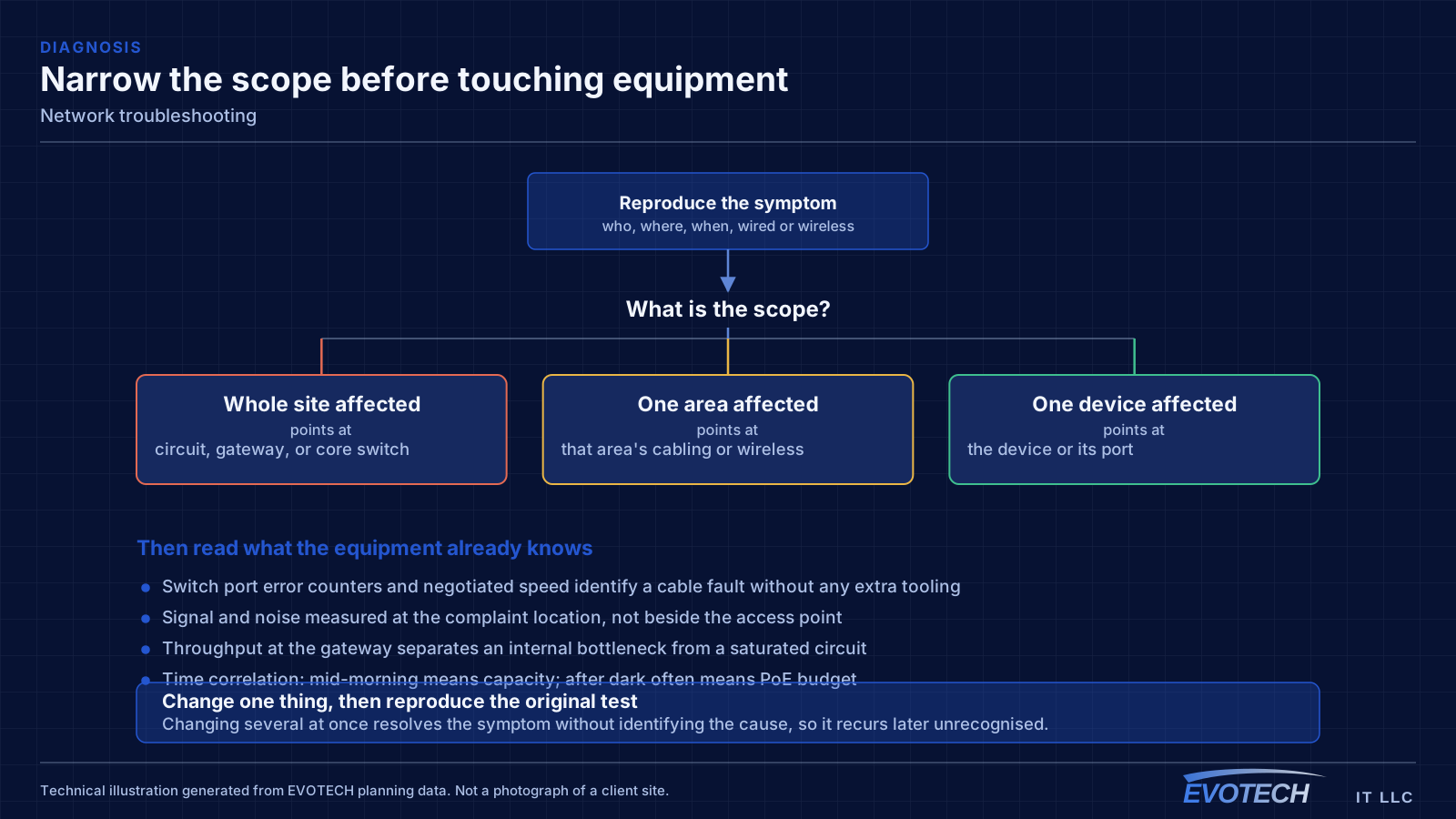
The single most useful distinction is between a problem affecting everything and a problem affecting one device or area. Everything at once points toward the shared path — the circuit, the gateway, or the main switch. One area points toward that area's cabling, its access point, or its switch. One device points at the device or its port.
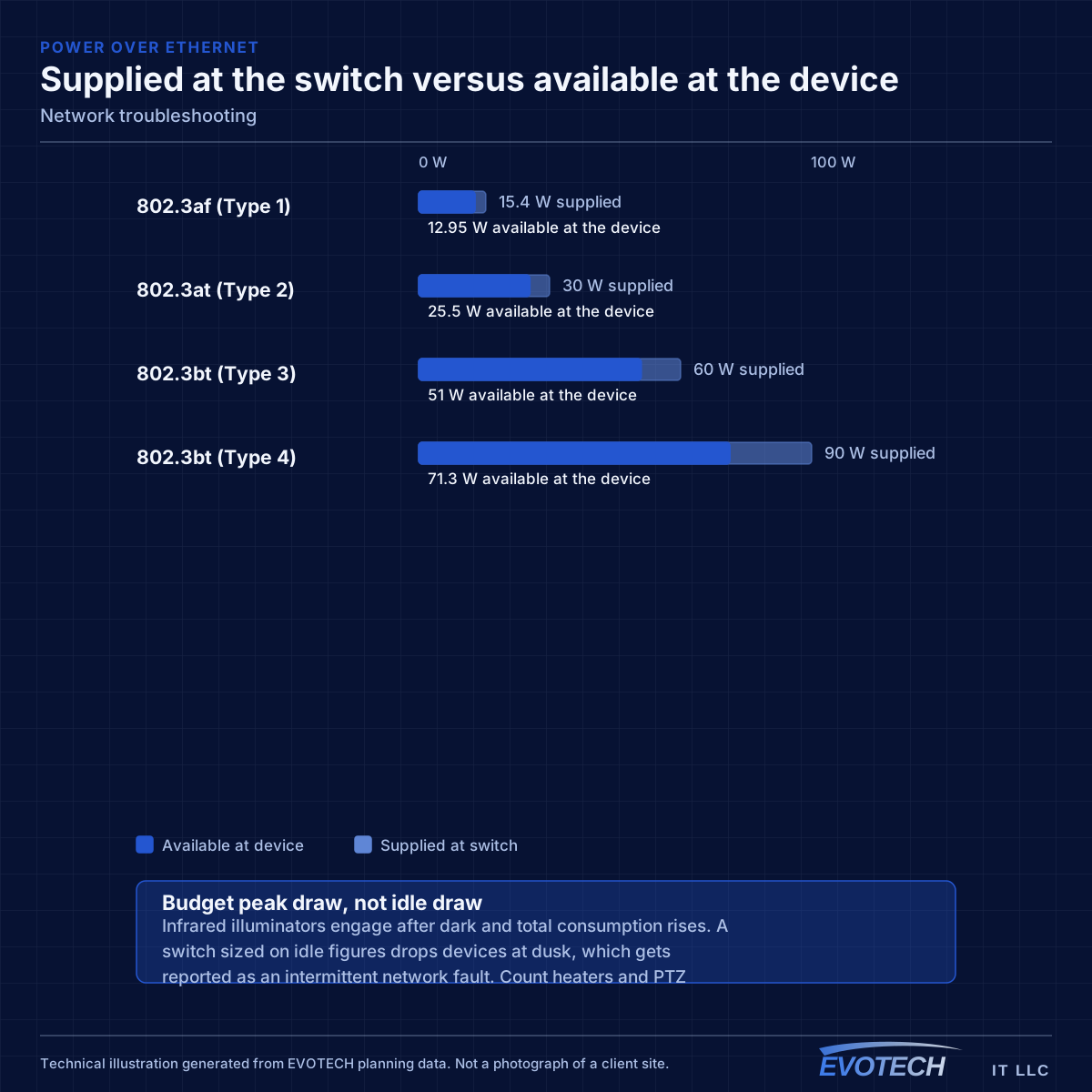
Timing is the second most useful clue. A problem that appears mid-morning and disappears at night is capacity related. A problem that appears after dark suggests something engaging on a schedule — camera illuminators pushing a PoE budget over is the classic example. A problem that appears at random is more often physical: a marginal termination, a failing port, or a cable that moves.
- Whole-site symptoms pointing at the circuit, gateway, or core switch
- Area-specific symptoms pointing at local cabling or wireless
- Time-correlated symptoms indicating capacity or a scheduled load
- Random symptoms suggesting a physical fault or marginal link
- Duplicate addressing or a rogue device handing out addresses
- Switching loops flooding a network after a cable was patched in twice
- Speed or duplex mismatches producing errors rather than outright failure
Isolating the layer, and reading what the equipment already knows
Switch port statistics are the most underused diagnostic resource on most networks. Error counters, discards, and negotiated speed for each port are already being recorded, and a port showing rising errors identifies a cable or connector problem without any additional testing. A port that negotiated 100 Mbps when it should be at 1 Gbps points at a damaged pair or a marginal termination.
For wireless symptoms, the measurement that matters is signal and noise at the location of the complaint, plus which access point and channel the client actually associated with. A device reporting reasonable signal but sitting on a congested channel behaves quite differently from one on a clean channel with weak signal, and the remedies are opposite.
For whole-site symptoms, measuring at the gateway separates the internal network from the circuit. If throughput measured directly at the gateway matches the circuit's rating while internal devices are slow, the problem is internal. If it does not, the conversation moves to the service provider — and having the measurement makes that conversation much shorter.
- Read switch port error counters, discards, and negotiated speeds first
- Measure wireless signal and noise at the complaint location, not at the access point
- Identify which AP and channel the affected client is actually using
- Measure at the gateway to separate internal problems from circuit problems
- Check for duplicate addressing and unexpected devices offering addresses
- Look for loops when a network degrades suddenly after a change
How the work runs
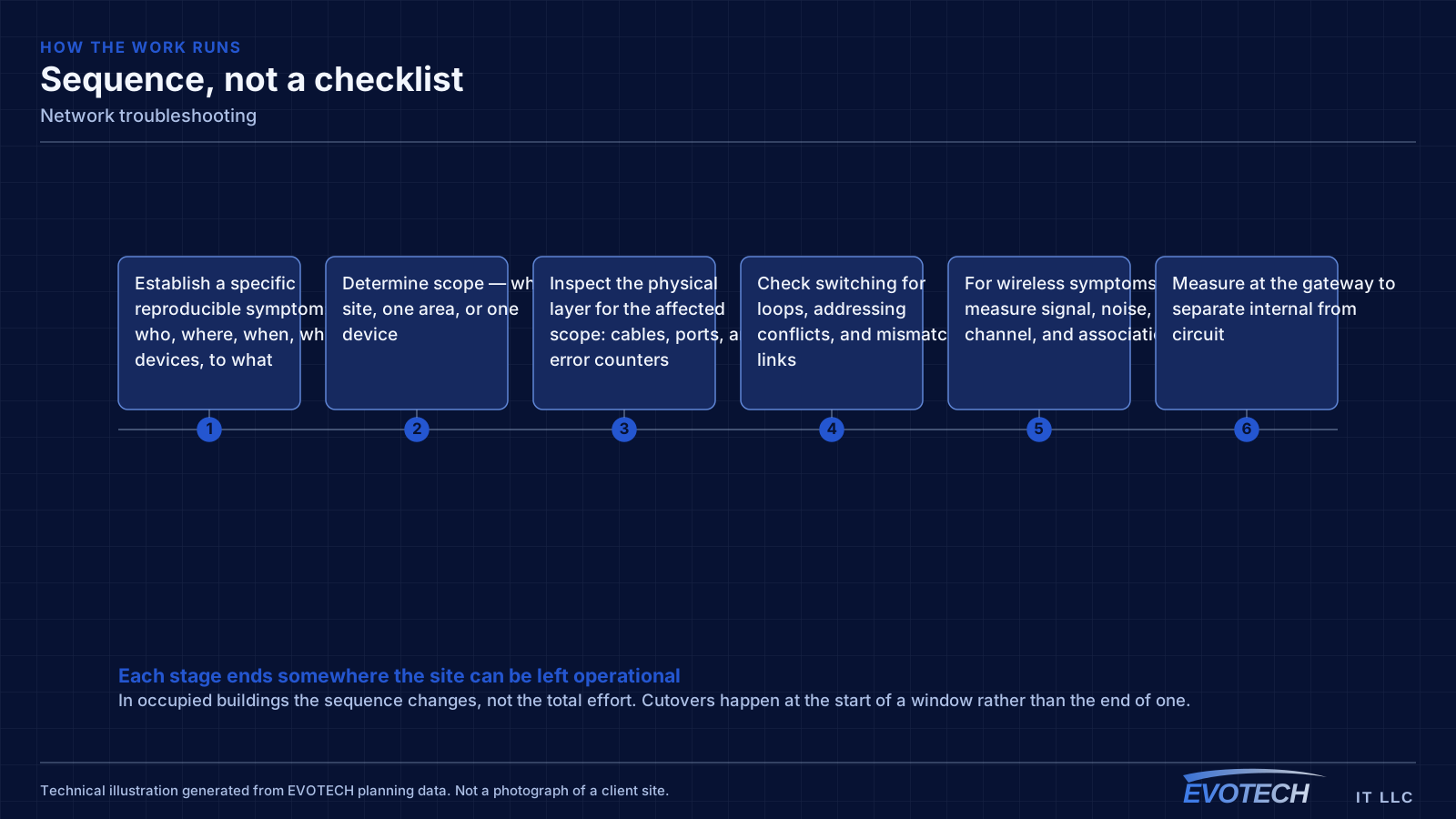
The sequence is designed to eliminate whole categories before spending time inside any one of them.
- Establish a specific reproducible symptom: who, where, when, which devices, to what
- Determine scope — whole site, one area, or one device
- Inspect the physical layer for the affected scope: cables, ports, and error counters
- Check switching for loops, addressing conflicts, and mismatched links
- For wireless symptoms, measure signal, noise, channel, and association
- Measure at the gateway to separate internal from circuit
- Apply the fix at the identified layer and reproduce the original test
- Document the cause and what was changed
Who this work is for
Troubleshooting requests usually arrive after something has already been tried.
- Offices where calls drop or applications stall at particular times of day
- Sites that replaced a router and kept the same symptom
- Buildings where one area works and another does not
- Point-of-sale or camera systems dropping intermittently
- Networks that grew organically and now behave unpredictably
- Properties where nobody is sure what is connected to what
Testing and verification
The test that matters is the one that reproduces the original complaint, run again after the change.
- Reproduce the reported symptom before changing anything, and record it
- Test suspect links physically rather than inferring from behaviour
- Measure wireless conditions at the complaint locations
- Measure throughput at the gateway and at the affected devices
- Re-run the original reproduction after the fix
- Observe over a realistic period where the fault was intermittent
What changes the scope
Troubleshooting effort depends mostly on how much is already known about the network.
- Whether documentation and labeling exist
- Whether the switching is manageable and reporting statistics
- How reproducible the symptom is
- Site size and the number of areas and devices involved
- How many changes have already been made in attempts to fix it
- Whether access to the equipment and to the circuit is available
- Whether the fault is intermittent, which extends observation time
Common mistakes
Troubleshooting goes wrong mainly by skipping the narrowing step.
- Replacing the router first because it is the most visible device
- Changing several things at once, so the actual cause stays unknown
- Accepting 'the internet is slow' without narrowing scope and timing
- Ignoring switch error counters that already identify the faulty port
- Blaming wireless for a saturated circuit or an oversubscribed uplink
- Fixing the symptom without documenting the cause, so it recurs unrecognised
What drives the cost
Diagnostic time is the cost, and documentation is the biggest thing that reduces it.
- Whether the network is documented and labeled
- Site size and number of areas involved
- How intermittent the symptom is
- Whether manageable switching provides statistics
- Amount of remediation required once the cause is identified
- Whether the work must happen outside operating hours
Honest limitations
These are the boundaries of what this service can do, stated up front rather than discovered later.
- Intermittent faults may require observation over time before the cause becomes visible.
- Problems inside the service provider's network can be identified and evidenced but not repaired by an installer.
- Undocumented networks take longer to diagnose; part of the work is often establishing what exists.
- Application-level problems on a healthy network fall outside network troubleshooting.
Frequently asked questions
Why is the network slow only in the afternoon?
Time-correlated symptoms usually mean capacity rather than a fault. Something is consuming the shared resource at that time — backups, updates, more people on site, or a scheduled process. Measuring at the gateway during the slow period, and comparing it to a quiet period, distinguishes a saturated circuit from an internal bottleneck quickly.
Would replacing the router fix it?
Only if the router is the cause, which is less often than it is assumed to be. Symptoms confined to one area point at that area's cabling or wireless; symptoms tied to a time of day point at capacity; random symptoms point at something physical. Narrowing the scope first avoids paying for hardware that leaves the symptom in place.
What information helps most before a visit?
Which devices are affected and which are not, whether they are wired or wireless, where in the building they are, what time the problem occurs, whether it is constant or intermittent, and what has already been changed. That set typically removes most of the possibility space before anyone arrives.
Can a cable fault cause slowness rather than a complete failure?
Frequently. A damaged pair can cause a link to negotiate at a lower speed or to run with rising errors and retransmissions, which looks like general slowness rather than an outage. Switch port statistics usually show it immediately, which is why reading them comes before swapping equipment.