The short version
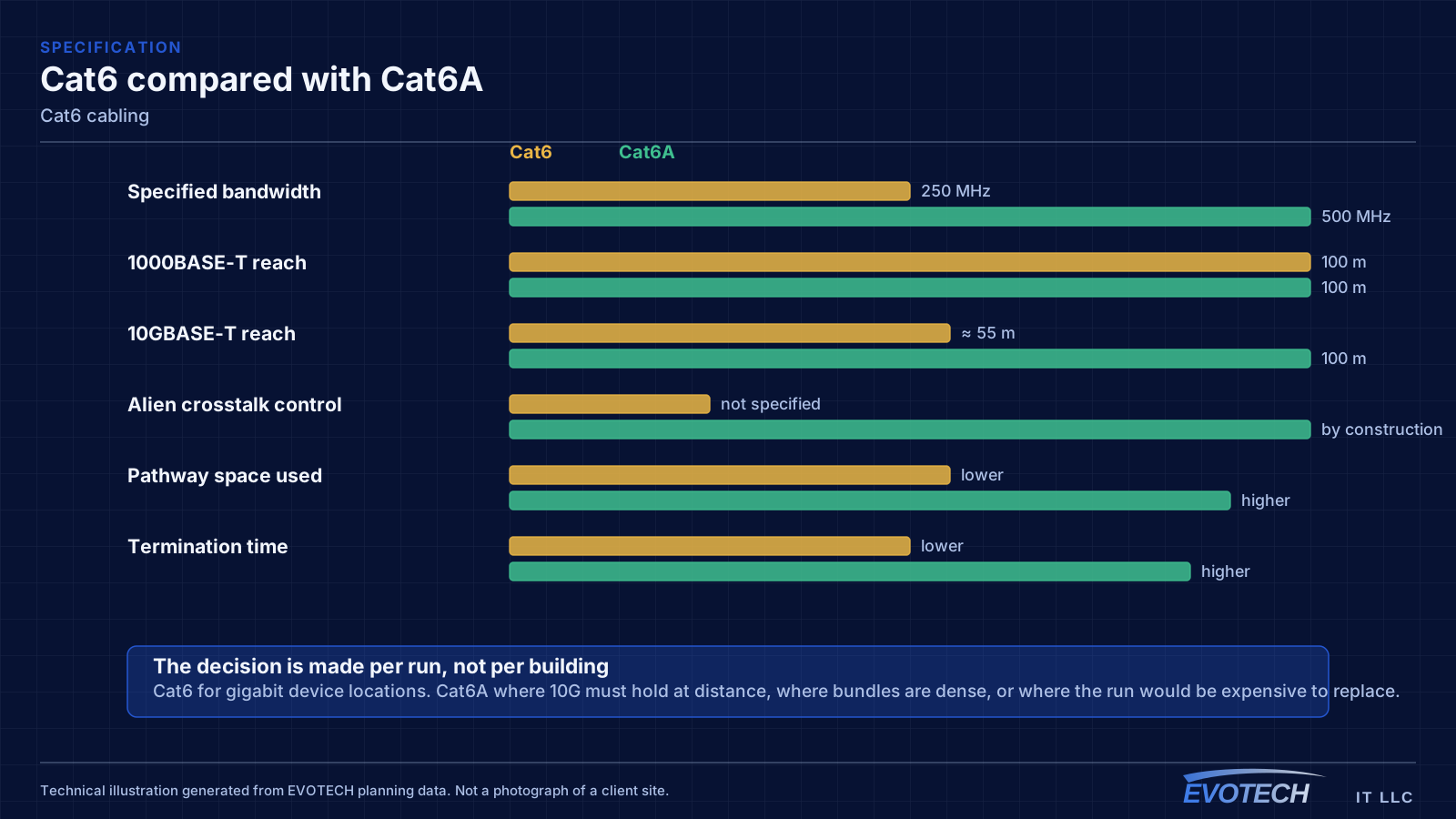
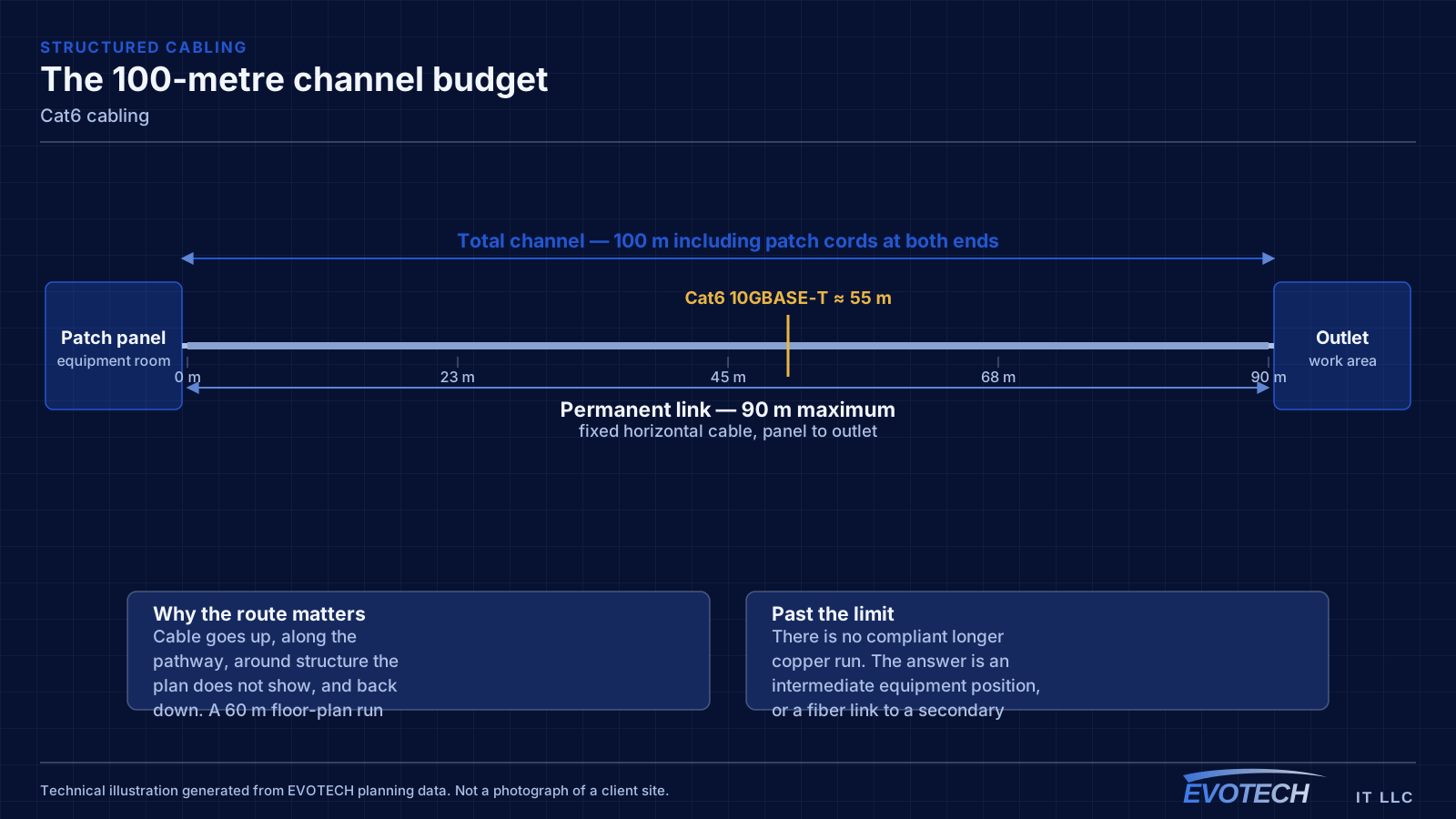
Cat6 carries gigabit Ethernet across the full 100-metre channel without drama, and that covers the overwhelming majority of what plugs into an office or home wall plate: computers, phones, printers, access points, cameras, and door controllers. Where it gets interesting is 10 gigabit. Cat6 can carry 10GBASE-T, but only to roughly 55 metres, and that figure assumes a favourable alien-crosstalk environment — cables not bundled tightly with many neighbours carrying the same signal.
So the honest framing is this: specify Cat6 when the device locations need gigabit and the building is unlikely to push 10G to the desk. Specify Cat6A when a run has to support 10G at full distance, when the cable will sit in a dense bundle, or when the location feeds equipment that already asks for more than gigabit.
The 55-metre figure, and what actually causes it
Cat6 is specified to 250 MHz. That bandwidth comfortably supports 1000BASE-T over a 100-metre channel. 10GBASE-T needs roughly 500 MHz of usable bandwidth, which is why the supported distance drops. The published guidance places Cat6 10G support at around 55 metres, and reduces it further in dense bundles where alien crosstalk is high.
Cat6A is specified to 500 MHz and adds physical measures to suppress alien crosstalk — larger overall diameter, tighter pair separation, and in shielded constructions a foil layer per pair or overall. That is why it holds 10G to the full 100 metres. The tradeoff is a fatter, stiffer cable that eats more pathway space and takes longer to dress and terminate.
One practical consequence: category is a property of the whole channel, not the cable spool. A Cat6 run terminated on a Cat5e jack and patched with a Cat5e cord is a Cat5e channel. Components have to match the intended rating end to end, or the certification test will say so.
- Cat6 specified to 250 MHz; Cat6A to 500 MHz
- 1000BASE-T over Cat6 to the full 100 m channel
- 10GBASE-T over Cat6 to approximately 55 m, less in dense bundles
- Alien crosstalk between adjacent cables is the limiting mechanism, not pair-to-pair noise
- Jacks, patch panels, and cords must match the intended category for the channel to hold it
What tends to go wrong
The failure mode with Cat6 is rarely the cable itself. It is the assumption that anything with eight conductors performs the same. Bulk cable sold as Cat6 varies in construction, and a run that skips the certification test may sit just inside or just outside the limits without anyone knowing until a device starts renegotiating its link speed.
The second problem is bundling. Alien crosstalk — interference between adjacent cables rather than between pairs inside one cable — is the specific mechanism that constrains Cat6 at 10G. A run that would be fine alone can degrade when it is cinched into a bundle of forty identical cables sharing a tray.
- Assuming 10G will work at any distance because the cable is labelled Cat6
- Tight bundling that raises alien crosstalk exactly where it matters most
- Mixing component categories so a Cat6 run terminates on a Cat5e jack
- Over-cinched tie-wraps deforming pair geometry along the run
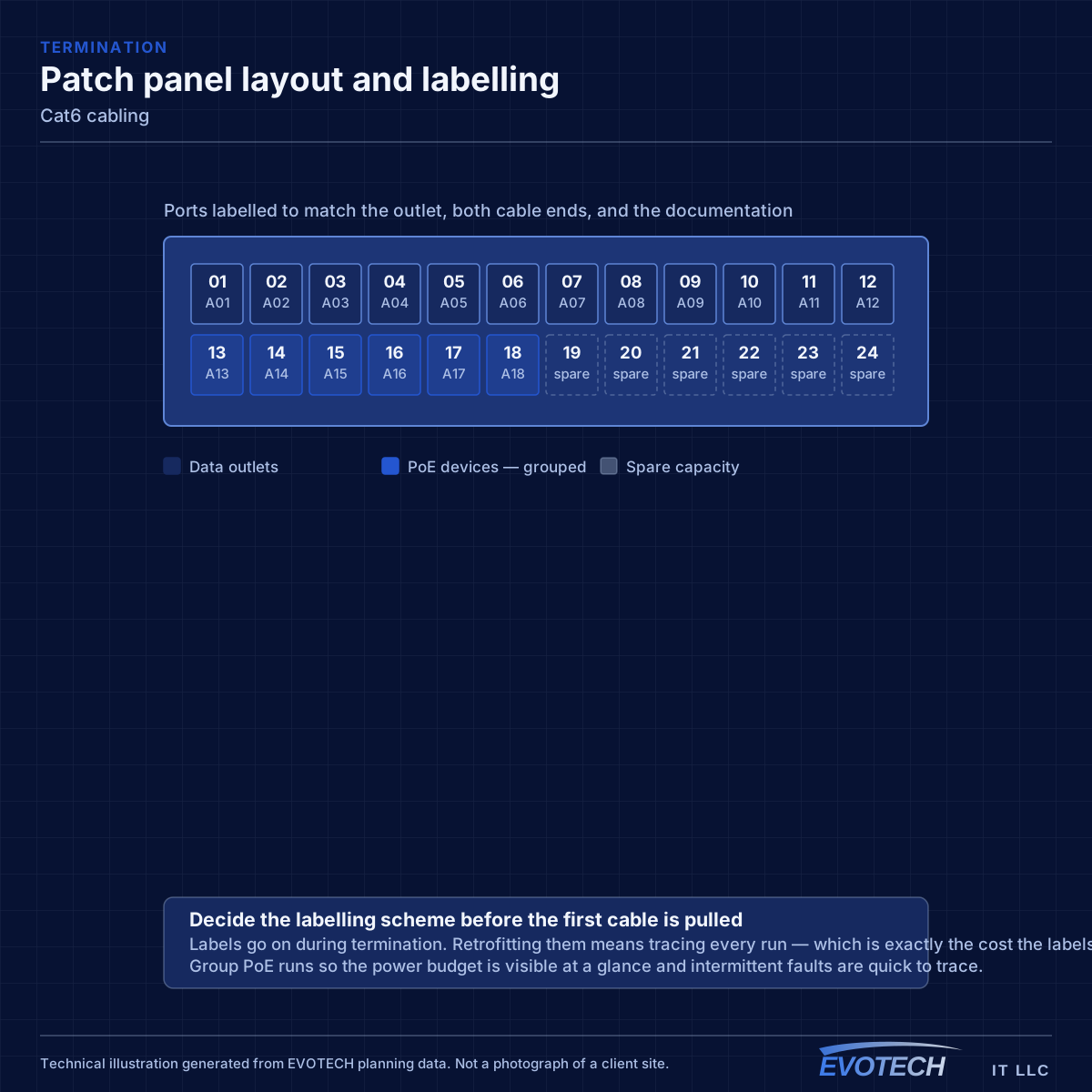
- No certification record, so marginal links are invisible until something misbehaves
How the work runs
A Cat6 installation is a structured cabling installation with a specific component standard applied consistently. The decisions that matter happen before the pull.
- Identify which runs need only gigabit and which are candidates for Cat6A
- Measure realistic pathway distances rather than straight-line floor-plan distances
- Select matching jacks, panels, and cords so the channel holds its rating
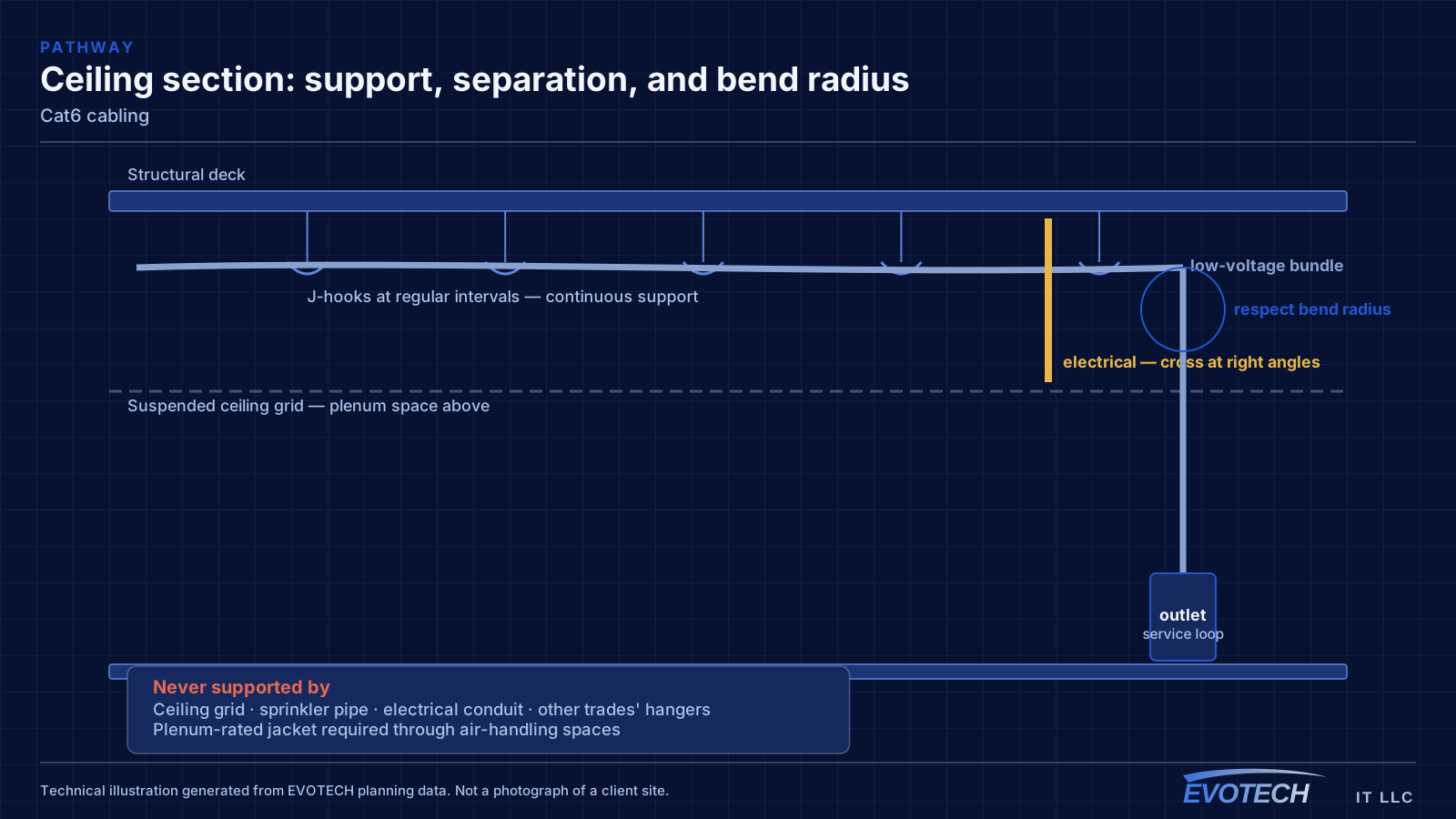
- Pull with controlled tension, avoiding tight bends and over-cinched bundles
- Terminate with minimal untwist at both ends
- Certify each link and keep the per-port results
What changes the scope
The Cat6-versus-Cat6A decision is usually made run by run rather than for the whole building, and the inputs are specific.
- Actual pathway length per run, measured rather than estimated
- Whether the location will ever need more than gigabit
- Bundle density along the shared portion of the pathway
- Whether shielding is warranted by the electrical environment
- Pathway capacity, since Cat6A occupies noticeably more space
- Termination labour, which rises with shielded constructions
Testing and verification
Certification for a Cat6 link measures the parameters that define the category: insertion loss, near-end and far-end crosstalk, return loss, and propagation delay skew across the frequency range up to 250 MHz. A pass means the link meets the standard's limits with margin recorded.
Where a project intends to run 10G over Cat6 on shorter links, the useful additional step is measuring alien crosstalk on a representative sample of the densest bundle, because that is the parameter the standard distance figure is derived from.
- Wire map, length, insertion loss, NEXT, FEXT, return loss, and delay skew
- Per-port margin recorded rather than just a pass/fail flag
- Sample alien-crosstalk measurement where short-run 10G is planned
- Failed links corrected and re-tested before handover
What drives the cost
Cable is a small share of an installed run. The spread between a cheap and an expensive Cat6 project comes from access and count, with component quality a distant third.
- Number of runs and their average length
- Ceiling and wall construction along the pathway
- Whether Cat6A is specified for some or all runs
- Shielded versus unshielded construction and the extra termination time shielding adds
- Certification depth and documentation format
Common mistakes
The common errors are decisions made once and regretted for years.
- Specifying Cat6 for a run that will need 10G at 80 metres
- Specifying Cat6A everywhere and losing pathway space that a mixed design would have kept
- Terminating a Cat6 run on leftover Cat5e hardware
- Bundling forty identical runs tightly and then expecting short-run 10G to hold
- Treating the certification report as paperwork rather than reading the margins
Who this work is for
Cat6 is the right specification for most horizontal runs in small and mid-sized commercial spaces, and for effectively all residential structured wiring. The pairing that shows up most often in practice is Cat6 to general device locations with Cat6A reserved for the handful of runs that genuinely need it.
- Office desk outlets, phone positions, and printer locations
- Residential structured wiring from a media panel to rooms and access-point positions
- Retail point-of-sale stations and back-office equipment
- Ceiling access points in buildings where per-AP throughput stays inside gigabit
- Camera and door-controller runs powered over Ethernet
Honest limitations
These are the boundaries of what this service can do, stated up front rather than discovered later.
- Cat6 does not carry 10 gigabit reliably at full 100-metre distance; that is what Cat6A is for.
- Category ratings apply to the assembled channel. Mismatched jacks or patch cords reduce the whole link.
- Certification results describe the link at the time of testing; later damage or re-termination changes them.
- Cable choice does not affect internet service speed delivered to the building.
Frequently asked questions
Is Cat6 enough, or should everything be Cat6A?
For most device locations Cat6 is enough, because most devices need gigabit and will for a long time. Cat6A earns its place on runs that must carry 10G at distance, runs sitting in dense bundles, and uplinks between equipment positions. Specifying Cat6A for the whole building is rarely wrong technically, but it costs pathway space and termination time that a mixed design keeps.
Why does Cat6 support 10G at 55 metres but not 100?
10GBASE-T needs roughly twice the usable bandwidth of gigabit, and the limiting factor at that frequency is alien crosstalk — interference between neighbouring cables. Cat6 has no specific construction feature to suppress it, so the supported distance drops. Cat6A adds physical separation and often shielding precisely to hold the full distance.
Does shielded cable always perform better?
Not automatically. Shielding helps in electrically noisy environments, but it only works when the shield is bonded correctly at the terminations. A poorly bonded shield can behave worse than a well-installed unshielded run, and shielded terminations take longer. It is a decision made for a reason, not a default upgrade.
Can Cat6 carry power for cameras and access points?
Yes. Power over Ethernet runs over the same cable, and Cat6 handles the common PoE classes. The consideration on higher-power classes is heat rise inside dense bundles, which is one of the reasons bundle size and pathway airflow show up in the design rather than only in the pull.