The short version
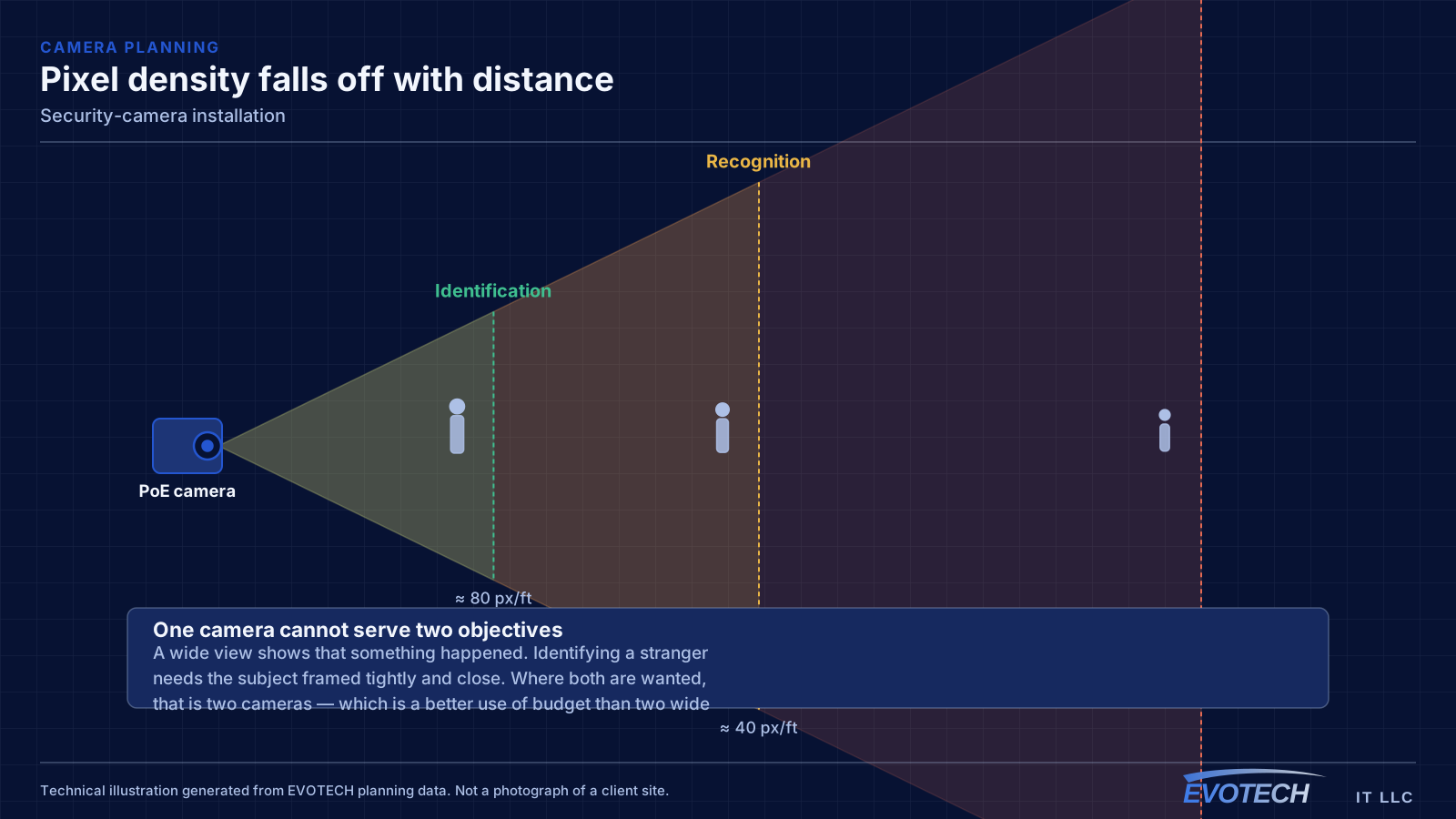
The useful design question is not how many cameras a property needs. It is what each camera has to accomplish. Detecting that a person is present, recognising someone you already know, and identifying a stranger from footage are three different requirements, and they need increasing pixel density on the subject. Planning guidance commonly cited from industry standards puts detection in the region of ten pixels per foot of subject, recognition around forty, and identification around eighty.
That number is what determines lens choice and mounting distance. A high-resolution camera aimed at a wide area spreads its pixels thin; the same camera aimed at a doorway concentrates them. This is why a well-planned four-camera system regularly outperforms a poorly planned twelve-camera one, and why 'more megapixels' does not by itself produce usable footage.
Who this work is for
Camera work is usually driven by a specific incident or a specific requirement, and the design should follow that requirement rather than blanket the property.
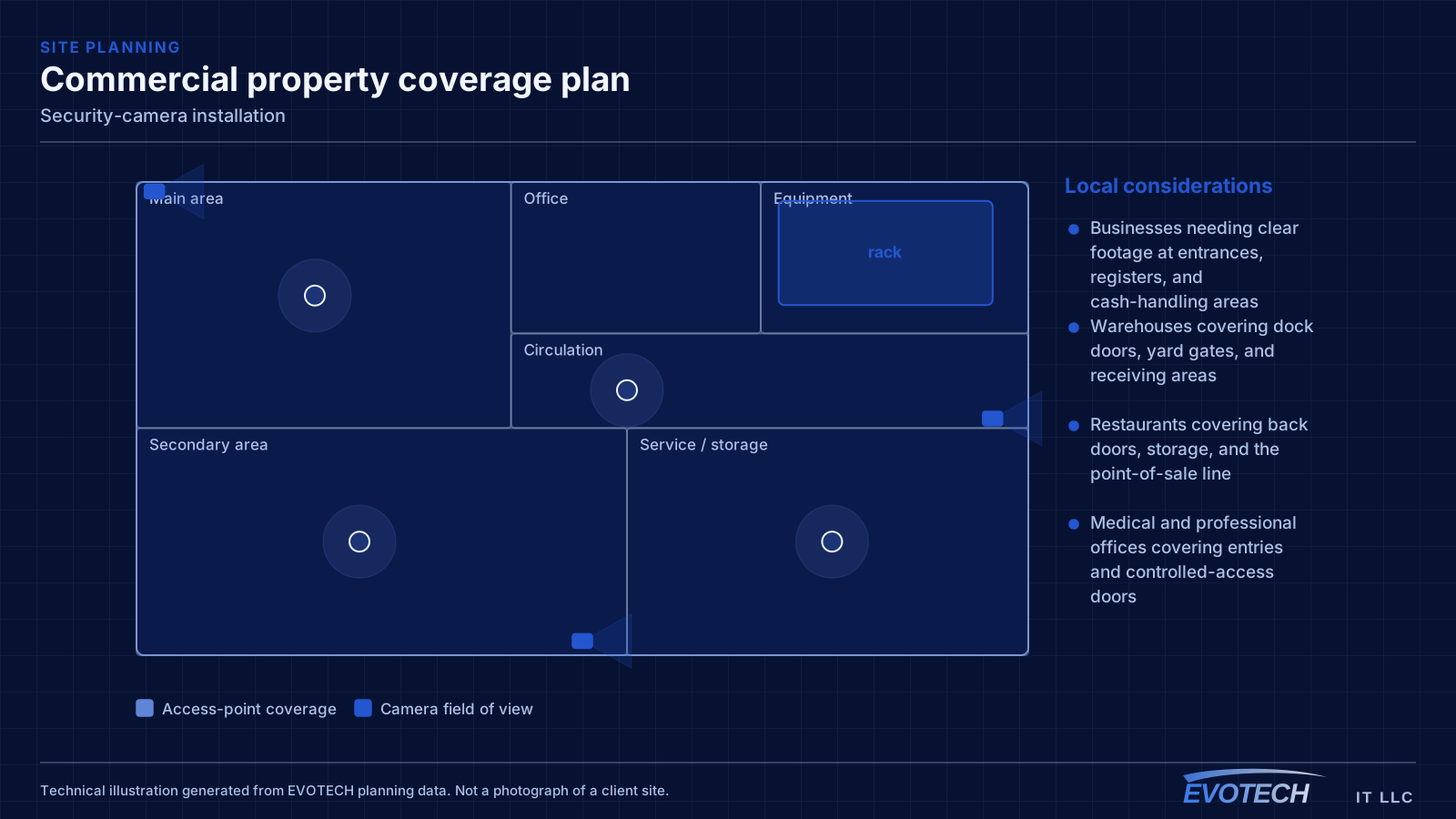
- Businesses needing clear footage at entrances, registers, and cash-handling areas
- Warehouses covering dock doors, yard gates, and receiving areas
- Restaurants covering back doors, storage, and the point-of-sale line
- Medical and professional offices covering entries and controlled-access doors
- Homes covering approaches, driveways, and entry points
- Properties replacing an older analogue system with networked cameras
What tends to go wrong
The dominant complaint about existing systems is footage that shows an event happened without showing anything useful about it. That is a design outcome: the camera was too far away, the lens too wide, or the scene lit so that the subject appears as a silhouette.
Backlighting is the specific and very common version of this. A camera pointed at a glass entrance during daylight sees a bright background and a dark figure. Wide dynamic range helps, but positioning that avoids shooting directly into the light source helps more.
- Wide-angle coverage that produces recognisable scenes but unidentifiable people
- Cameras pointed toward windows or the sky, silhouetting anyone in frame
- Infrared illumination reflecting off a nearby wall, soffit, or spider web and washing out the image
- Retention too short to be useful by the time an incident is noticed
- No remote access configured, so footage is only available on site
- Cameras mounted where they are exposed to tampering or weather they were not rated for
Pixel density, lighting, field of view, and mounting height
Pixel density on the target is the governing figure. It falls off with distance and with wider fields of view, so the design pairs each camera's resolution and lens with the distance to the area it must cover. A camera intended for identification at an entry door is placed close and framed tightly; a camera intended to show general activity across a yard is framed wide and is not expected to identify anyone.
Lighting deserves as much attention as optics. Scenes with strong contrast — a glass door during the day, a bright forecourt at night — need cameras with genuine dynamic range and careful positioning. At night, integrated infrared works well over modest distances but reflects badly off nearby surfaces, so a camera tucked under a soffit with a wall a foot away will illuminate the wall rather than the scene. Where usable colour footage at night matters, that is a lighting decision, not only a camera decision.
Mounting height is a frequent compromise. High mounting protects the camera and widens the view but steepens the angle, and a steep downward angle mostly captures the tops of heads. For identification, mounting nearer face height along the approach path produces far better footage, accepting that the camera is more reachable and needs a housing appropriate to that.
- Commonly cited planning targets: roughly 10 px/ft detection, 40 px/ft recognition, 80 px/ft identification
- Frame identification cameras tightly on the approach rather than across a whole area
- Avoid aiming into windows, sky, or fixed light sources
- Keep infrared illumination clear of nearby walls, soffits, and obstructions
- Balance mounting height against viewing angle; steep angles rarely identify anyone
- Match housing rating to the actual exposure, including driven rain and heat
How the work runs
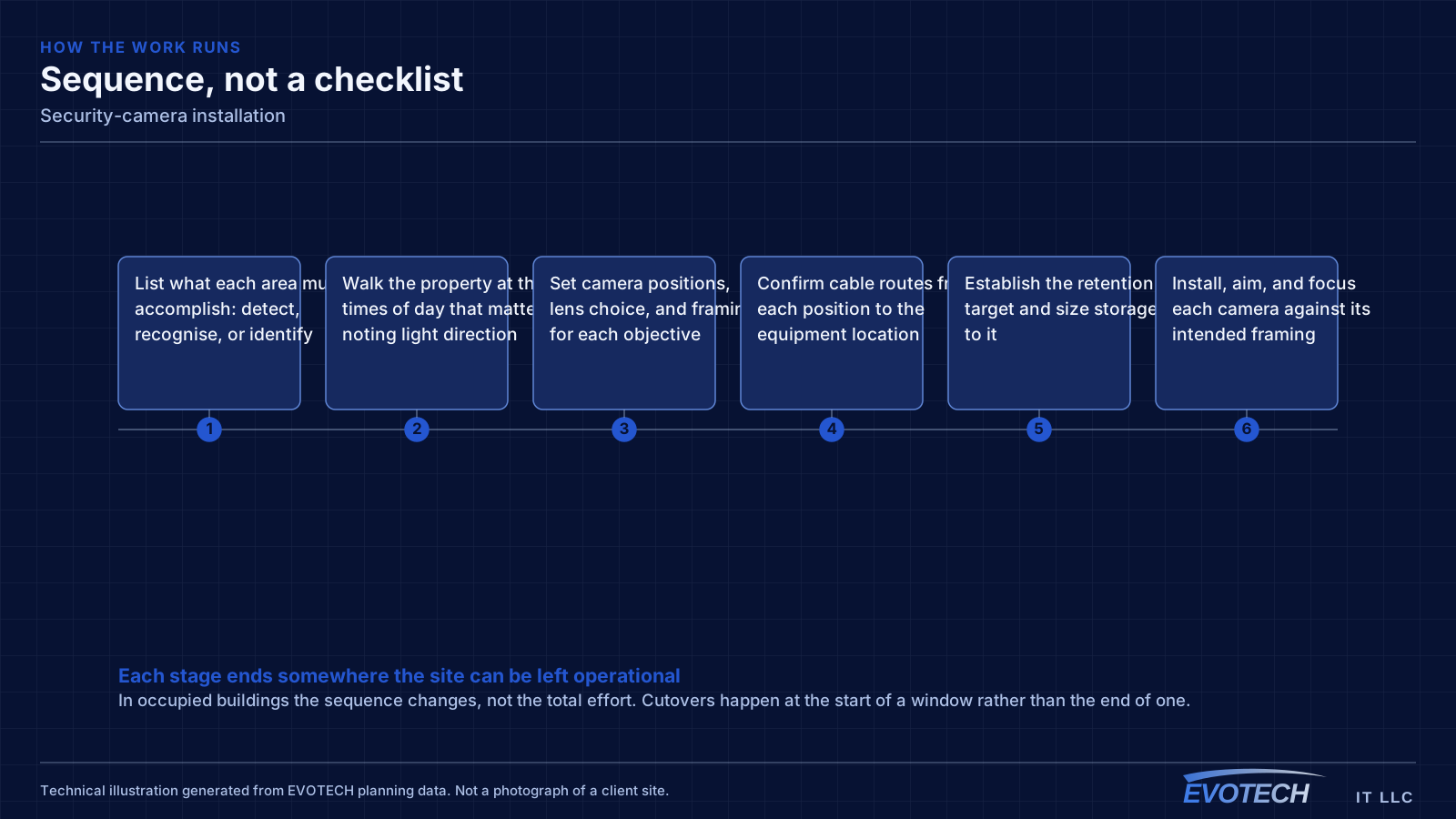
Camera design works backwards from the questions the footage has to answer.
- List what each area must accomplish: detect, recognise, or identify
- Walk the property at the times of day that matter, noting light direction
- Set camera positions, lens choice, and framing for each objective
- Confirm cable routes from each position to the equipment location
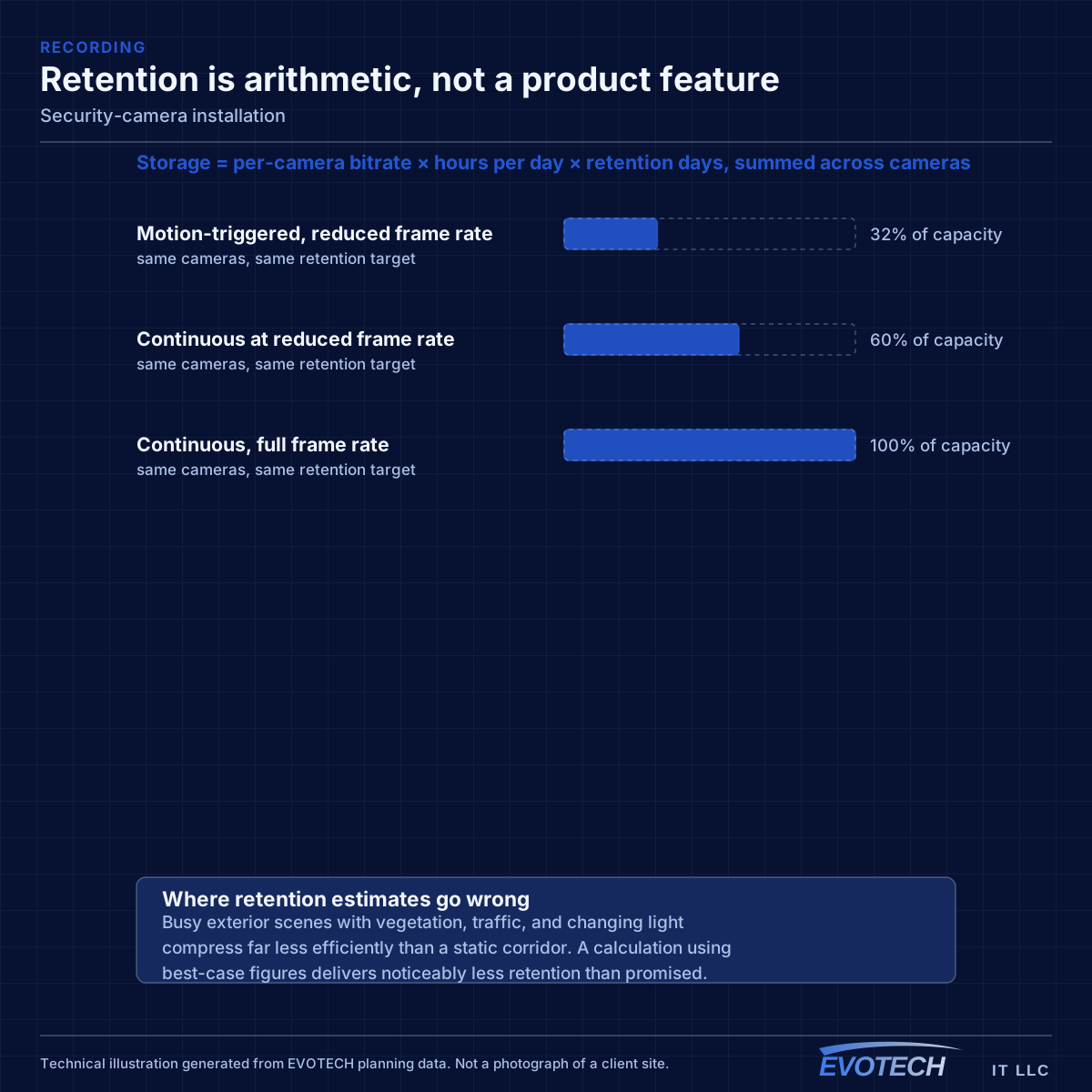
- Establish the retention target and size storage to it
- Install, aim, and focus each camera against its intended framing
- Review recorded footage day and night, then adjust aim, exposure, and framing
- Configure recording, access permissions, and remote viewing
Testing and verification
A camera system is commissioned by looking at its recordings, not its live view. Live video on a monitor at midday tells you very little about what the recorded file will show at nine in the evening.
- Review recorded footage from each camera in daylight and after dark
- Verify a person is identifiable where identification was the objective
- Confirm framing has no unintended blind spot at the edges
- Check infrared performance for reflection and wash-out
- Confirm the retention period matches the target with all cameras recording
- Verify remote access and that permissions match who should have them
What changes the scope
Camera scope depends on objectives and access more than on property size.
- Number of areas and the objective for each
- Distance from each camera position to its target area
- Indoor, covered exterior, or fully exposed mounting
- Cable routing difficulty, including exterior penetrations and soffit access
- Retention target in days, which drives storage
- Resolution and frame rate, which also drive storage
- Lift or ladder requirements for high mounting positions
- Remote-access requirements and who needs viewing rights
What drives the cost
Camera cost is driven by positions and cable routes, with storage the other major line.
- Camera count and the type each objective requires
- Cable run difficulty, particularly exterior and high-level runs
- Recorder capacity sized to the retention target
- Mounting hardware, junction boxes, and weather-appropriate housings
- Lift or scaffold access for elevated positions
- Network and PoE switching capacity
- Configuration of remote access and user permissions
Common mistakes
Camera systems disappoint for predictable, avoidable reasons.
- Buying camera count instead of designing coverage objectives
- Mounting everything high and wide, then expecting identification
- Aiming a camera at a glass entrance from inside during daylight
- Sizing storage for resolution but not for the retention period
- Leaving default credentials and default remote-access settings in place
- Skipping the after-dark review and discovering the night image months later
Honest limitations
These are the boundaries of what this service can do, stated up front rather than discovered later.
- Cameras record what happens; they do not prevent it, and this site makes no claim about deterrence or outcomes.
- Identification-grade footage requires specific framing and distance. A camera covering a wide area will not also identify strangers within it.
- Storage is finite. A longer retention period requires more capacity, lower resolution, or fewer cameras.
- Cameras must be positioned to view the client's own property and approaches; EVOTECH will not aim cameras to surveil neighbouring private spaces.
- Legal requirements for recording, notice, and audio vary by situation and are the property owner's responsibility to confirm.
Popular services nearby
Frequently searched near this area — the pages people look for most.
Frequently asked questions
How many cameras does a property need?
Count objectives, not walls. Each area needs a stated purpose — detect activity, recognise a known person, or identify a stranger — and the camera serving it is chosen for that purpose. A property with four well-framed cameras at the points that matter usually produces more useful footage than one with twelve wide shots covering everything approximately.
Why is night footage unusable even though the camera has infrared?
Usually reflection. Infrared bouncing off a nearby wall, a soffit, an eave, or even a spider web returns straight into the lens and washes out the scene. Moving the camera away from adjacent surfaces, or using separate illumination positioned away from the lens, fixes far more night-footage complaints than changing the camera does.
How long should recordings be kept?
Long enough that an incident is still on disk when someone notices it. Two weeks is a common baseline and thirty days is a frequent business requirement. The retention period, camera count, resolution, and frame rate are one calculation — raising any of the first three raises the storage needed.
Can cameras be viewed remotely?
Yes, and it should be set up deliberately rather than by leaving a device exposed to the internet. That means changed credentials, appropriate user accounts with the right level of access, and a manufacturer-supported remote path rather than an open port. It is worth deciding who genuinely needs viewing rights before the accounts are created.