

The environment is harder on equipment than the traffic is
Restaurant networks do not carry much data. What makes them difficult is everything else: heat and grease near the kitchen, wash-down areas, a guest population that will connect anything to anything, payment systems that must not share a network with either, and an operating schedule that leaves a narrow window for anyone to work.
The result is that restaurant technology projects are planned around constraints rather than capacity. Where equipment can physically live, how it stays clean and cool, what has to stay isolated, and when a technician is allowed on a ladder are the questions that shape the design.
- Kitchen heat, grease, and moisture degrade equipment placed without protection
- Payment systems require separation from guest and general operations traffic
- Guest Wi-Fi demand is unpredictable and must not consume the whole circuit
- Work windows are narrow — before opening, after closing, or on a closure day
What to get right first
In order of consequence: keep the payment systems isolated, put the equipment somewhere it will survive, cover the dining room and patio properly, and place cameras where they answer real questions.
The ordering matters because the failure modes differ. A congested guest network is an annoyance. A payment terminal on a shared flat network is a genuine exposure. Equipment cooked in a hot back room is a recurring replacement cost.
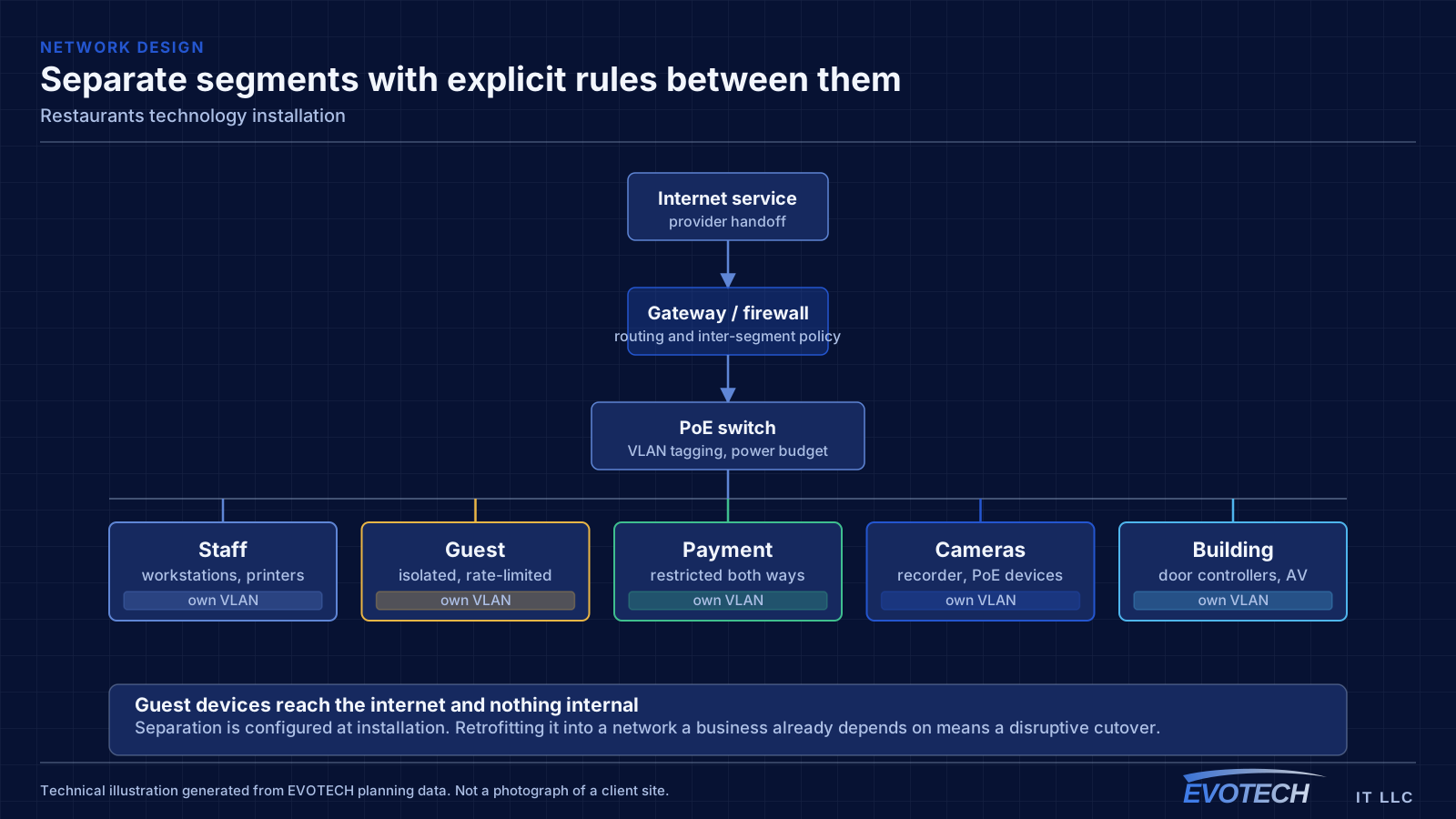
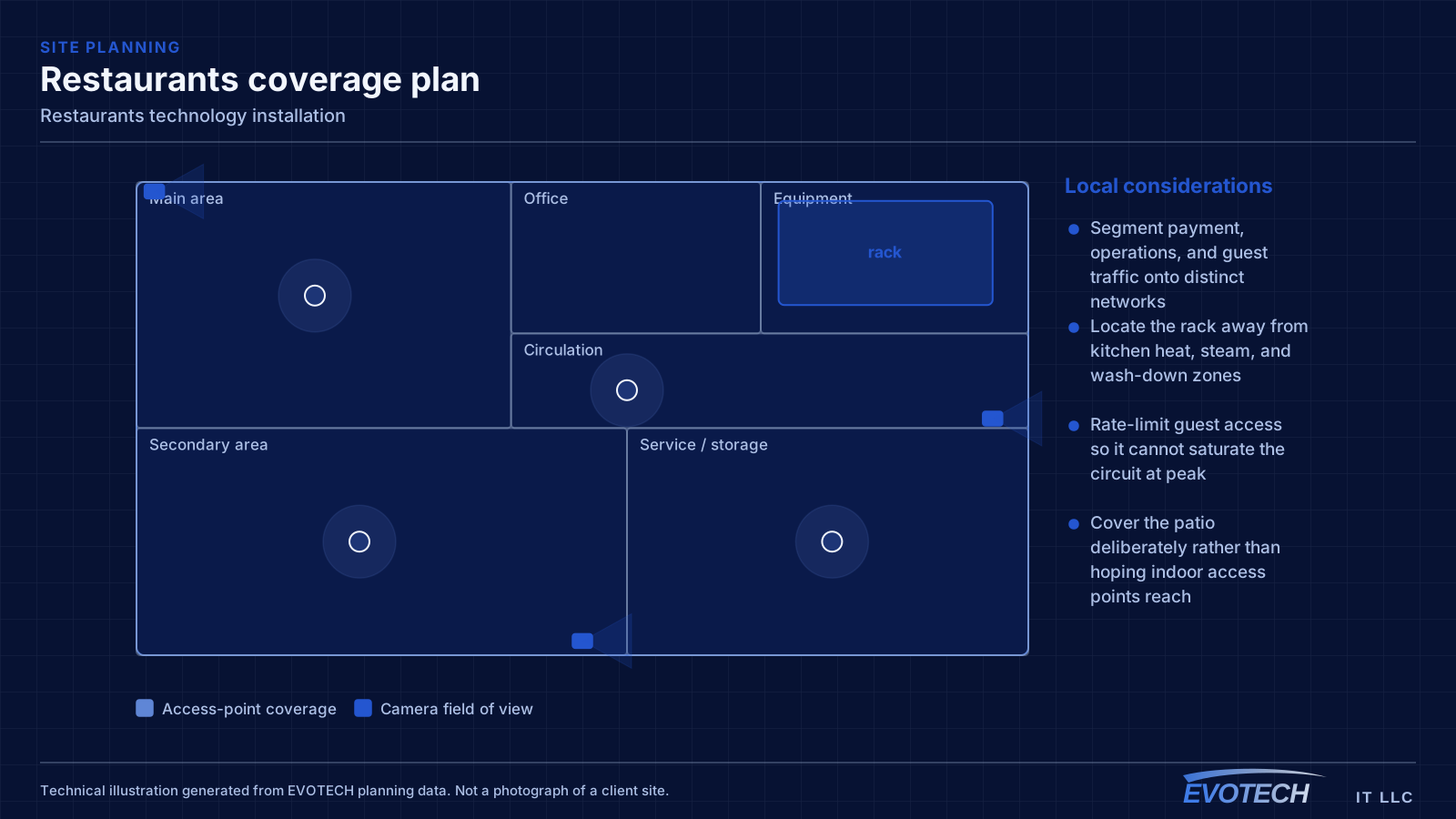
- Segment payment, operations, and guest traffic onto distinct networks
- Locate the rack away from kitchen heat, steam, and wash-down zones
- Rate-limit guest access so it cannot saturate the circuit at peak
- Cover the patio deliberately rather than hoping indoor access points reach
- Put the network equipment and recorder on a UPS
Segmentation and the point-of-sale question
The payment environment should sit on its own network segment with restricted access to and from everything else. That is standard practice, it simplifies any compliance conversation the operator has with their payment provider, and it means a compromised guest device cannot reach a terminal. Building it in at installation is straightforward; retrofitting it into a flat network during business hours is not.
Operations traffic — kitchen display screens, tablets, printers, back-office computers, phone systems — belongs on a third segment. These need reliability more than bandwidth, and several of them work better wired than wireless. A kitchen display or receipt printer on a cable stops being a wireless troubleshooting problem permanently.
Guest Wi-Fi should be isolated from everything internal, isolated from other guest devices, and rate-limited. Without a limit, a handful of guests streaming can degrade the connection that the payment system depends on, which turns a hospitality feature into an operational risk.
- Payment systems on a dedicated segment with restricted cross-network access
- Kitchen displays, printers, and back-office equipment wired where practical
- Guest network isolated from internal systems and from other guest devices
- Guest bandwidth capped so it cannot starve operations at peak
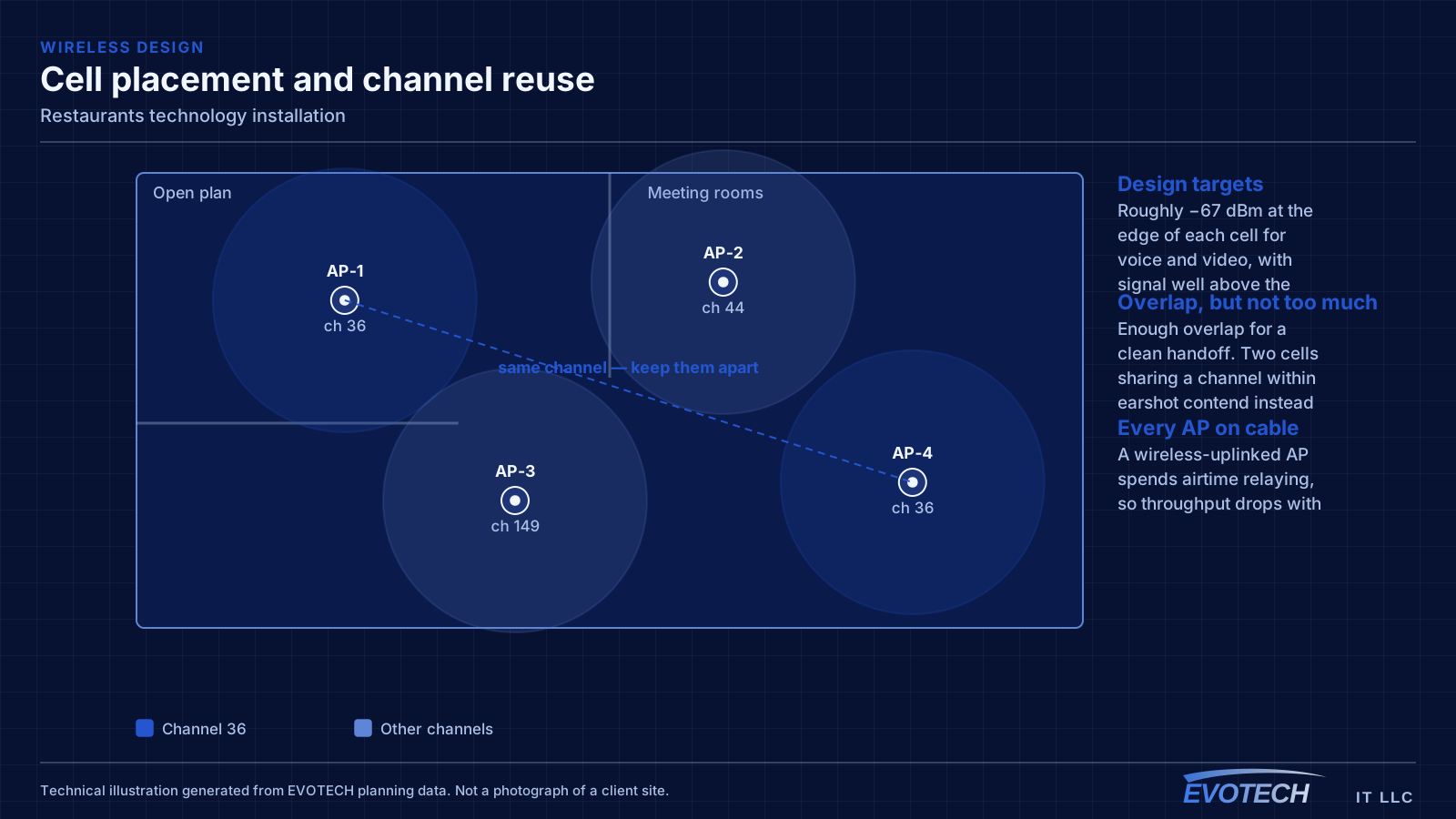
- Access points covering the dining room, bar, and patio as distinct areas
Where cameras earn their place
Restaurant camera coverage tends to concentrate on a small number of high-value views rather than blanketing the space. The point-of-sale line, the safe or cash-handling area, the back door, and the dry and walk-in storage entrances answer most of the questions that get asked of restaurant footage.
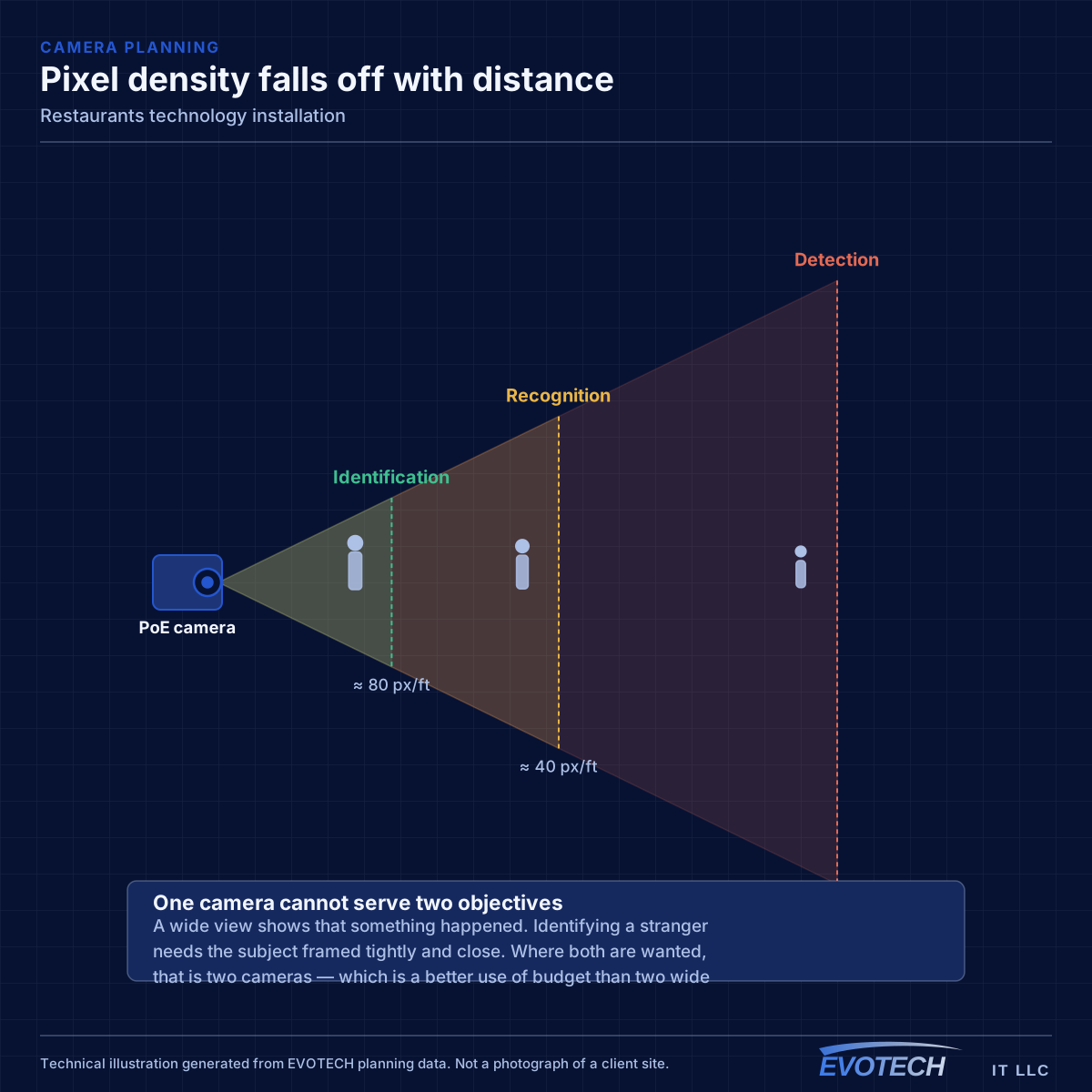
Framing matters more than count. A camera at the register needs enough pixel density to show what was on the screen and in the drawer; a camera on the back door needs to identify who came through it. A wide shot of the whole dining room satisfies neither and is the most commonly installed view.
Ambient lighting in a dining room is deliberately low, which is the other complication. Cameras selected for a brightly lit retail floor often perform poorly in restaurant lighting, and this is worth checking against recorded footage in actual service conditions rather than a live view during setup.
- Register and cash-handling views framed tightly enough to be useful
- Back door and delivery entrance framed for identification
- Storage and walk-in entrances for inventory questions
- Camera selection checked against real dining-room light levels
- Retention long enough to cover the delay before an issue is noticed
Working around service
Nearly all restaurant installation happens outside operating hours. That does not usually change the total labour, but it changes the sequencing: every session has to end with the site fully operational, because the doors open regardless of whether the project is finished.
Physical constraints compound this. Ceiling access above a kitchen line may only be reachable when equipment is cold and the area is clean. Cable pathways need to avoid hood systems, steam, and grease-laden air. Anything mounted in a wash-down area needs an enclosure appropriate to being sprayed.
- Sessions planned so the site is operational at the end of each one
- Kitchen ceiling access scheduled around cleaning and cool-down
- Pathways routed away from hood systems and grease-laden air
- Appropriate enclosures for wash-down and high-humidity areas
- Equipment position chosen for temperature as much as convenience
Explore everything in this section
All 59 pages under Restaurant networks, cameras, and cabling that survive service.
- Access-control installation for restaurants
- Business phone & VoIP for restaurants
- Cat6 cabling for restaurants
- Cat6A cabling for restaurants
- Commercial IT solutions for restaurants
- Commercial Wi-Fi for restaurants
- Conference-room AV for restaurants
- Data-jack installation for restaurants
- Digital signage for restaurants
- Ethernet installation for restaurants
- Fiber-optic cabling for restaurants
- Floodlight camera installation for restaurants
- Gate & license-plate cameras for restaurants
- In-wall cable concealment for restaurants
- Intercom installation for restaurants
- Low-voltage installation for restaurants
- Network cabling for restaurants
- Network troubleshooting for restaurants
- Network-rack installation for restaurants
- NVR installation for restaurants
- Outdoor & patio speakers for restaurants
- Paging & PA systems for restaurants
- PoE camera installation for restaurants
- Projector & screen installation for restaurants
- Security-camera installation for restaurants
- Soundbar mounting for restaurants
- Technology for restaurants in Bridgeland and Towne Lake
- Technology for restaurants in Cinco Ranch and Seven Meadows
- Technology for restaurants in Downtown Houston
- Technology for restaurants in EaDo (East Downtown)
- Technology for restaurants in east Kingwood
- Technology for restaurants in League City
- Technology for restaurants in Memorial and Bunker Hill
- Technology for restaurants in Midtown and the Museum District
- Technology for restaurants in Missouri City
- Technology for restaurants in Rice Military and Washington Avenue
- Technology for restaurants in River Oaks
- Technology for restaurants in Shadow Creek Ranch and Silverlake
- Technology for restaurants in Sharpstown
- Technology for restaurants in Stafford
- Technology for restaurants in Sugar Creek and old Sugar Land
- Technology for restaurants in the 77469 Richmond area
- Technology for restaurants in the 77523 area east of Baytown
- Technology for restaurants in the 77573 League City area
- Technology for restaurants in the Braeswood area
- Technology for restaurants in the Coles Crossing area of Cypress
- Technology for restaurants in The Heights
- Technology for restaurants in the Kelliwood and Nottingham Country area
- Technology for restaurants in the Klein area
- Technology for restaurants in the Lake Conroe side of Conroe
- Technology for restaurants in the Pecan Grove and west Richmond area
- Technology for restaurants in the Sienna area
- Technology for restaurants in the Spring Valley area
- Technology for restaurants in the Texas Medical Center area
- TV mounting for restaurants
- Ubiquiti UniFi installation for restaurants
- Video wall installation for restaurants
- Wi-Fi installation for restaurants
- Wireless bridge (point-to-point) for restaurants
Popular services nearby
Frequently searched near this area — the pages people look for most.
Frequently asked questions
Should the point-of-sale system be on the guest Wi-Fi?
No. Payment systems belong on their own network segment with restricted access to and from everything else. Beyond the security argument, it also removes a real operational risk: guests saturating the connection should never be able to slow down payment processing.
Why do cameras look worse in the dining room than expected?
Restaurant lighting is deliberately low, and many cameras that perform well on a bright retail floor struggle with it. The test that matters is reviewing recorded footage during actual service conditions, not looking at the live view with the house lights up during installation.
Where should the network equipment go in a restaurant?
Somewhere cool, dry, and away from the kitchen — an office, a dry storage area, or a ventilated cabinet in a back-of-house space. Heat is the main enemy of equipment life, and a rack placed near the kitchen for convenience of cable routing tends to become a recurring replacement cost.
Can this work happen without closing?
Usually yes, by working outside service hours. The practical consequence is that the project spans more calendar days, because each session has to finish with the site fully operational for the next service. Ceiling work over the kitchen line has the tightest constraints of all.



