Why this page exists
Digital signage for restaurants is shaped by how the space is used, not just by the service itself. Restaurants bring their own operating constraints, and this page pairs what digital signage actually involves with what that environment changes about it.
A digital sign is not a television. It runs many hours a day, often near a window in bright ambient light, and it has to show scheduled content on its own without anyone touching it. That means a display rated for commercial duty cycle and adequate brightness, a content player that drives it reliably, and a way to change what it shows remotely — so a menu, a promotion, or a directory can be updated from a desk rather than a step-ladder.
The environment is harder on equipment than the traffic is
Restaurant networks do not carry much data. What makes them difficult is everything else: heat and grease near the kitchen, wash-down areas, a guest population that will connect anything to anything, payment systems that must not share a network with either, and an operating schedule that leaves a narrow window for anyone to work.
The result is that restaurant technology projects are planned around constraints rather than capacity. Where equipment can physically live, how it stays clean and cool, what has to stay isolated, and when a technician is allowed on a ladder are the questions that shape the design.
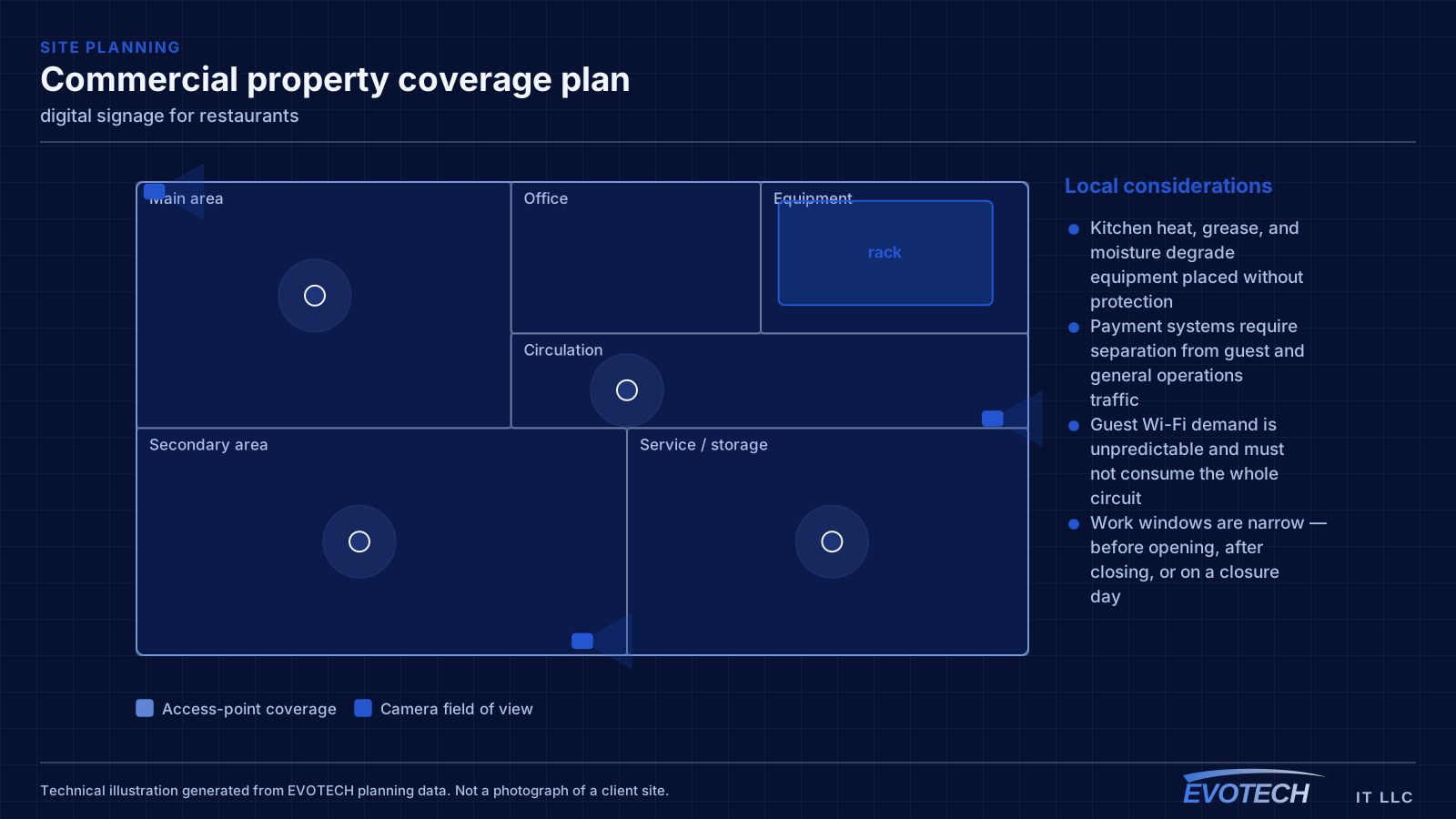
- Kitchen heat, grease, and moisture degrade equipment placed without protection
- Payment systems require separation from guest and general operations traffic
- Guest Wi-Fi demand is unpredictable and must not consume the whole circuit
- Work windows are narrow — before opening, after closing, or on a closure day
What digital signage usually involves
The first failure is the display itself: a consumer television running twelve hours a day in a commercial setting is being used outside what it was built for, and it degrades or fails on a timescale that makes it a false economy. Commercial displays are rated for the hours and, where needed, for higher brightness.
The second failure is content. A sign is only as useful as the ease of changing it. Without a proper content player and a remote management path, updates require physically visiting the screen with a drive, which means they stop happening and the sign goes stale.
- Consumer televisions failing early under commercial duty cycle
- Signs too dim to read against daylight or bright interiors
- No reliable content player, so the display shows an error or freezes
- No remote management, so updates require a physical visit and stop happening
- Menu boards with fonts and layouts unreadable at viewing distance
- Video walls with visible mismatch or timing differences between panels
Segmentation and the point-of-sale question
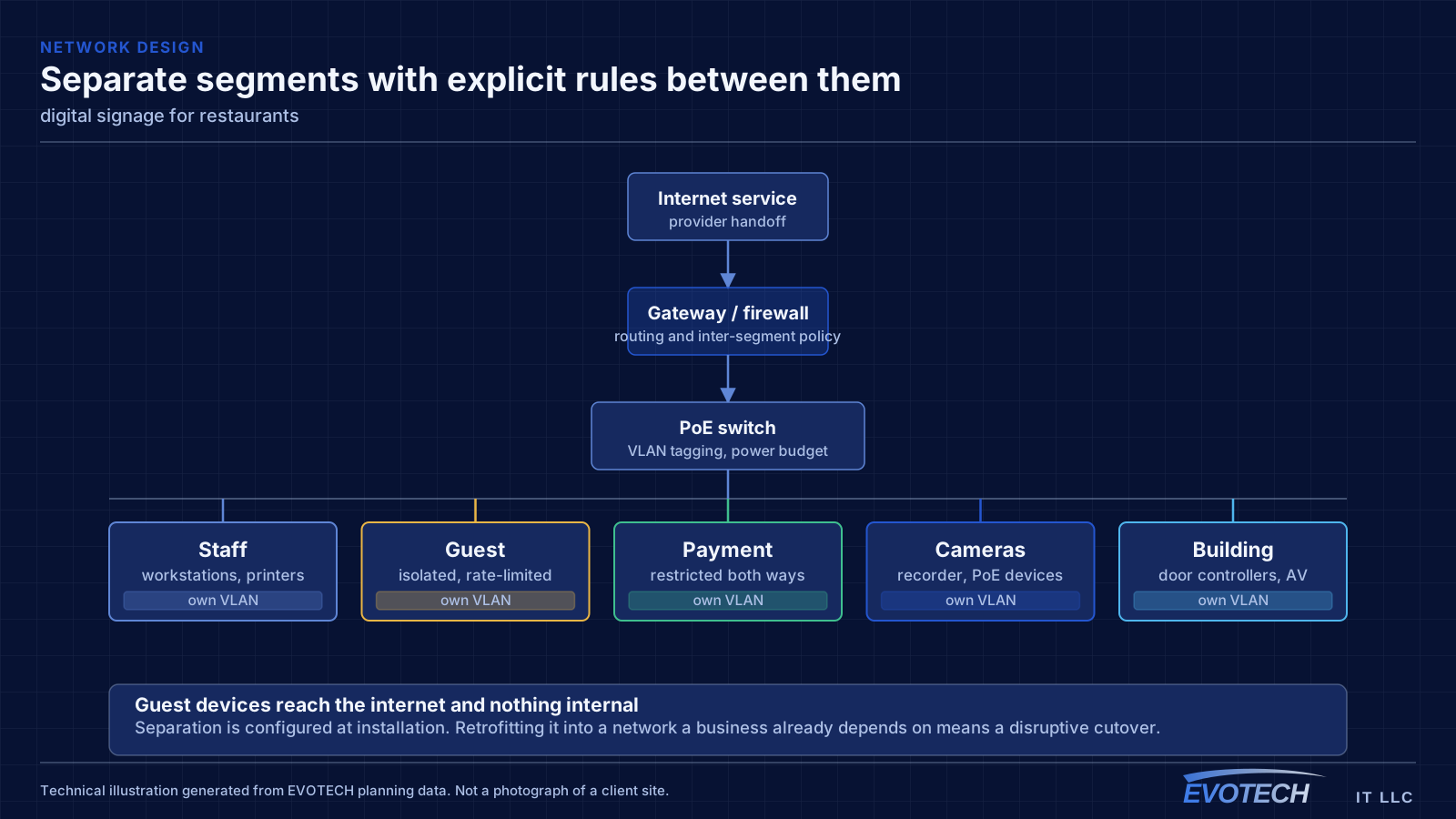
The payment environment should sit on its own network segment with restricted access to and from everything else. That is standard practice, it simplifies any compliance conversation the operator has with their payment provider, and it means a compromised guest device cannot reach a terminal. Building it in at installation is straightforward; retrofitting it into a flat network during business hours is not.
Operations traffic — kitchen display screens, tablets, printers, back-office computers, phone systems — belongs on a third segment. These need reliability more than bandwidth, and several of them work better wired than wireless. A kitchen display or receipt printer on a cable stops being a wireless troubleshooting problem permanently.
Guest Wi-Fi should be isolated from everything internal, isolated from other guest devices, and rate-limited. Without a limit, a handful of guests streaming can degrade the connection that the payment system depends on, which turns a hospitality feature into an operational risk.
- Payment systems on a dedicated segment with restricted cross-network access
- Kitchen displays, printers, and back-office equipment wired where practical
- Guest network isolated from internal systems and from other guest devices
- Guest bandwidth capped so it cannot starve operations at peak
- Access points covering the dining room, bar, and patio as distinct areas
Duty cycle, brightness, content delivery, and orientation
Display selection starts with two ratings people skip on consumer sets: the rated daily operating hours and the brightness. A sign running open-to-close needs a panel rated for those hours, and a sign facing daylight needs brightness well above living-room levels to stay readable. Portrait orientation, common for menu boards and directories, also requires a display rated to run rotated — not every panel is.
- Displays rated for the daily operating hours, not consumer duty cycle
- Brightness matched to the ambient light, especially near windows
- Panels rated for portrait orientation where used
- A networked media player for scheduled content and remote updates
- Automatic recovery after power interructions
- Synchronised mounting and signal distribution for video walls
Popular services nearby
Frequently searched near this area — the pages people look for most.
Frequently asked questions
What changes about digital signage in restaurants?
The operating environment does. Restaurants bring specific constraints — how the space is used, when work can happen, and what has to keep running — and those shape the digital signage plan as much as the service's own technical requirements.
Can we just use a regular TV for a menu board?
For a few hours a day, maybe. For open-to-close operation it is a false economy — consumer televisions are not rated for that duty cycle and fail earlier, and they are often too dim to read against daylight. A commercial display rated for the hours and the brightness costs more up front and far less over its life in a signage role.
Should the point-of-sale system be on the guest Wi-Fi?
No. Payment systems belong on their own network segment with restricted access to and from everything else. Beyond the security argument, it also removes a real operational risk: guests saturating the connection should never be able to slow down payment processing.