The short answer
Plan a restaurant network as three separate networks from the start: payment systems, operations, and guest. Payment systems should be isolated from both of the others, operations should be reliable rather than fast, and guest access should be isolated and rate-limited so it cannot consume the connection the business depends on.
For cameras, the views that answer real questions are a short list: the point-of-sale line, cash-handling areas, the back door, and storage entrances. A wide shot of the dining room looks reassuring and answers almost nothing.
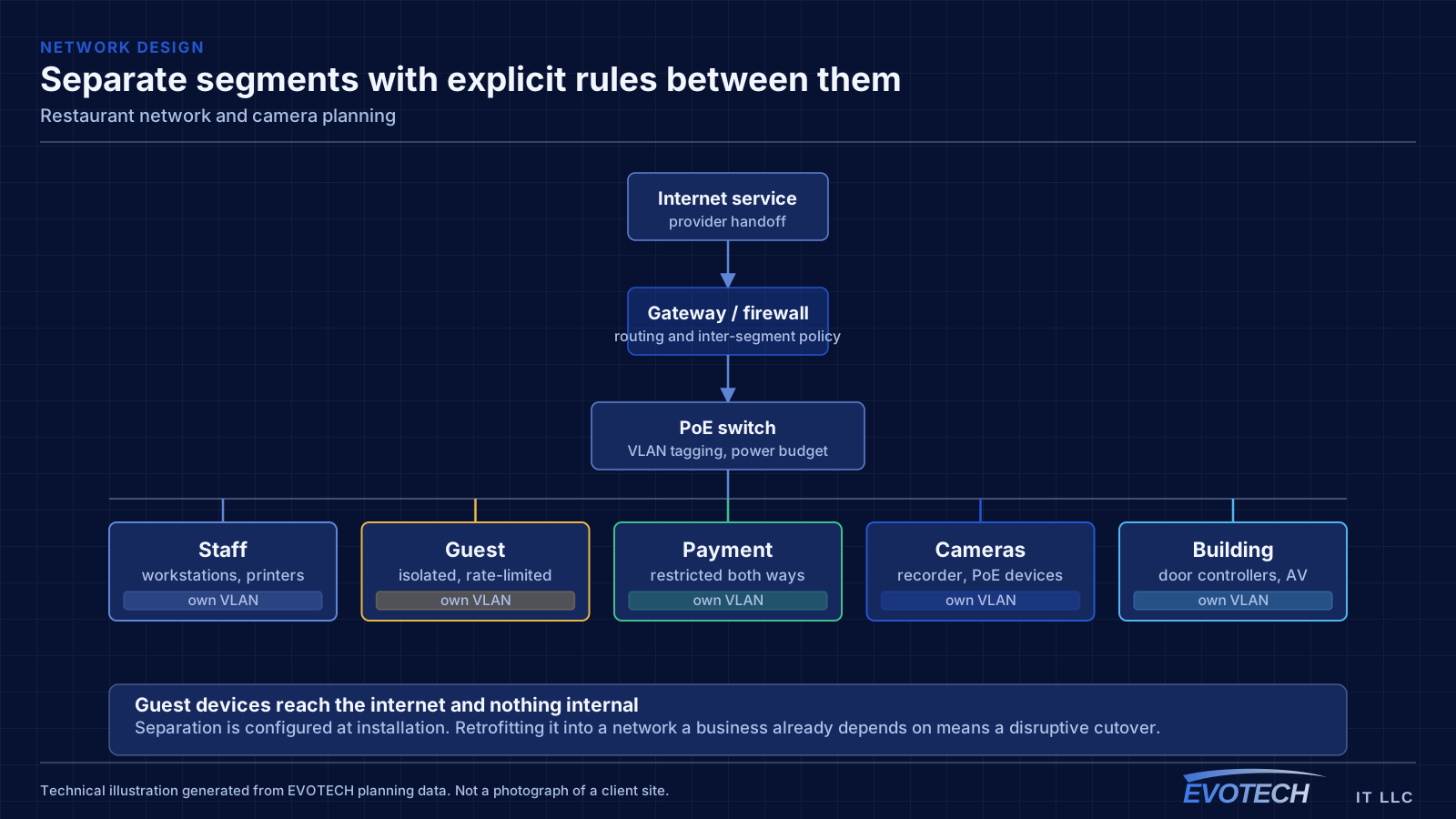
Three networks, defined before installation
Payment systems belong on their own segment with restricted access to and from everything else. Beyond the security argument, it removes a real operational risk: guests saturating the connection should never be able to slow payment processing. It also simplifies whatever conversation the operator has with their payment provider about network separation.
Operations covers kitchen display screens, receipt printers, tablets, back-office computers, and any phone system. These need reliability more than bandwidth, and several of them work better wired — a kitchen display on a cable stops being a wireless troubleshooting problem permanently.
Guest access should reach the internet and nothing internal, should isolate guest devices from each other, and should be rate-limited. Without a limit, a handful of guests streaming can degrade everything else the restaurant runs on the same circuit.
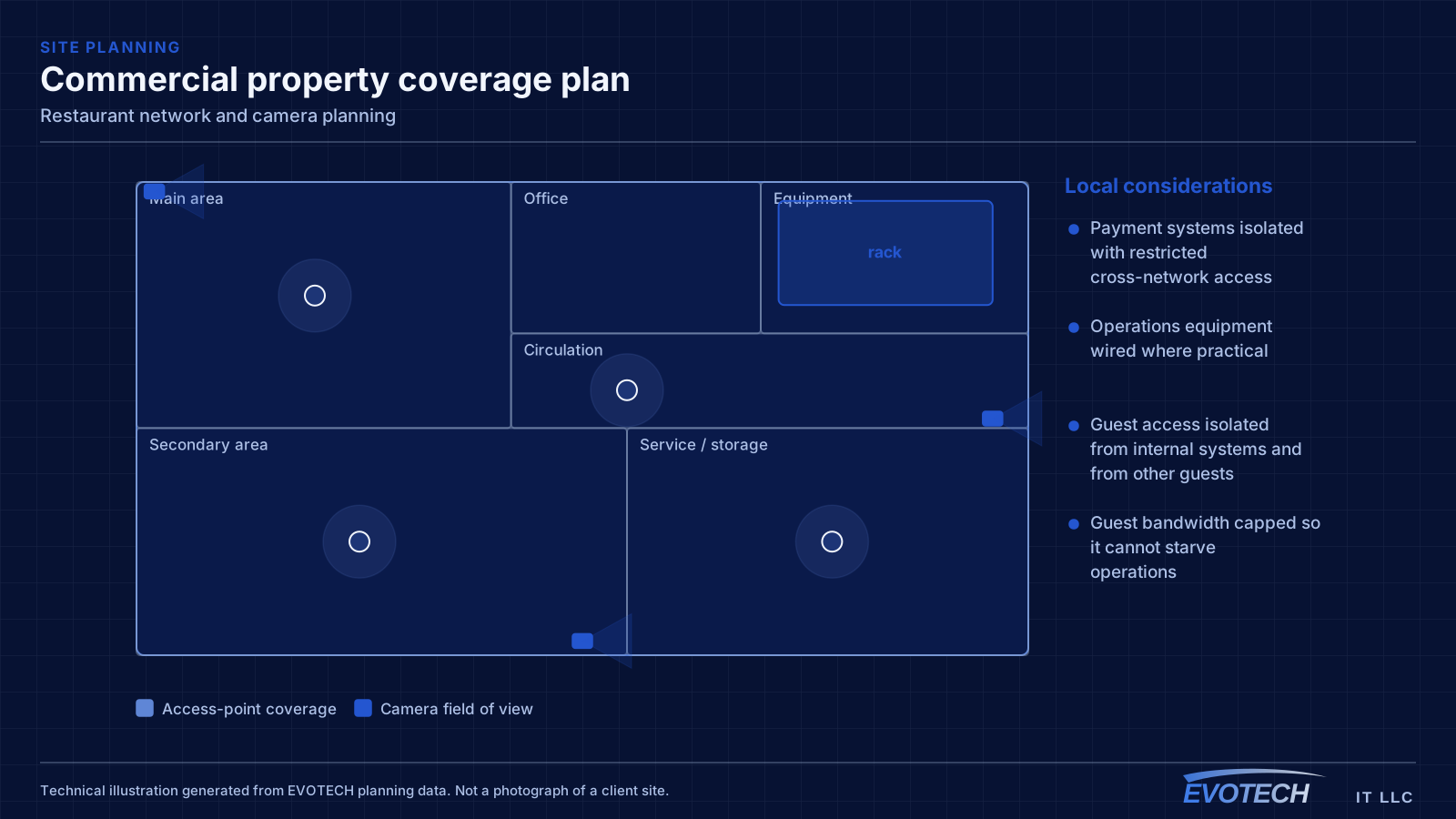
- Payment systems isolated with restricted cross-network access
- Operations equipment wired where practical
- Guest access isolated from internal systems and from other guests
- Guest bandwidth capped so it cannot starve operations
- Segmentation configured at installation, not retrofitted
Covering the dining room, patio, and back of house
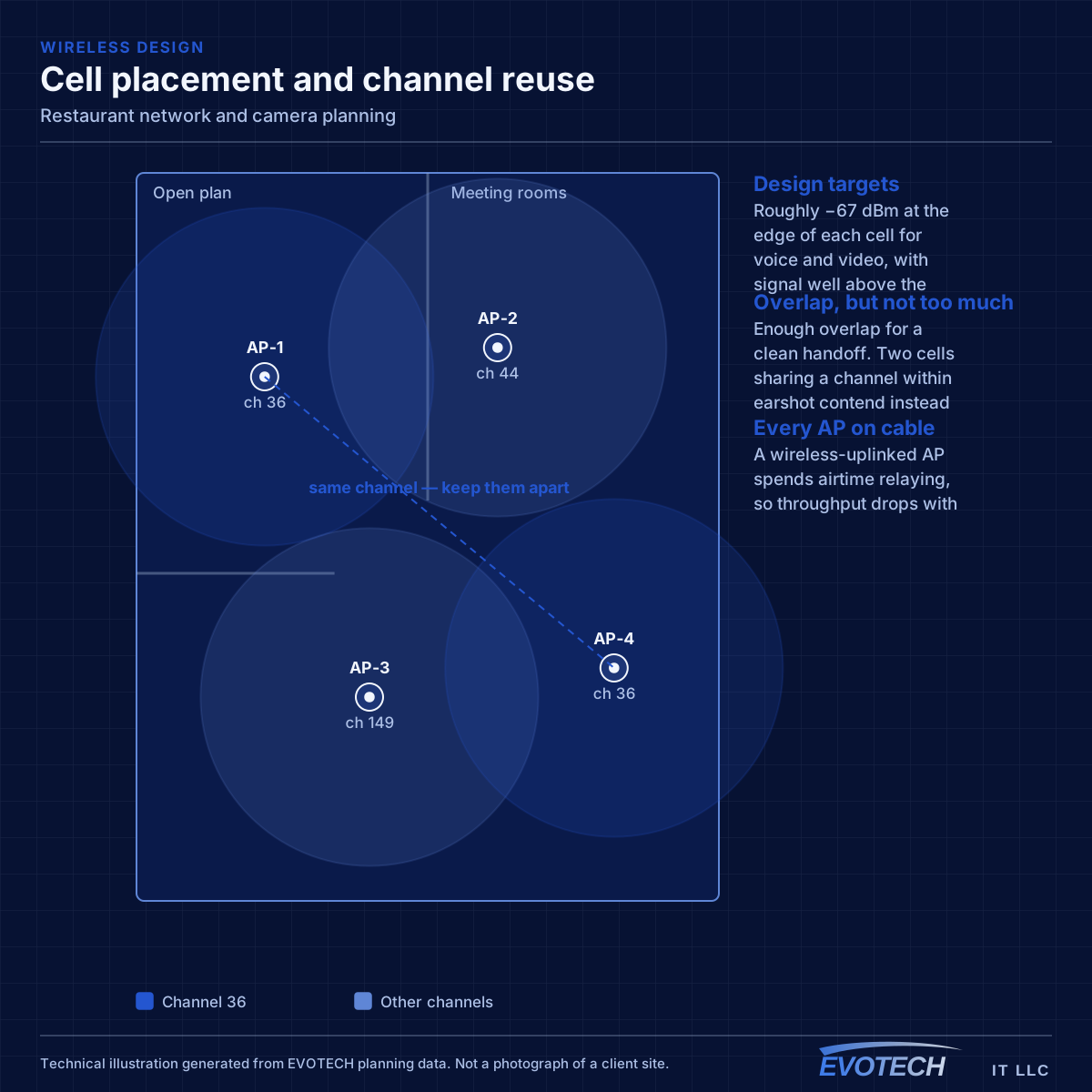
These are distinct coverage areas with different requirements. The dining room needs guest coverage and staff device coverage. The patio needs its own rated equipment rather than indoor spillover through glass — an indoor access point turned up to reach outside creates a large interfering cell indoors and still delivers a marginal signal outside.
Back of house needs reliable coverage for handhelds and tablets in an environment full of stainless steel, which reflects signal in ways an open dining room does not. Kitchens frequently need their own access point rather than being served from the dining room.
The office or back area holding the equipment needs coverage too, and it is the one most often forgotten because it is where the equipment already is.
- Dining room, patio, kitchen, and back office as distinct areas
- Patio covered by rated outdoor equipment positioned for it
- Kitchens often need their own access point due to reflective surfaces
- Handhelds and tablets need clean roaming between areas
- Equipment position itself needs coverage
Where the equipment can survive
Heat is the main determinant of equipment life in a restaurant, and the convenient position for a rack is frequently the worst one. A back-of-house location near the kitchen line is easy to reach with cable and will run hot for the life of the installation.
The better position is an office or dry storage area — cool, dry, away from steam and grease-laden air. It usually costs a little more cable and repays it in equipment that does not need replacing on a short cycle.
Anything that genuinely has to live in a wash-down area needs an enclosure rated for being sprayed, and cable pathways need to avoid hood systems and grease-laden air entirely rather than passing near them.
- Rack sited away from kitchen heat, steam, and grease
- Office or dry storage preferred over convenient back-of-house positions
- Rated enclosures for anything in a wash-down area
- Pathways routed clear of hood systems
- Network equipment and recorder on a UPS
The camera views that earn their place
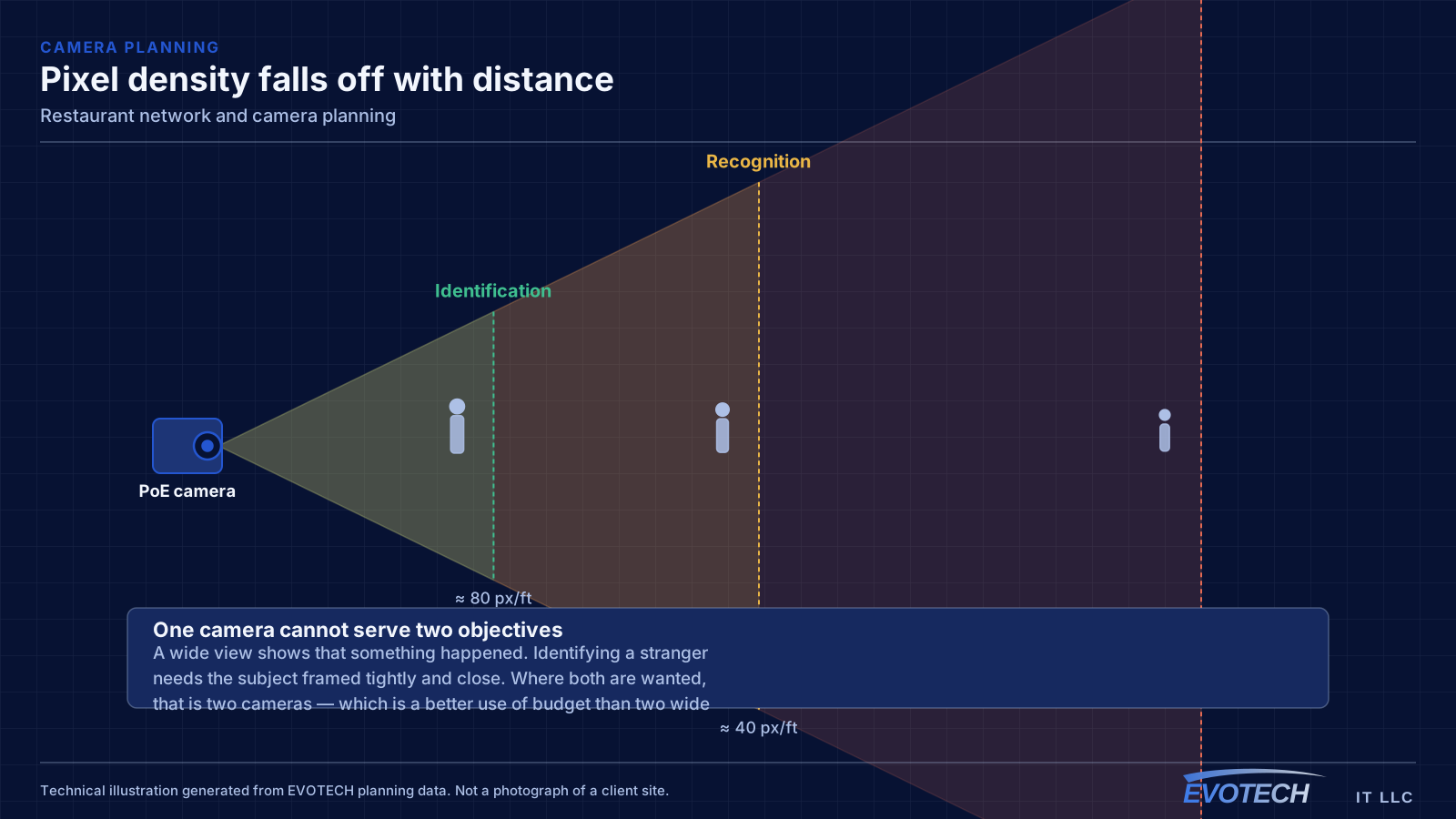
The point-of-sale line, framed tightly enough to show what was on the screen and in the drawer. The back door, framed for identification of anyone coming through it. Storage and walk-in entrances, for inventory questions. Cash-handling areas or a safe location where one exists.
A wide dining-room view has some value for general context and is not an identification camera. Installing one and expecting it to answer specific questions is the most common source of disappointment with restaurant camera systems.
Dining-room lighting is the other complication. Rooms are deliberately dim, and cameras selected for a brightly lit retail environment frequently struggle. The check that matters is reviewing recorded footage during actual service conditions rather than a live view with the house lights up.
- Register views framed for transaction detail
- Back door framed for identification
- Storage and walk-in entrances for inventory questions
- Dining room as context, not identification
- Camera selection verified against real service lighting
Scheduling, and getting it done between services
Nearly all restaurant installation happens outside operating hours, which does not usually change total labour but changes sequencing substantially. Every session has to end with the site fully operational, because the doors open whether or not the project is finished.
Kitchen ceiling access has the tightest constraints — it usually needs to happen when equipment is cold and the area has been cleaned, which is a narrower window than the rest of the site.
The practical approach is splitting the scope into sessions that each end at a safe stopping point, and doing the work that touches operational systems — payment network cutover in particular — at the start of a closure rather than the end of one.
- Sessions planned to end with the site operational
- Kitchen ceiling access scheduled around cleaning and cool-down
- Payment network cutover early in a closure window, not late
- Cable pathways kept away from hood systems and steam
- Testing done before reopening rather than during service
- Equipment positions agreed with the kitchen before anything is mounted
- A written note of what staff should check before escalating a fault
- Spare patch cords and a labelled diagram kept at the equipment position
- One named person who knows where the equipment lives and what it does
What happens when the connection drops mid-service
A restaurant is one of the few environments where a network outage has an immediate revenue consequence, so it is worth deciding in advance what happens when the circuit goes down rather than discovering it during a Friday evening.
The first question is whether the payment system can operate offline and for how long. Many can, with transactions stored and processed when connectivity returns, but the behaviour and the limits vary and are worth confirming with the provider rather than assuming.
The second is whether a backup path exists. A secondary connection — a different provider, or a cellular failover — that carries payment and operations while leaving guest access offline is a proportionate arrangement: it keeps the business running without paying to keep guests streaming.
The third is power. A UPS on the network equipment and the recorder means a brief interruption does not take down the whole system and leave someone rebooting equipment during service. That is a modest cost for removing a recurring category of disruption.
- Confirm offline behaviour and limits with the payment provider
- Consider a failover path carrying payment and operations only
- Guest access is the correct thing to drop first when capacity is constrained
- UPS on network equipment and the recorder
- Write down what staff should do when the connection drops
Frequently asked questions
Can the point-of-sale system share the guest network?
It should not. Beyond the security exposure of a payment terminal reachable from guest devices, there is a direct operational risk: guests consuming the connection can slow payment processing at exactly the busiest times. Separating them at installation is straightforward; separating them later in a running restaurant is not.
Why do restaurant cameras look worse than expected?
Dining rooms are deliberately dimly lit, and many cameras that perform well on a bright retail floor struggle with it. The verification that matters is reviewing recorded footage during actual service conditions, not looking at a live view during installation with the house lights up.
Where should the network equipment go?
Somewhere cool and dry — an office or dry storage area rather than the convenient position near the kitchen. Heat is the main determinant of equipment life, and a rack placed for cable convenience near the line becomes a recurring replacement cost rather than a one-time installation.
Does the patio need its own access point?
Usually yes. Turning up an indoor access point to reach outside creates a large interfering cell inside and still delivers a marginal signal on the patio. A rated outdoor unit positioned for the area serves it properly and survives the humidity and driven rain that an indoor unit would not.
How many cameras does a typical restaurant need?
Fewer than most quotes propose, and better placed. The register line, the back door, storage and walk-in entrances, and any cash-handling area cover the questions restaurant footage actually gets asked. A wide dining-room view adds context. Beyond that, additional cameras tend to add storage cost and review time without adding answers, which is a poor trade.