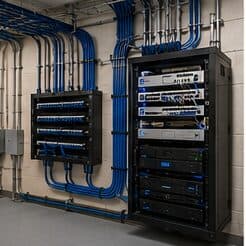
Ubiquiti UniFi installation for new construction, in Baytown
Ubiquiti UniFi installation for new construction in Baytown is a three-part question: what ubiquiti unifi installation involves, what new construction need from it, and what Baytown changes about the install. An industrial and refining base with rugged operational environments.
A UniFi deployment puts the gateway, switching, wireless, and often cameras and door access under one controller. The practical benefit is operational rather than raw performance: one interface for network configuration, client visibility, firmware updates, and camera review, instead of separate systems that each need their own knowledge.
Positions to prewire even if cameras come later
Camera positions are among the cheapest things to prewire and among the most annoying to retrofit, because they are usually exterior, high, and behind finished soffit. Running cable to likely positions during rough-in preserves the option at almost no cost.
The positions worth prewiring in nearly every building: primary entrance, rear or service entrance, any delivery or receiving point, parking approaches, and the equipment room itself. In residential construction, add the front door for a doorbell and the driveway approach.
- Primary and secondary entrance positions
- Delivery, receiving, and service door approaches
- Parking and vehicle approach positions
- Doorbell position in residential builds
- Cable terminated and labeled even where no camera is installed yet
What changes ubiquiti unifi installation from job to job
Scope moves with device count and the amount of configuration the site needs.
- Number of access points, cameras, switches, and door devices
- Number of network segments and the complexity of the rules between them
- Cabling required to reach each device position
- Camera resolution and retention target, which set storage
- Whether the controller runs on dedicated hardware
- Whether an existing network must be migrated with minimal downtime
- Remote-access requirements and who needs which level of visibility
Baytown: what the location changes
In Baytown, the plan is built outward from the conditions that are actually here. An industrial and refining base with rugged operational environments. Older commercial stock needing pathway remediation and rack cleanup. Newer retail development with more straightforward conditions. Each one changes where cable can run, where equipment can sit, and how coverage is shaped, which is why a walkthrough settles a Baytown scope faster than any generic estimate.
- An industrial and refining base with rugged operational environments
- Older commercial stock needing pathway remediation and rack cleanup
- Newer retail development with more straightforward conditions
- Coastal humidity and driven rain requiring durable exterior sealing and surge protection
- Slab-foundation residential following the regional pattern
Getting it done in Baytown
Validation covers the network design as well as the radio coverage, because segmentation that was configured but not tested is not yet segmentation.
Low-voltage rough-in happens in a specific slot: after framing and electrical, before insulation and drywall. Inside that window, running a cable anywhere is straightforward. Once drywall goes up, the same cable costs many times more and sometimes cannot be run at all.
On site, the schedule and working method turn on conditions like these. Coastal humidity and driven rain requiring durable exterior sealing and surge protection. Slab-foundation residential following the regional pattern. Both shape how and when a crew can actually operate, which is why EVOTECH scopes each Baytown job from the property itself rather than assuming one approach fits every address. Coverage is stated as a service area, never an office claim, and anything about Baytown that cannot be verified is left out instead of invented.
Frequently asked questions
Is ubiquiti unifi installation for new construction different in Baytown?
The sector needs stay the same, but the install changes with the place. In Baytown, the conditions above — not the new construction label — decide routes, mounting, and equipment placement, which is why this page pairs all three.
Is UniFi the right choice for a small business?
It suits sites that want proper segmentation, decent wireless, and cameras under one interface without employing a network administrator. The tradeoff is committing to one vendor's ecosystem. A mixed-vendor design gives more freedom to pick the best component for each role; the single-vendor version is easier to live with day to day. Both are defensible — it is worth choosing on purpose.