Wi-Fi installation for new construction, in Baytown
Wi-Fi installation for new construction in Baytown is a three-part question: what wi-fi installation involves, what new construction need from it, and what Baytown changes about the install. An industrial and refining base with rugged operational environments.
The part people skip is the channel plan. Two access points on the same channel that can hear each other do not add capacity — they share it, because Wi-Fi devices take turns on a channel. That is why adding more access points to a struggling network sometimes makes it worse, and why 2.4 GHz, with only three non-overlapping channels, is usually the band causing the complaints.
Positions to prewire even if cameras come later
Camera positions are among the cheapest things to prewire and among the most annoying to retrofit, because they are usually exterior, high, and behind finished soffit. Running cable to likely positions during rough-in preserves the option at almost no cost.
The positions worth prewiring in nearly every building: primary entrance, rear or service entrance, any delivery or receiving point, parking approaches, and the equipment room itself. In residential construction, add the front door for a doorbell and the driveway approach.
- Primary and secondary entrance positions
- Delivery, receiving, and service door approaches
- Parking and vehicle approach positions
- Doorbell position in residential builds
- Cable terminated and labeled even where no camera is installed yet
What changes wi-fi installation from job to job
Access-point count is an output of the design, not an input. What drives it:
- Construction materials: drywall behaves very differently from masonry, tile, or metal stud with foil-backed board
- Ceiling height, which changes both coverage radius and mounting method
- Device density per area and what those devices do
- Whether coverage is needed outdoors, in stairwells, or in parking areas
- Cable reachability to each candidate AP position
- Neighbouring networks competing for the same spectrum
- Whether the client population includes older devices limited to 2.4 GHz
Baytown: what the location changes
What separates a Baytown scope from the rest of the city is concrete and local. An industrial and refining base with rugged operational environments. Older commercial stock needing pathway remediation and rack cleanup. Newer retail development with more straightforward conditions. That short list is what actually drives the design in this pocket, and it is why photographs or a brief site visit beat a floor plan — the plan follows the building's real constraints, not the neighborhood name on the map.
- An industrial and refining base with rugged operational environments
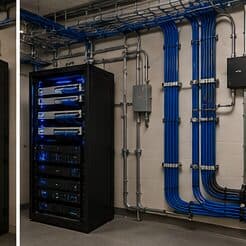
- Older commercial stock needing pathway remediation and rack cleanup
- Newer retail development with more straightforward conditions
- Coastal humidity and driven rain requiring durable exterior sealing and surge protection
- Slab-foundation residential following the regional pattern
Getting it done in Baytown
A wireless installation is validated by walking it. Signal level, signal-to-noise ratio, and the channel each AP settled on are measured at the places people actually work, not from the middle of the room.
Low-voltage rough-in happens in a specific slot: after framing and electrical, before insulation and drywall. Inside that window, running a cable anywhere is straightforward. Once drywall goes up, the same cable costs many times more and sometimes cannot be run at all.
Execution in Baytown is planned around real conditions, not a template. Coastal humidity and driven rain requiring durable exterior sealing and surge protection. Slab-foundation residential following the regional pattern. These decide the sequence, the access, and the method as much as the design does. EVOTECH describes Baytown as coverage rather than a place it occupies, and omits any area detail it cannot confirm — building and site conditions only, no invented landmarks or promised arrival times.
Frequently asked questions
Is wi-fi installation for new construction different in Baytown?
The sector needs stay the same, but the install changes with the place. In Baytown, the conditions above — not the new construction label — decide routes, mounting, and equipment placement, which is why this page pairs all three.
Why does a call drop when walking between rooms?
That is a roaming symptom. Either the coverage areas do not overlap enough, so the device holds a fading signal past the point of usefulness, or they overlap heavily on the same channel, so the handoff happens into a congested cell. Both are fixed by adjusting placement, power, and the channel plan rather than by adding another access point at the same settings.