The short answer
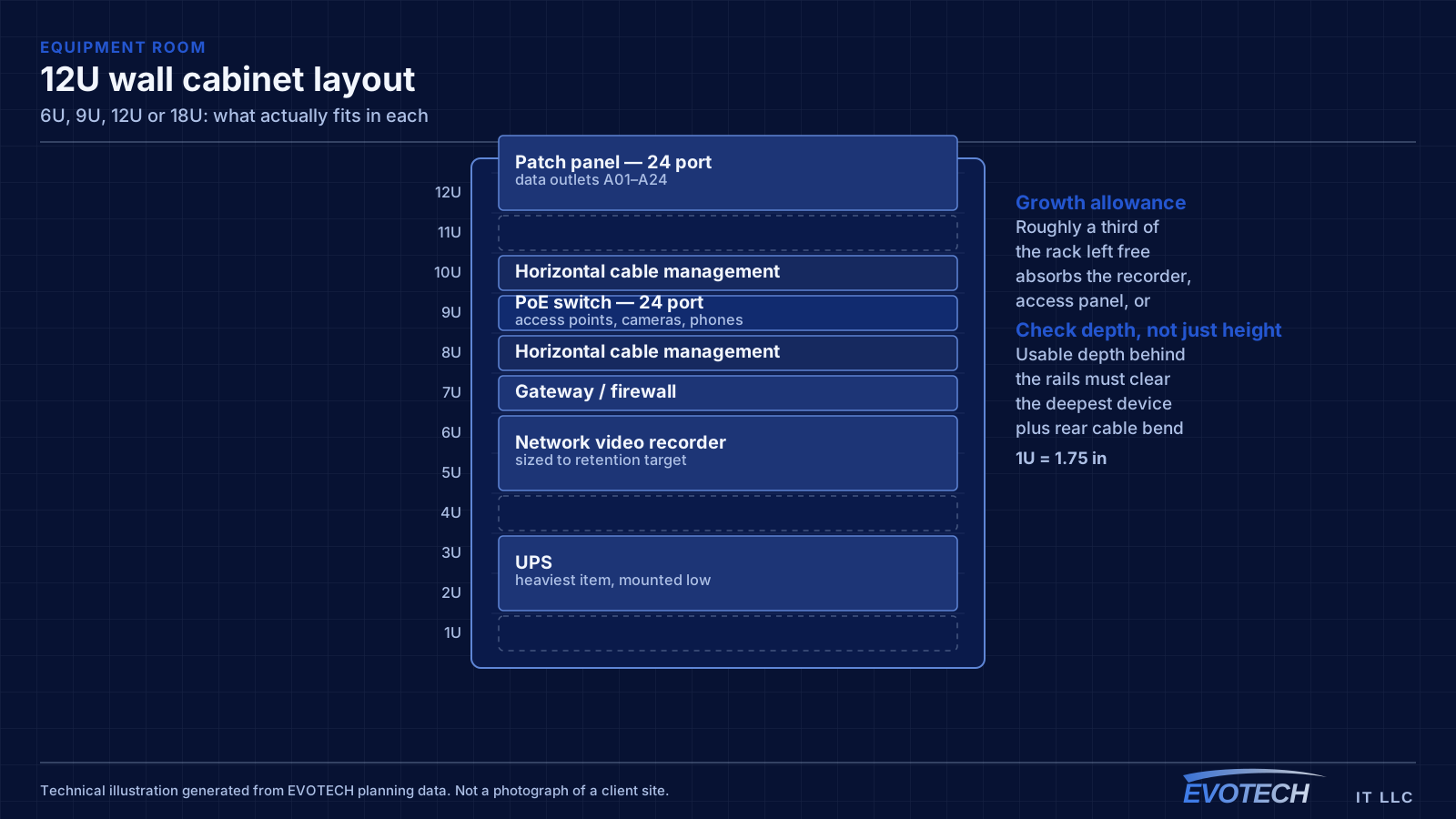
In practical terms: 6U holds a patch panel, a switch, and very little else. 9U adds room for a small recorder or a compact UPS. 12U comfortably holds a network plus a camera system with management space. 18U accommodates a network, cameras, access control, and a UPS with some room left.
Those descriptions already assume a rack unit of cable management between groups, which is why the usable capacity is lower than the raw unit count suggests. A 6U cabinet with a 1U patch panel, 1U of management, and a 1U switch has three units left, and one of those is usually consumed by a shelf or a PDU.
What each size realistically holds
6U is a termination position rather than an equipment room. A patch panel, a switch, and a power strip fit; anything beyond that competes for the remaining space. It suits a small residential installation or a satellite position where the real equipment lives elsewhere.
9U is the smallest size that comfortably holds a network plus one additional system. A patch panel, management, a switch, a small recorder, and a PDU fit with a unit or so spare. It is a common and reasonable choice for a home with cameras or a very small office.
12U is where a cabinet stops feeling constrained. Two patch panels, management between groups, a switch, a recorder, a PDU, and a compact UPS fit with genuine room left over. For most small commercial installations this is the size that does not need revisiting.
18U accommodates a full small-business set: network, cameras, access control, a substantial UPS, and the management to keep it serviceable. At this size, floor-standing racks also become worth comparing, particularly where the loaded weight is significant.
- 6U: patch panel, switch, power strip — a termination position
- 9U: adds a small recorder or compact UPS with little spare
- 12U: network plus cameras with genuine room left over
- 18U: network, cameras, access control, and a substantial UPS
- Every size above assumes management units between groups
Depth varies independently of height
Cabinets at any of these heights come in different depths, and the depth is the specification that determines what equipment will physically fit. A shallow 12U cabinet may not accept a device that fits comfortably in a deeper 9U one.
Shallow cabinets are usually chosen to reduce how far the unit projects from a wall, which matters in corridors and small rooms. That is a real constraint and a reasonable reason — it simply has to be checked against the intended equipment first.
The specific figure to check is usable depth behind the mounting rails, with allowance for cables entering the rear of the deepest device without a tight bend. Recorders and UPS units are the two items that most often exceed a shallow cabinet.
- Depth varies at every height; check it separately
- Usable depth behind the rails is the relevant number
- Allow for rear cable bend radius on the deepest device
- Recorders and UPS units most often exceed shallow cabinets
- A deeper small cabinet can be more useful than a shallow large one
Load ratings and mounting
Wall-mount cabinets carry a stated load rating, and it assumes proper mounting into structure. Drywall anchors do not achieve it regardless of what they are rated for individually, because the failure mode is the board rather than the anchor.
Weight rises sharply once a UPS is involved, which is the main reason the larger sizes need more attention to mounting. At 18U with a substantial UPS, the loaded weight is enough that a floor-standing rack is worth comparing purely on installation practicality.
Heavier items belong low in any cabinet, for stability and because installing a heavy unit at head height is both awkward and a good way to damage something below it.
- Load ratings assume mounting into structure, not drywall anchors
- UPS weight dominates the total in most installations
- At 18U with a UPS, compare against floor-standing options
- Heavier equipment mounted low
- Check the wall construction before selecting the size
Heat rises with size and with what goes in
A larger cabinet does not automatically run cooler. It holds more equipment, which produces more heat, and if the ventilation and the room are unchanged the result can be warmer rather than cooler.
Passive ventilation — vented door and top vent — is adequate at modest loads. Once a recorder and a UPS are in the cabinet, active ventilation is usually worth specifying, and the room itself needs a path for that heat to leave.
This is worth deciding at purchase, because retrofitting fans to a cabinet already mounted and populated is more disruptive than specifying them initially.
- More capacity means more heat, not less
- Passive ventilation adequate at modest loads
- Active ventilation usually warranted once a recorder and UPS are present
- The room needs a path for the heat, whatever the cabinet does
- Specify ventilation at purchase rather than retrofitting
Picking between two adjacent sizes
When the calculation lands between two sizes, take the larger one. The price difference between adjacent cabinet sizes is small, and it is very much smaller than the cost of migrating a live equipment position into a bigger cabinet a year later.
The exception is where physical space genuinely does not allow it — a corridor where a deeper or taller cabinet would obstruct, or a wall that cannot carry the load. In that case, the honest answer is either a floor-standing rack in a different position or accepting a constrained cabinet with a clear understanding that future additions will need somewhere else to go.
What is not a good reason to size down is the current device count. That number only goes up, and it goes up in predictable ways: a recorder when cameras arrive, an access panel when doors get automated, a second switch when ports run out.
- Between two sizes, choose the larger
- Physical obstruction and load capacity are the legitimate reasons to size down
- Current device count is not a good basis — it only rises
- Migration into a larger cabinet later is disruptive and avoidable
- Consider a floor-standing rack where wall constraints bind
Open frame versus enclosed, at any of these sizes
All four sizes exist as enclosed cabinets and as open frames, and the choice affects heat, security, and serviceability in opposite directions.
An open frame has no heat problem worth discussing — equipment sits in the room's ambient air with nothing trapping it — and it is far easier to work on, because every side is reachable. What it offers is no physical security, no dust protection, and a permanently visible tangle unless the cable management is genuinely good.
An enclosed cabinet gives security, dust protection, and a tidier appearance in a visible location, at the cost of needing a deliberate ventilation path and being harder to work in. In a locked equipment room where nobody sees it, an open frame is frequently the better engineering choice. In a shared office corner, a cabinet usually is.
The middle path many installations use is an enclosed cabinet with a vented door and top vent in a room that itself has an airflow path, which recovers most of the ventilation benefit while keeping the security and appearance.
- Open frame: best heat behaviour and serviceability, no security or dust protection
- Enclosed cabinet: security, dust protection, and tidier appearance
- Enclosed cabinets require a deliberate ventilation path
- A locked equipment room may not need an enclosure at all
- Vented door plus top vent recovers much of the airflow benefit
Frequently asked questions
Is 6U enough for a house?
For a house with a network and nothing else, often yes — a patch panel, a switch, and a power strip fit. It runs out quickly once a camera recorder is added, which is a common second-phase request. Where cameras are even a possibility, 9U or 12U avoids revisiting the decision.
Why does a 12U cabinet not hold twelve devices?
Because cable management, patch panels, a PDU, and any shelf all consume units alongside the active equipment. A realistic 12U layout might hold two patch panels, two management bars, a switch, a recorder, a PDU, and a compact UPS — which is seven or eight units of the twelve before any growth.
Does the cabinet need to be lockable?
In a shared or public-facing space, yes — the equipment position holds the systems everything else depends on, including camera recordings. In a private home or a secured back office it matters less, though a door still helps with dust and with keeping cables undisturbed.
Can a cabinet be swapped for a larger one later?
It can, and it is more disruptive than it sounds. Everything has to be unracked, the cabinet unmounted, the new one mounted and possibly re-anchored, and everything re-racked and re-dressed — usually with the network down for part of it. The size difference at purchase is far cheaper.