Security-camera installation for home offices, in Rosenberg
Security-camera installation for home offices in Rosenberg is a three-part question: what security-camera installation involves, what home offices need from it, and what Rosenberg changes about the install. Warehousing and light-industrial buildings along the highway corridor, with metal construction that reflects wireless signal and needs proper cable support.
The useful design question is not how many cameras a property needs. It is what each camera has to accomplish. Detecting that a person is present, recognising someone you already know, and identifying a stranger from footage are three different requirements, and they need increasing pixel density on the subject. Planning guidance commonly cited from industry standards puts detection in the region of ten pixels per foot of subject, recognition around forty, and identification around eighty.
The house is competing with the work
A home office shares its connection with everything else in the house, and household demand is highest during exactly the hours that matter least to the household and most to the person working. Streaming, gaming, backups, and connected devices all contend for the same circuit and, if the office is on wireless, for the same airtime.
The second factor is position. Home offices frequently end up in a spare bedroom at the far corner of the house, which is often the worst wireless position in the building — furthest from the router, through the most walls.
- Household traffic peaking during working hours
- Office often located at the far edge of wireless coverage
- Video calls being the least tolerant workload in the house
- Work equipment sharing a flat network with household devices
Where security-camera installation goes wrong — and how it's avoided
Camera systems disappoint for predictable, avoidable reasons.
- Buying camera count instead of designing coverage objectives
- Mounting everything high and wide, then expecting identification
- Aiming a camera at a glass entrance from inside during daylight
- Sizing storage for resolution but not for the retention period
- Leaving default credentials and default remote-access settings in place
- Skipping the after-dark review and discovering the night image months later
Rosenberg: what the location changes
Warehousing and light-industrial buildings along the highway corridor, with metal construction that reflects wireless signal and needs proper cable support. In Rosenberg, that is where the plan begins, because it changes cable paths, device placement, and access-point counts before anything else does. An older rail-town commercial core with masonry buildings and limited existing pathway. Newer suburban subdivisions on slab foundations following the regional attic-routing pattern. None of these are generic checklist items — each moves the design in a direction a citywide assumption would miss, and the honest recommendation always depends on what this particular property allows.
- Warehousing and light-industrial buildings along the highway corridor, with metal construction that reflects wireless signal and needs proper cable support
- An older rail-town commercial core with masonry buildings and limited existing pathway
- Newer suburban subdivisions on slab foundations following the regional attic-routing pattern
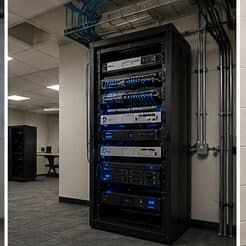
- Dust exposure in industrial and distribution environments, affecting rack and equipment placement
- Gulf Coast humidity and driven-rain events requiring rated exterior housings and sealed penetrations
Getting it done in Rosenberg
A camera system is commissioned by looking at its recordings, not its live view. Live video on a monitor at midday tells you very little about what the recorded file will show at nine in the evening.
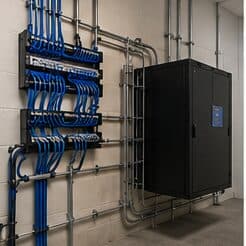
A wired connection to the desk eliminates the variables that cause most home-office call problems: signal strength, interference from neighbouring networks, and contention with household devices for airtime. In slab-foundation construction the run typically goes up into the attic and down an interior wall, which is why the destination wall matters more than the distance.
On site, the schedule and working method turn on conditions like these. Dust exposure in industrial and distribution environments, affecting rack and equipment placement. Gulf Coast humidity and driven-rain events requiring rated exterior housings and sealed penetrations. Both shape how and when a crew can actually operate, which is why EVOTECH scopes each Rosenberg job from the property itself rather than assuming one approach fits every address. Coverage is stated as a service area, never an office claim, and anything about Rosenberg that cannot be verified is left out instead of invented.
Popular services nearby
Frequently searched near this area — the pages people look for most.
Frequently asked questions
Is security-camera installation for home offices different in Rosenberg?
The sector needs stay the same, but the install changes with the place. In Rosenberg, the conditions above — not the home offices label — decide routes, mounting, and equipment placement, which is why this page pairs all three.
How many cameras does a property need?
Count objectives, not walls. Each area needs a stated purpose — detect activity, recognise a known person, or identify a stranger — and the camera serving it is chosen for that purpose. A property with four well-framed cameras at the points that matter usually produces more useful footage than one with twelve wide shots covering everything approximately.