The short answer
The cameras themselves are frequently a minority of the total. The cost concentrates in three places: getting cable to each position, reaching each mounting point safely, and providing enough storage for the retention you actually want.
This page describes those variables and their relative weight. It does not publish rates, because a number without a specific site behind it would be misleading — and because pricing on this site requires owner approval before it can be published at all.
Cable routes: usually the biggest variable
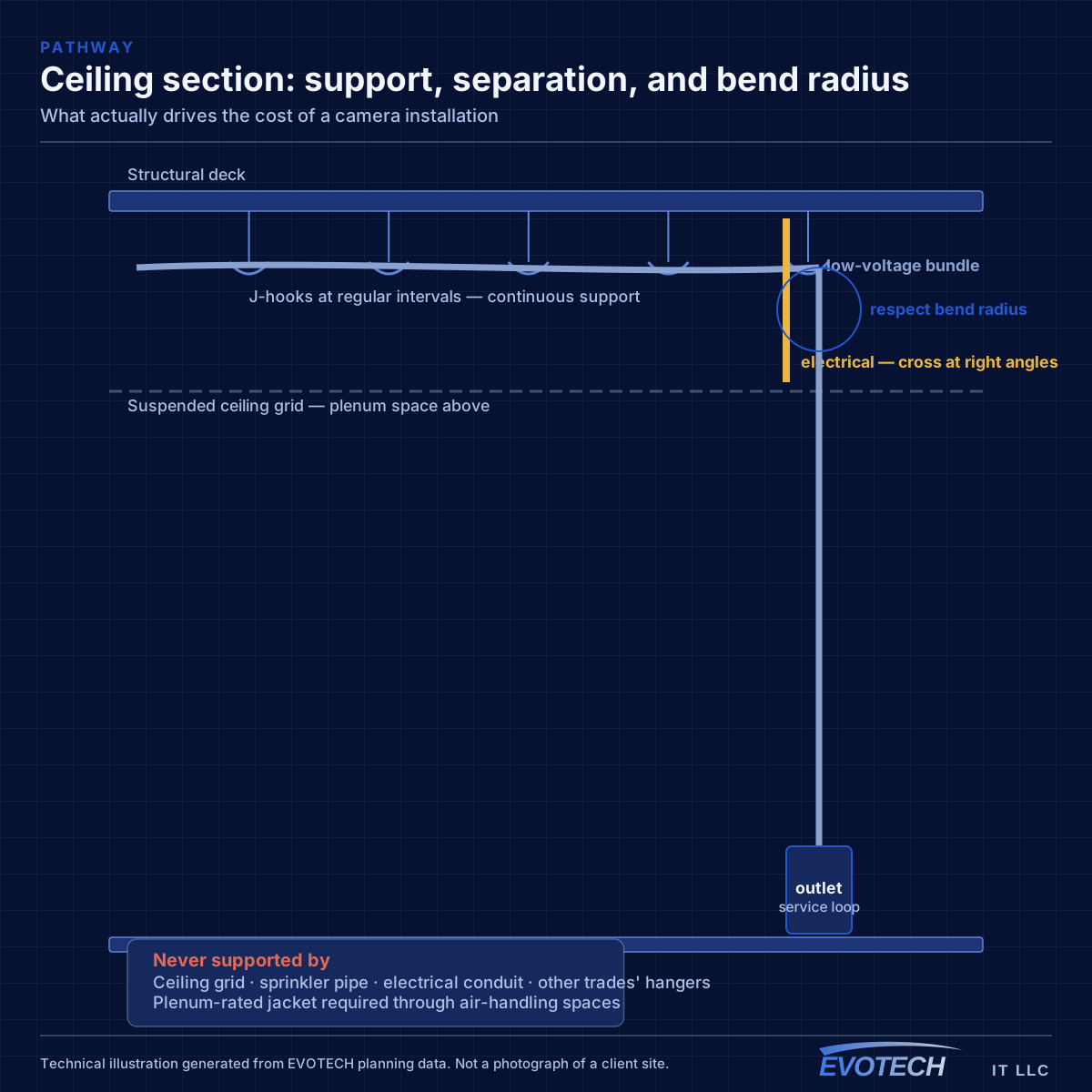
Two cameras on the same building can differ by a large multiple in installation effort depending on where they go. A position above an accessible suspended ceiling with existing pathway is a short run. A position on a far exterior wall requiring a route through a hard-lid ceiling, an exterior penetration, and a soffit is a different job entirely.
Exterior positions carry additional work regardless of distance: a properly sealed penetration, a drip loop, and a housing rated for the exposure. Those are small items individually and they recur at every exterior camera.
Distance matters at the extremes. Positions approaching or exceeding the 100-metre channel limit need an intermediate powered location or a fiber leg with local power, which changes the shape of the project rather than just its length.
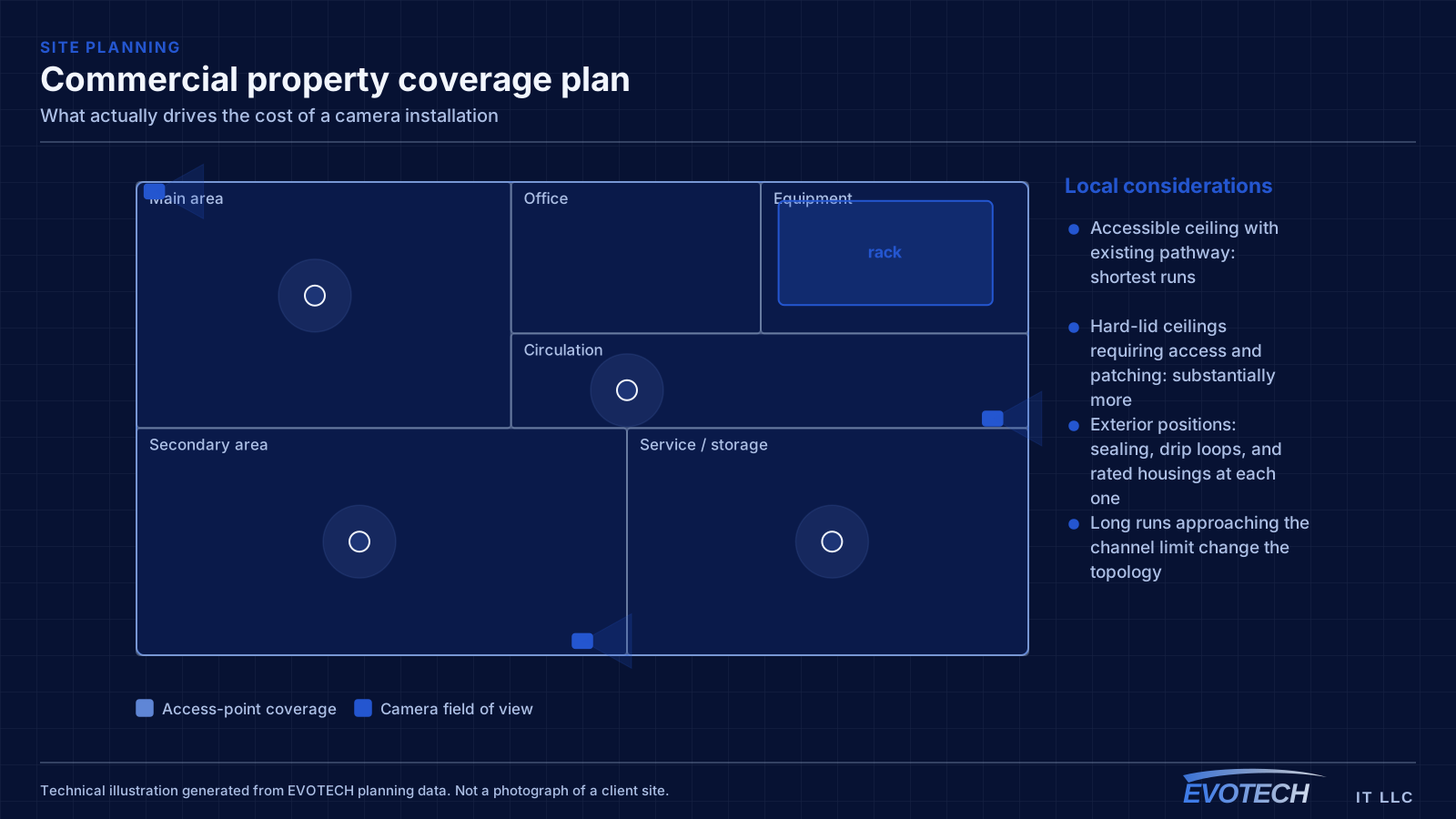
- Accessible ceiling with existing pathway: shortest runs
- Hard-lid ceilings requiring access and patching: substantially more
- Exterior positions: sealing, drip loops, and rated housings at each one
- Long runs approaching the channel limit change the topology
- Existing usable pathway is the single biggest cost reducer
Mounting access and working at height
Reaching a mounting position safely is a real cost. A camera at normal ceiling height is straightforward; a camera at warehouse roof-deck height needs lift access, and lift access needs clear floor space, coordination with operations, and sometimes a scheduled shutdown.
Exterior positions under eaves and soffits sit somewhere in between, needing ladder work at height with appropriate footing — which on uneven ground, over landscaping, or above a roof line becomes its own consideration.
This is why camera count is a poor predictor of cost. Six cameras at accessible interior positions can be less work than two at difficult exterior ones.
- Standard ceiling height: straightforward
- High-level positions: lift access, clear floor space, coordination
- Exterior eaves and soffits: ladder work with appropriate footing
- Uneven ground and roof-line positions add complexity
- Camera count is a weak predictor; access is a strong one
Storage, driven by the retention decision
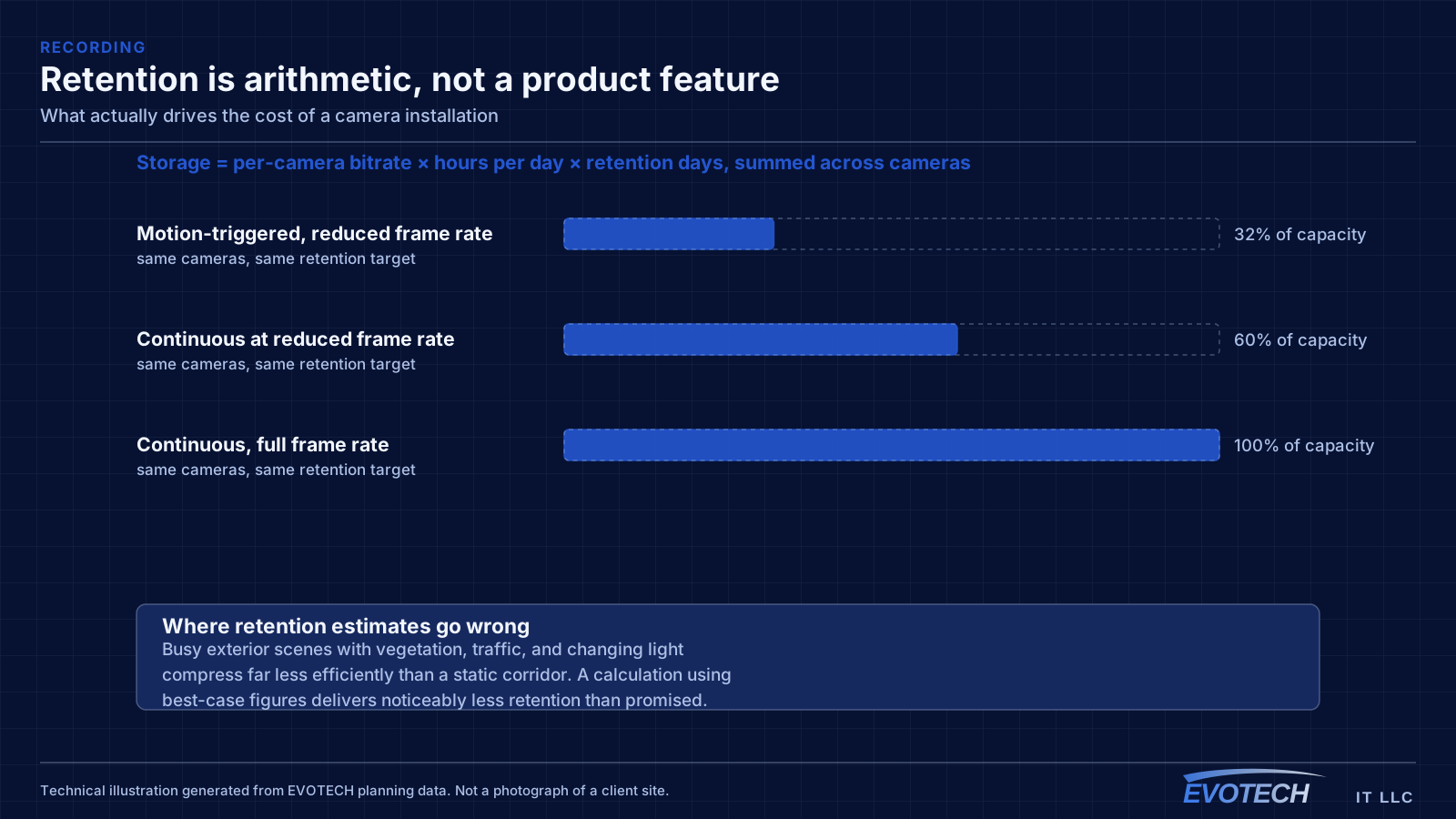
Storage cost follows directly from the retention target, and it is the line most often underestimated because the decision is made casually. Doubling the retention period roughly doubles the storage requirement, all else equal.
Resolution and frame rate multiply into the same calculation, so a decision to record everything at maximum resolution and frame rate can raise the storage requirement by a large factor over a considered configuration that records at full quality where it matters and lower elsewhere.
Drive selection matters too. Recorders write continuously, which is a different duty cycle from a desktop, and drives designed for that workload cost more and last considerably longer in the role.
- Retention period is the primary driver
- Resolution and frame rate multiply into the same total
- Recording mode — continuous, motion, or hybrid — changes it substantially
- Drives suited to continuous write cost more and last longer
- Redundancy, where required, adds capacity beyond the calculation
Power, switching, and protection
PoE switching has to carry the peak load with headroom, and a switch sized for the camera count but not the wattage is a false economy that produces intermittent faults. Higher-power devices — pan-tilt-zoom units, heated housings, cameras with strong illuminators — push this up disproportionately.
A UPS for the recorder and the switch is a modest line item that determines whether a brief power interruption creates a gap in the footage. Sizing it for runtime rather than just capacity is a separate decision.
Where positions are beyond copper reach, local power at the far end becomes part of the scope, and that can mean coordinating with an electrical trade.
- PoE switch sized on wattage as well as port count
- High-power devices counted individually
- UPS for recorder and switch, sized for the intended runtime
- Local power required at positions beyond copper reach
- Electrical work by the appropriate qualified trade
Where to spend and where not to
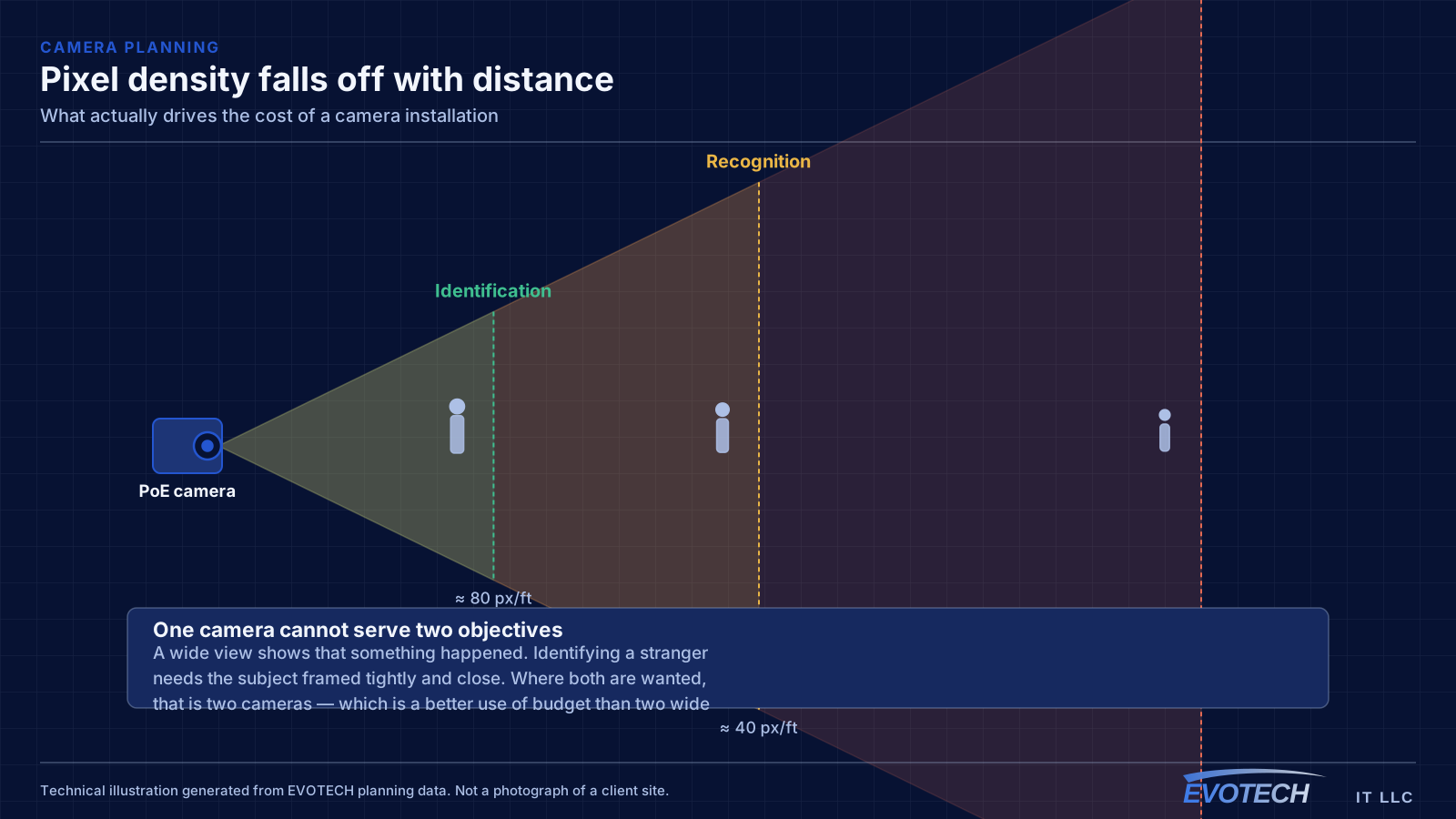
Spend on the cameras that have to identify people. Those are the views that get reviewed when something happens, and framing, lens, and position all matter there. A tightly framed identification camera at an entrance earns its cost repeatedly.
Spend on storage that matches how quickly issues actually surface in your operation. A retention period shorter than that discovery time makes the whole system decorative.
Spend less on wide contextual views. They are useful and they do not need to be the best camera in the system, because nobody is going to identify anyone from them regardless of specification.
And spend on getting cable to positions while access is easy. A run installed during a fit-out costs a fraction of the same run retrofitted, and a terminated spare at a likely future camera position is among the cheapest things in the project.
- Prioritise the identification views — those are what get reviewed
- Match retention to how quickly issues actually surface
- Contextual wide views do not need premium cameras
- Run cable while access is easy; spares are cheap during a fit-out
- Avoid paying for resolution that framing will waste
- Prefer fewer, better-placed cameras over broad coverage at lower quality
- Budget for the recorder and storage as a first-class line, not a rounding error
Costs that arrive after the installation
A camera system has a small but real ongoing cost, and it is worth accounting for at the point of purchase rather than discovering it later.
Drives are the main one. Recorders write continuously, and drives in that duty cycle wear out on a timescale measured in years rather than decades. A system with no drive health monitoring will simply stop recording one day without announcing it, and the failure is typically discovered when someone asks for footage. Budgeting for eventual drive replacement, and enabling health alerting from the start, turns that from an incident into a maintenance task.
Cleaning is the second and it is genuinely mundane. Exterior camera housings accumulate dust, spider webs, and insect activity, and a web across an infrared illuminator produces exactly the wash-out that makes night footage useless. A periodic wipe of the housings is a small task that recovers a surprising amount of image quality.
Then there are the changes: a camera repositioned after a layout change, a new area needing coverage, retention extended because an incident took longer than expected to surface. Systems with headroom in the PoE budget, recorder channels, and storage absorb those cheaply. Systems built exactly to requirement do not.
- Drive replacement on a multi-year cycle, with health monitoring enabled
- Periodic cleaning of exterior housings and illuminators
- Repositioning after layout changes
- Additional cameras, which need PoE, channel, and storage headroom
- Retention extensions, which need storage headroom specifically
- Firmware updates, particularly for anything reachable remotely
Frequently asked questions
Why can two eight-camera systems cost very differently?
Cable routes, mounting access, and retention. Eight cameras above an accessible ceiling with existing pathway and two weeks of retention is a very different project from eight exterior cameras needing lift access, sealed penetrations, and thirty days at full resolution — even though both are 'eight cameras'.
Are more expensive cameras worth it?
For the views that have to identify people, better low-light performance and dynamic range genuinely matter. For wide contextual views, the difference is largely wasted, because nobody identifies anyone from those regardless. Spending unevenly — better cameras where identification matters, ordinary ones elsewhere — usually produces a better system for the same money.
Can cameras be added to the system later?
Yes, subject to three checks: switch PoE budget headroom, recorder channel capacity, and storage. All three are worth confirming before adding, because exceeding any one of them produces problems across the whole system rather than a clean failure on the new camera.
Why does this page not include prices?
Because a rate published without a specific site behind it would mislead more than it helps — the variables above move the total by large multiples. Published pricing on this site also requires owner approval, which has not yet been given, so quoting a figure here would be inventing one.
Is it cheaper to install cameras at the same time as network cabling?
Substantially, because most of the cost is reaching the pathway rather than each individual run. Camera runs pulled during the same visit as the data cabling share the ceiling access, the containment, and the mobilisation, and they land in the same equipment position. Adding cameras as a separate project later means paying for all of that a second time, frequently with worse routing options because the easy paths are already taken.