The short answer
Calls are less tolerant than almost anything else on a network. A download that stalls for two seconds finishes two seconds later and nobody notices; a call that stalls for two seconds is visible to everyone on it. So calls surface problems — jitter, brief loss, roaming gaps — that other traffic absorbs invisibly.
The three most common causes, in rough order: roaming failures when someone moves between coverage areas, channel contention where too many devices or access points share a channel, and a saturated internet circuit at particular times of day. Each has a distinguishable signature, and identifying which one is at work matters more than any equipment change.
Cause one: roaming
The signature is that the call fails when someone walks — from a desk to a meeting room, upstairs, or into a corridor. It works fine when they stand still. This is the most common single cause and it is entirely a design issue.
There are two opposite failure modes. If coverage areas overlap too little, the device holds onto a fading access point past the point of usefulness, because it cannot see a better option until its current one is nearly unusable. If they overlap too heavily on the same channel, the handoff lands in a cell that is already contending, so the call degrades rather than recovering.
The fix is adjusting placement, transmit power, and the channel plan so that adjacent cells overlap enough for a clean handoff without occupying the same channel. Reducing transmit power is frequently part of it, because oversized cells are what create excessive overlap in the first place.
- Signature: fails while moving, fine while stationary
- Too little overlap: clients cling to a dying signal
- Too much same-channel overlap: handoff into a contended cell
- Fixed by placement, power, and channel plan rather than more hardware
- Reducing transmit power often improves roaming behaviour
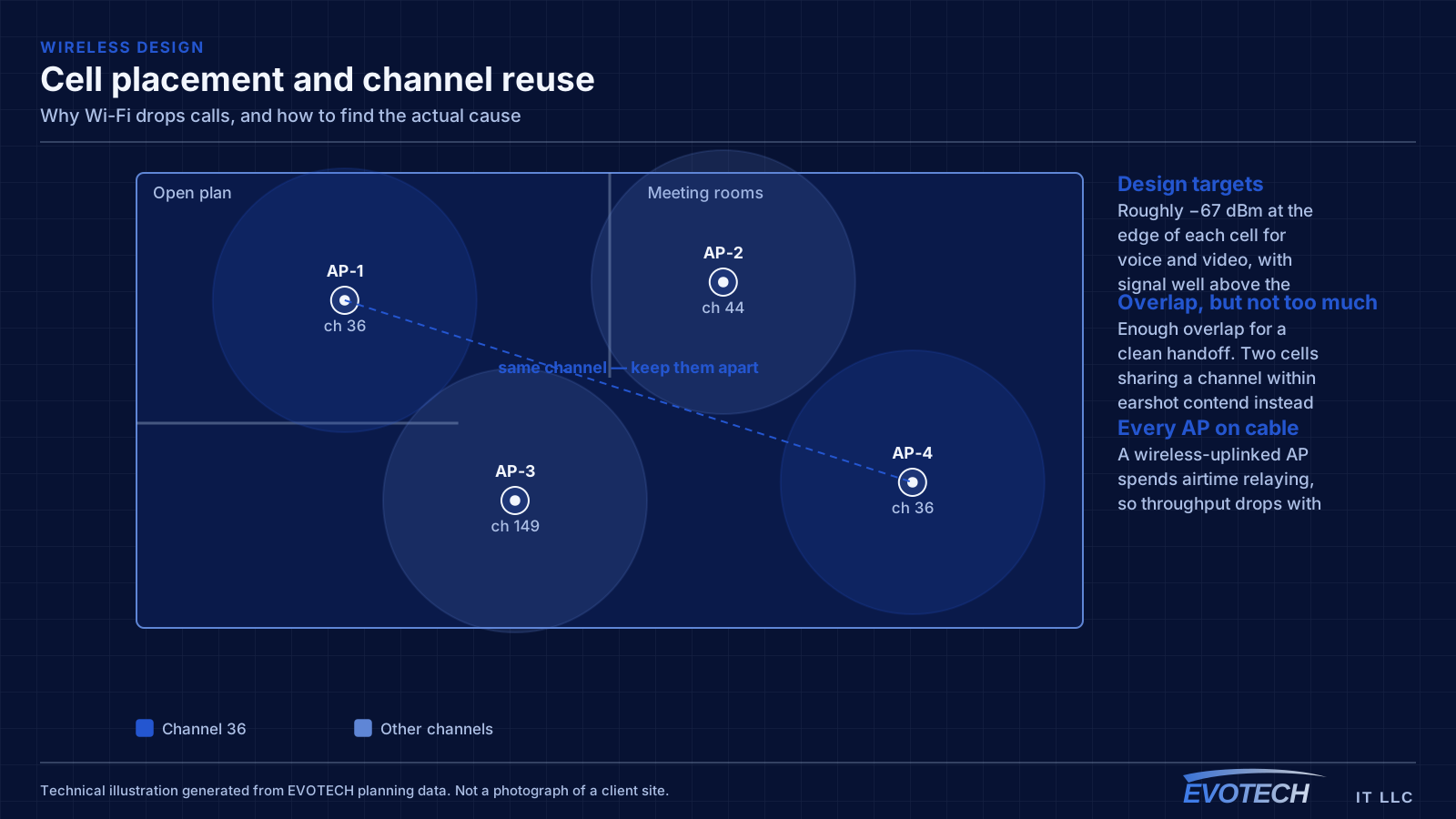
Cause two: contention
The signature is that calls degrade in specific places at specific times — a conference room during a full meeting, an office floor at mid-morning — while the same device works fine elsewhere or at other times.
Contention comes from three sources that add together. Other devices on the same access point, other access points on the same channel within earshot, and in a shared building, neighbouring tenants' networks on the same channel. All of them take turns on the same medium, and a device cannot distinguish between them.
A particular contributor worth knowing about: a single slow legacy device holds the channel longer to send the same amount of data, which reduces the airtime available to everyone else on it. That is why one old 2.4 GHz device can visibly affect a cell, and why moving capable clients to higher bands helps more than it seems it should.
- Signature: specific places at specific times, fine elsewhere
- Contention from own clients, own access points, and neighbours
- Slow legacy devices consume disproportionate airtime
- Narrower channels increase reuse and reduce contention
- Adding access points on busy channels makes this worse, not better
Cause three: the circuit, not the Wi-Fi
The signature is that calls degrade at consistent times of day regardless of where in the building the person is, and wired devices are affected as well as wireless. That combination points past the wireless network entirely.
Upload capacity is the specific thing to check, because calls depend on it and most connections have far less upload than download. A connection that streams video beautifully can still fail at calls if several people are uploading simultaneously — and household or office backups running during working hours are a frequent hidden cause.
Measuring at the gateway during a bad period, and comparing with a quiet period, distinguishes this from everything else quickly. If the circuit is saturated, no wireless change will help.
- Signature: consistent times of day, affects wired devices too
- Upload capacity matters more for calls than download does
- Backups and sync running during working hours are a common cause
- Measure at the gateway during both a bad and a good period
- No wireless change fixes a saturated circuit
Less common causes worth checking
Interference from non-Wi-Fi sources is real but less common than it gets blamed for. Certain cordless devices, some wireless cameras, and older microwave ovens emit in the 2.4 GHz band. The signature is a problem confined to 2.4 GHz that correlates with a specific activity or appliance.
Power-saving behaviour on some client devices causes brief gaps that a call notices and a download does not. This is device-specific rather than network-specific, and shows up as one person's laptop having problems that nobody else on the same network experiences.
Finally, a marginal cable to the access point itself. A run with a damaged pair may negotiate at a lower speed or run with rising errors, and everything downstream of it inherits the problem while the wireless side looks perfect. Switch port error counters usually reveal this immediately.
- Non-Wi-Fi interference: confined to 2.4 GHz, correlates with an activity
- Client power-saving: one device affected, others fine
- Marginal cable to the access point: check switch port error counters
- Access point mounted inside a closet or above ductwork
- Outdated firmware causing known roaming or stability issues
A diagnostic order that saves time
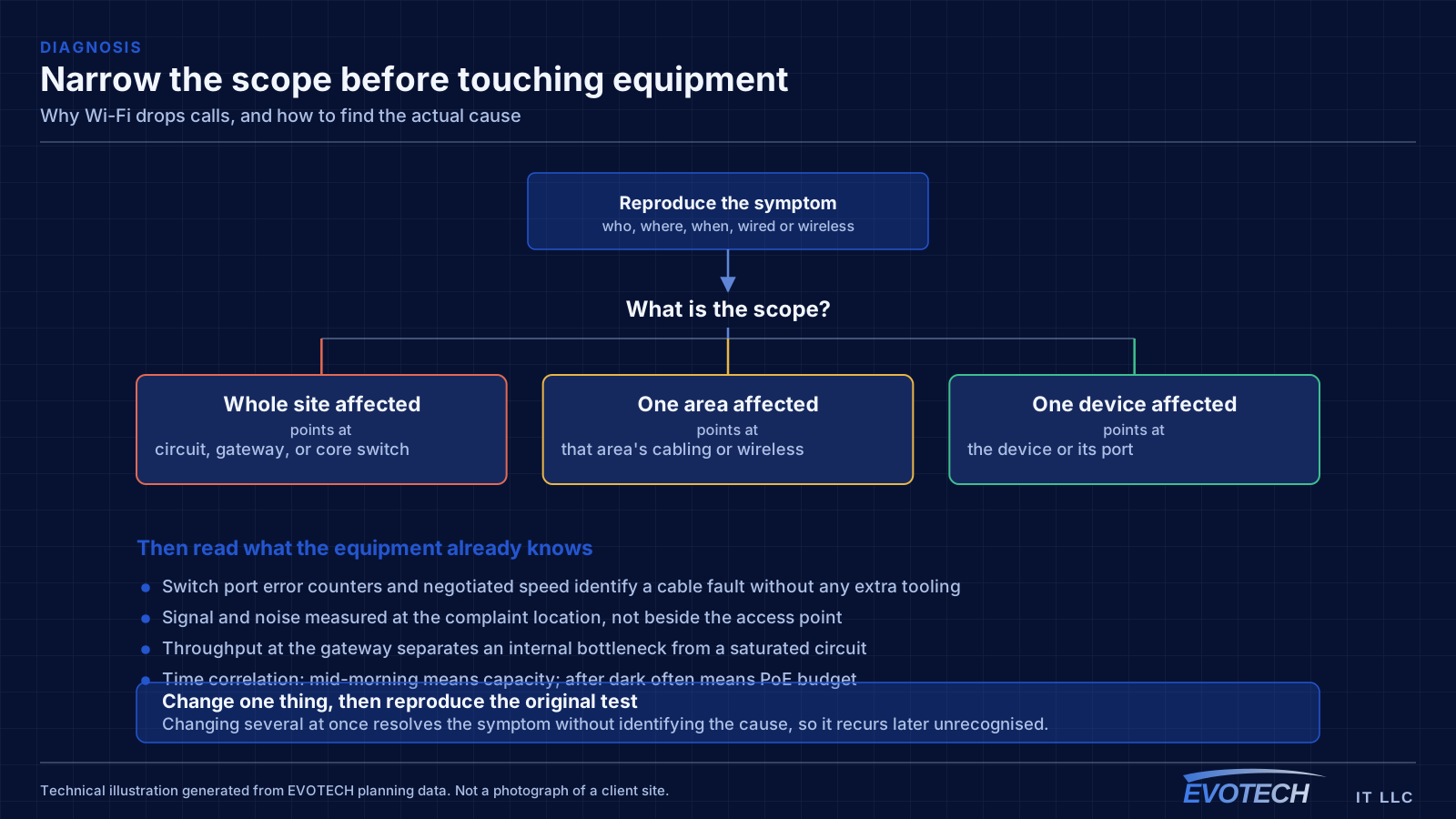
Start by characterising the failure precisely: who, where, when, moving or stationary, wired or wireless, and whether others are affected simultaneously. Those five answers usually eliminate two of the three main causes before anyone touches equipment.
If it correlates with movement, investigate roaming — check which access point the device associates with at each point along the route, and look at overlap and channels between those cells. If it correlates with location and time, investigate contention — count devices in that area and survey what else is on the channel, including neighbours. If it correlates with time regardless of location and affects wired devices too, measure the circuit.
Then change one thing and re-test the original scenario. Changing several things at once resolves the symptom without identifying the cause, which means it recurs later unrecognised.
- Characterise: who, where, when, moving, wired or wireless
- Movement correlation → roaming investigation
- Location and time correlation → contention investigation
- Time-only correlation with wired devices affected → circuit measurement
- Change one thing, then reproduce the original test
What to record while the problem is happening
Intermittent problems are difficult mainly because the evidence is gone by the time anyone looks. A small amount of recording discipline during a bad episode makes the difference between a diagnosis and a theory.
The useful data points are all cheap to capture. Note the exact time, because that lets you correlate against switch statistics, controller logs, and any scheduled process. Note which access point and channel the affected device was on, which most wireless management interfaces will show. Note whether wired devices in the same area were affected simultaneously, which separates a wireless cause from a shared-path one.
Where the problem recurs on a schedule, the most valuable single artefact is a throughput measurement taken at the gateway during a bad period and again during a good one. That one comparison eliminates or confirms the circuit as a cause faster than any amount of investigation inside the building.
- Exact time, so it can be correlated against logs and statistics
- Which access point and channel the affected device was using
- Whether wired devices in the same area were affected at the same time
- Gateway throughput during both a bad and a good period
- What changed recently — a new device, a config change, a patched cable
Frequently asked questions
Why do calls fail when everything else on the network is fine?
Because calls are real-time and everything else is not. A download absorbs a two-second interruption invisibly; a call cannot. So calls surface jitter, brief loss, and roaming gaps that other traffic hides, which is why they are frequently the first and only symptom of a problem that has been present for a while.
The signal shows full bars — how can it be a Wi-Fi problem?
Signal strength is only one of the things that matter. A strong signal on a congested channel performs badly because the device is waiting its turn among many others, and a strong signal to a relay says nothing about that relay's own connection. Bars measure one variable out of several.
Would upgrading the internet plan fix dropped calls?
Only if the circuit is genuinely the constraint, which is one of three common causes and not the most common. If the problem correlates with movement or with specific locations, more bandwidth changes nothing. Measuring at the gateway during a bad period tells you whether the plan is even involved.
Should the call device be wired instead?
For a stationary position, yes — it removes roaming, contention, and interference from the equation in one step, and it is usually a single cable run. It does not help someone who needs to move around during calls, which is where the roaming design has to be right regardless.