Network troubleshooting for professional offices, in Kingwood
Network troubleshooting for professional offices in Kingwood is a three-part question: what network troubleshooting involves, what professional offices need from it, and what Kingwood changes about the install. Mature tree cover on wooded residential lots, attenuating outdoor wireless and generating camera motion events.
The layers worth isolating in order are physical (cable, connectors, ports), local network (switching, addressing, loops), wireless (signal, contention, roaming), the internet circuit itself, and the destination service. Each has characteristic symptoms, and most of the diagnostic value comes from the first few questions rather than from expensive tooling.
Entry control and modest camera coverage
Office camera requirements are usually limited: the main entrance, the suite door, any rear or service entrance, and sometimes the server or equipment room. Interior open-plan coverage is less common and is worth questioning when requested, since it changes the character of the workplace for limited benefit.
Access control frequently matters more. A suite door with credential access, an after-hours schedule, and a record of entries covers most of what an office actually needs. In multi-tenant buildings this also handles the situation where base-building hours differ from a tenant's own working pattern.
- Main entrance and suite door coverage framed for identification
- Rear and service entrances where they exist
- Equipment room access controlled and logged
- Access schedules matched to actual working patterns
- Interior general coverage questioned rather than assumed
Where network troubleshooting goes wrong — and how it's avoided
Troubleshooting goes wrong mainly by skipping the narrowing step.
- Replacing the router first because it is the most visible device
- Changing several things at once, so the actual cause stays unknown
- Accepting 'the internet is slow' without narrowing scope and timing
- Ignoring switch error counters that already identify the faulty port
- Blaming wireless for a saturated circuit or an oversubscribed uplink
- Fixing the symptom without documenting the cause, so it recurs unrecognised
Kingwood: what the location changes
What separates a Kingwood scope from the rest of the city is concrete and local. Mature tree cover on wooded residential lots, attenuating outdoor wireless and generating camera motion events. Larger lots with detached garages, workshops, and pool structures needing their own connectivity. Predominantly newer slab-foundation homes with good attic access. That short list is what actually drives the design in this pocket, and it is why photographs or a brief site visit beat a floor plan — the plan follows the building's real constraints, not the neighborhood name on the map.
- Mature tree cover on wooded residential lots, attenuating outdoor wireless and generating camera motion events
- Larger lots with detached garages, workshops, and pool structures needing their own connectivity
- Predominantly newer slab-foundation homes with good attic access
- Multi-storey floor plans benefiting from a wired access point per floor
- Seasonal foliage variation affecting any wireless link between structures
Getting it done in Kingwood
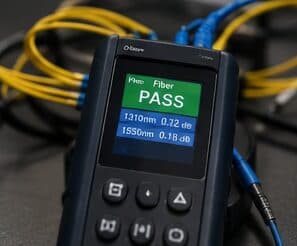
The test that matters is the one that reproduces the original complaint, run again after the change.
An office floor's network demand is not spread evenly. Individual desks are undemanding. Meeting rooms concentrate a dozen people, their laptops and phones, a display system, and a video call into one radio cell for an hour at a time. That concentration is where the design effort belongs.
Getting Kingwood work done means planning around the site as it actually is. Multi-storey floor plans benefiting from a wired access point per floor. Seasonal foliage variation affecting any wireless link between structures. Both matter as much as the design to how and when the work happens. The scope is drawn from the real property, the coverage is stated as a service area rather than an office, and unverifiable specifics about Kingwood are kept off the page on purpose.
Frequently asked questions
Is network troubleshooting for professional offices different in Kingwood?
The sector needs stay the same, but the install changes with the place. In Kingwood, the conditions above — not the professional offices label — decide routes, mounting, and equipment placement, which is why this page pairs all three.
Why is the network slow only in the afternoon?
Time-correlated symptoms usually mean capacity rather than a fault. Something is consuming the shared resource at that time — backups, updates, more people on site, or a scheduled process. Measuring at the gateway during the slow period, and comparing it to a quiet period, distinguishes a saturated circuit from an internal bottleneck quickly.