Network troubleshooting for new construction, in Baytown
Network troubleshooting for new construction in Baytown is a three-part question: what network troubleshooting involves, what new construction need from it, and what Baytown changes about the install. An industrial and refining base with rugged operational environments.
Effective troubleshooting is a process of elimination against a specific, reproducible symptom. 'The internet is slow' is not yet a diagnosis — slow for whom, on which devices, wired or wireless, at what times, to which destinations. Those answers usually point at a layer before any equipment is touched.
Positions to prewire even if cameras come later
Camera positions are among the cheapest things to prewire and among the most annoying to retrofit, because they are usually exterior, high, and behind finished soffit. Running cable to likely positions during rough-in preserves the option at almost no cost.
The positions worth prewiring in nearly every building: primary entrance, rear or service entrance, any delivery or receiving point, parking approaches, and the equipment room itself. In residential construction, add the front door for a doorbell and the driveway approach.
- Primary and secondary entrance positions
- Delivery, receiving, and service door approaches
- Parking and vehicle approach positions
- Doorbell position in residential builds
- Cable terminated and labeled even where no camera is installed yet
What changes network troubleshooting from job to job
Troubleshooting effort depends mostly on how much is already known about the network.
- Whether documentation and labeling exist
- Whether the switching is manageable and reporting statistics
- How reproducible the symptom is
- Site size and the number of areas and devices involved
- How many changes have already been made in attempts to fix it
- Whether access to the equipment and to the circuit is available
- Whether the fault is intermittent, which extends observation time
Baytown: what the location changes
In Baytown, the plan is built outward from the conditions that are actually here. An industrial and refining base with rugged operational environments. Older commercial stock needing pathway remediation and rack cleanup. Newer retail development with more straightforward conditions. Each one changes where cable can run, where equipment can sit, and how coverage is shaped, which is why a walkthrough settles a Baytown scope faster than any generic estimate.
- An industrial and refining base with rugged operational environments
- Older commercial stock needing pathway remediation and rack cleanup
- Newer retail development with more straightforward conditions
- Coastal humidity and driven rain requiring durable exterior sealing and surge protection
- Slab-foundation residential following the regional pattern
Getting it done in Baytown
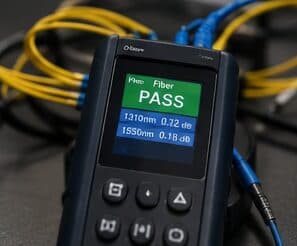
The test that matters is the one that reproduces the original complaint, run again after the change.
Low-voltage rough-in happens in a specific slot: after framing and electrical, before insulation and drywall. Inside that window, running a cable anywhere is straightforward. Once drywall goes up, the same cable costs many times more and sometimes cannot be run at all.
On site, the schedule and working method turn on conditions like these. Coastal humidity and driven rain requiring durable exterior sealing and surge protection. Slab-foundation residential following the regional pattern. Both shape how and when a crew can actually operate, which is why EVOTECH scopes each Baytown job from the property itself rather than assuming one approach fits every address. Coverage is stated as a service area, never an office claim, and anything about Baytown that cannot be verified is left out instead of invented.
Frequently asked questions
Is network troubleshooting for new construction different in Baytown?
The sector needs stay the same, but the install changes with the place. In Baytown, the conditions above — not the new construction label — decide routes, mounting, and equipment placement, which is why this page pairs all three.
Why is the network slow only in the afternoon?
Time-correlated symptoms usually mean capacity rather than a fault. Something is consuming the shared resource at that time — backups, updates, more people on site, or a scheduled process. Measuring at the gateway during the slow period, and comparing it to a quiet period, distinguishes a saturated circuit from an internal bottleneck quickly.