Why this page exists
Video wall installation for multifamily properties is shaped by how the space is used, not just by the service itself. Multifamily properties bring their own operating constraints, and this page pairs what video wall installation actually involves with what that environment changes about it.
A video wall is an array of thin-bezel panels driven so that content spans them as a single image. What makes it a distinct discipline from hanging displays is precision: the panels have to align to a fraction of a millimetre, the thin gaps (mullions) between them have to be compensated so the image reads as continuous, a processor has to split and scale content across the array, and the whole wall has to stay serviceable when one panel needs attention.
Two audiences, one building
A multifamily property runs two distinct technology environments. Residents have their own connectivity inside their units, generally provided by whatever service they select. The property operates everything else: common-area wireless, controlled entry, intercom, package rooms, amenity spaces, cameras, and the office network.
The property-operated side is what needs design. It has to work for a resident population that turns over continuously, be administrable by on-site staff who also turn over, and survive being used by everyone in the building without a support desk.
- Resident in-unit service separate from property-operated systems
- Continuous resident turnover requiring rapid credential issue and revocation
- On-site staff administering systems without specialist training
- Common areas, amenity spaces, and package rooms all needing coverage
What video wall installation usually involves
The defining problem is precision. Consumer-mounting practice is nowhere near tight enough — panels have to be co-planar and aligned so a horizontal line crosses the seams without stepping, which needs mounts with fine micro-adjustment and careful setting. A wall that looks 'close' reads as broken.
The second is the system behind it: without a proper video-wall processor, content is not split and scaled correctly across the array and the mullions are not compensated, so the image looks like separate screens rather than one. And thermal and service access — panels generate heat and eventually need attention — has to be designed in, or maintenance becomes a demolition job.
- Panels not co-planar or aligned, so lines step across the seams
- Colour mismatched between panels, breaking the single-image look
- No processor, so content is not split, scaled, or mullion-compensated
- Heat build-up in a tightly packed array
- No service access, so one panel means dismantling the wall
- Consumer mounts without the fine adjustment a wall needs
Property systems and common-area coverage
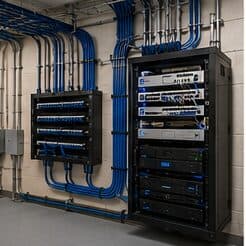
The property network carries cameras, door controllers, intercom, the leasing office, and common-area wireless. These belong on separate segments from each other — common-area guest wireless in particular should reach the internet and nothing else, since it is used by residents, visitors, and anyone within range of an amenity space.
Common-area coverage is a distributed problem. Lobbies, corridors, fitness rooms, clubhouses, pool areas, and parking structures each have different construction and different demand, and outdoor amenity areas need equipment rated for the exposure. Corridor coverage in particular tends to be underestimated, since corridors are long, narrow, and full of doors.
Where a property spans multiple buildings, the links between them are fiber, for the same distance and electrical-isolation reasons that apply on any campus.
- Property systems segmented from common-area guest wireless
- Amenity spaces, corridors, and outdoor areas as distinct coverage zones
- Outdoor-rated equipment for pool decks and exterior amenity areas
- Fiber between buildings on multi-building properties
- Leasing office network separated from resident-facing systems
Precision mounting, the processor, calibration, and service
Video-wall mounts are built for the job: they hold panels co-planar and provide micro-adjustment in every axis so each panel aligns to its neighbours to a fraction of a millimetre, and many pull the panel forward for service access. Setting the array flat and aligned is painstaking and is most of the installation's skill — it is what makes the seams disappear into a single image.
- Video-wall mounts with fine micro-adjustment, holding panels co-planar
- Panels aligned to a fraction of a millimetre across the array
- A processor to split, scale, and mullion-compensate content
- Colour and brightness calibration for a uniform image
- Heat managed for the packed panel environment
- Pull-out or serviceable mounting for single-panel access
Frequently asked questions
What changes about video wall installation in multifamily properties?
The operating environment does. Multifamily properties bring specific constraints — how the space is used, when work can happen, and what has to keep running — and those shape the video wall installation plan as much as the service's own technical requirements.
How is a video wall different from mounting several TVs?
Precision and the system behind it. A video wall's panels must be co-planar and aligned to a fraction of a millimetre so seams read as continuous, driven by a processor that splits and scales content and compensates for the gaps, and built so one panel can be serviced without dismantling the array. Hanging several TVs is nowhere near that tolerance — treat a wall that way and it looks like separate screens.
Does the property provide internet inside the units?
That varies by property and is a business decision rather than a technical one. What the property always operates is the common-area and building-systems side: entry, intercom, package rooms, amenity wireless, cameras, and the leasing office network. That is where the design work sits.