Network troubleshooting for medical offices, in Friendswood
Network troubleshooting for medical offices in Friendswood is a three-part question: what network troubleshooting involves, what medical offices need from it, and what Friendswood changes about the install. Established suburban homes on larger lots with mature landscaping.
The layers worth isolating in order are physical (cable, connectors, ports), local network (switching, addressing, loops), wireless (signal, contention, roaming), the internet circuit itself, and the destination service. Each has characteristic symptoms, and most of the diagnostic value comes from the first few questions rather than from expensive tooling.
Separation, access, and continuity
Three priorities dominate. Separate the networks so patient-facing guest access cannot reach clinical systems. Control access to the areas that require it, with records that show who entered and when. Plan any cutover so clinical operations are not interrupted mid-session.
Everything else — coverage quality, cable tidiness, camera placement — matters, but these three are the ones with consequences beyond inconvenience.
- Guest, staff, clinical, and building-system networks kept separate
- Access control on records, medication, and treatment areas as appropriate
- Cutovers scheduled around clinical sessions, not around installer convenience
- Wired connections for imaging and other equipment that depends on throughput
- Equipment position secured against casual access
What drives the cost of network troubleshooting here
Diagnostic time is the cost, and documentation is the biggest thing that reduces it.
- Whether the network is documented and labeled
- Site size and number of areas involved
- How intermittent the symptom is
- Whether manageable switching provides statistics
- Amount of remediation required once the cause is identified
- Whether the work must happen outside operating hours
Friendswood: what the location changes
What separates a Friendswood scope from the rest of the city is concrete and local. Established suburban homes on larger lots with mature landscaping. Wider and multi-storey plans needing multiple wired access points. Slab-foundation construction with attic-to-interior-wall retrofit routing. That short list is what actually drives the design in this pocket, and it is why photographs or a brief site visit beat a floor plan — the plan follows the building's real constraints, not the neighborhood name on the map.
- Established suburban homes on larger lots with mature landscaping
- Wider and multi-storey plans needing multiple wired access points
- Slab-foundation construction with attic-to-interior-wall retrofit routing
- Detached structures and outdoor areas needing dedicated coverage
- Mature trees affecting outdoor wireless and camera framing
Getting it done in Friendswood
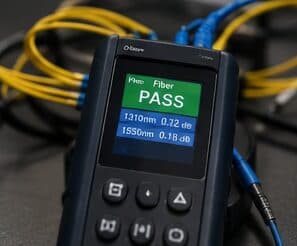
The test that matters is the one that reproduces the original complaint, run again after the change.
Camera coverage in medical settings is deliberately limited in scope. Entrances, corridors leading to controlled areas, medication storage approaches, parking areas, and after-hours coverage of the perimeter are the usual placements. Treatment areas are not camera locations, and this is worth stating plainly during design so the boundary is explicit.
Execution in Friendswood is planned around real conditions, not a template. Detached structures and outdoor areas needing dedicated coverage. Mature trees affecting outdoor wireless and camera framing. These decide the sequence, the access, and the method as much as the design does. EVOTECH describes Friendswood as coverage rather than a place it occupies, and omits any area detail it cannot confirm — building and site conditions only, no invented landmarks or promised arrival times.
Frequently asked questions
Is network troubleshooting for medical offices different in Friendswood?
The sector needs stay the same, but the install changes with the place. In Friendswood, the conditions above — not the medical offices label — decide routes, mounting, and equipment placement, which is why this page pairs all three.
Why is the network slow only in the afternoon?
Time-correlated symptoms usually mean capacity rather than a fault. Something is consuming the shared resource at that time — backups, updates, more people on site, or a scheduled process. Measuring at the gateway during the slow period, and comparing it to a quiet period, distinguishes a saturated circuit from an internal bottleneck quickly.